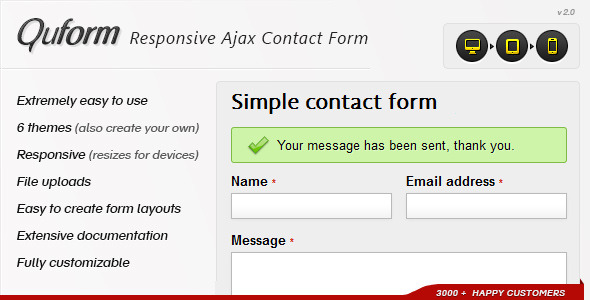
When you need a reliable way for visitors to get in touch, a standard contact form often falls short. You need something that works flawlessly on any device, prevents spam effectively, and integrates without a headache. Quform – Responsive Ajax Contact Form from ThemeCatcher is a powerful, lightweight script designed to do exactly that. Built for developers and site owners alike, this form handles submissions via Ajax for a smooth, page-free experience, ensuring your users never lose their place. With over 8,150 sales and a reputation for stellar documentation, Quform has become a go-to solution for anyone needing a robust, customizable form on their PHP or HTML website.
Key Features
- Ajax-Powered Submission: Forms submit data without reloading the page, creating a sleek, uninterrupted user experience that keeps visitors engaged.
- Fully Responsive Design: Quform is tested on iPad, iPhone, and Android devices, ensuring your form looks and functions perfectly on any screen size.
- Three CAPTCHA Options: Choose from a static image CAPTCHA, Google reCAPTCHA v3 (the latest invisible version), or a Honeypot field to block spam bots effectively.
- File Upload Support: Allow users to upload files directly through the form. These files can be attached to the email sent to you or stored securely on your server.
- Database Storage: Save all submitted form data to a MySQL database for easy retrieval and record-keeping, in addition to or instead of email delivery.
- Custom Autoresponders: Set up automatic reply emails that are sent to users after they submit the form, perfect for confirming receipt or providing next steps.
- Powerful Validation & Filtering: Built with a framework inspired by Zend, Quform gives you full control over input data. You can validate fields, filter unwanted characters, and set custom rules to ensure you only receive clean, accurate information.
- Multi-Language Ready: Using UTF-8 encoding by default, Quform handles submissions in virtually any language, including non-Latin scripts, making it ideal for international websites.
- 3 Ready-to-Use Themes with Variations: Start quickly with pre-designed themes, each offering multiple color variations. You can also easily create your own custom theme using the well-commented CSS.
- Works With or Without JavaScript: The form gracefully degrades. If a user has JavaScript disabled, the form still functions perfectly, ensuring no visitor is left out.
Who Is This For? Use Cases
Quform is versatile enough for a wide range of projects, from simple personal blogs to complex business applications. Its balance of power and ease of use makes it suitable for both beginners and experienced developers.
Web Designers & Freelancers
If you build websites for clients, you need a form that is easy to install, customize, and hand off. Quform’s extensive documentation and straightforward PHP/HTML embedding make it a professional, reliable choice. You can quickly adapt it to match any brand’s style without writing complex code from scratch.
Small Business Owners
For a simple contact page, a quote request form, or a registration form, Quform provides everything you need out of the box. The database storage feature is invaluable for keeping a record of inquiries, and the autoresponder ensures your customers receive an immediate confirmation, building trust from the first interaction.
Developers Needing Custom Functionality
The object-oriented, unit-tested PHP code provides a solid foundation for developers who need to extend the form’s capabilities. Whether you need to integrate with a CRM, add complex conditional logic, or build a multi-step form, Quform’s clean codebase and filter/validator system give you the flexibility to do so.
Technical Details & Compatibility
Quform is built on a modern, object-oriented PHP framework. To run it, your server must support PHP version 7.1 or later. The script outputs valid HTML5 and is fully compatible with all major browsers, including Chrome, Firefox, Safari, and Edge. It has been specifically tested on mobile devices like the iPad, iPhone, and Android phones and tablets. The latest update (v2.6.0, released October 18, 2025) includes critical fixes for PHP 8+ compatibility, updated PHPMailer to version 7.0.0, and improved SSL certificate verification via Composer, ensuring the form remains secure and future-proof.
Pros and Cons
Pros
- Exceptional Documentation: Users consistently praise the thorough, easy-to-follow help files and commented code, making setup and customization straightforward.
- Excellent Value: At just $9.00, Quform offers a feature set that rivals much more expensive solutions, including Ajax, file uploads, database storage, and three spam protection methods.
- Rock-Solid Reliability: With over 8,150 sales and consistent 5-star reviews, the script is battle-tested. It works reliably across different server configurations, including Microsoft IIS with SMTP authentication.
- Responsive & Mobile-Friendly: The form is fully responsive out of the box, ensuring a perfect experience for the growing number of mobile visitors.
- Active Support & Updates: ThemeCatcher provides responsive support and regularly updates the script to maintain compatibility with the latest PHP versions and security standards.
Cons
- Requires PHP Knowledge for Advanced Customization: While basic setup is simple, modifying form logic or adding complex features requires a working knowledge of PHP.
- Single Site License: The Regular License covers use on only one website. If you need the form on multiple sites, you must purchase a separate license for each.
- No Visual Drag-and-Drop Builder: The form is configured through PHP arrays and configuration files, not a visual interface. This gives immense power but may be less intuitive for users accustomed to page builders.
Frequently Asked Questions
Is Quform compatible with WordPress?
Quform is a standalone PHP script, not a WordPress plugin. However, it can be embedded into any WordPress page or post using a shortcode or by directly adding the PHP include code to your theme files. Many users successfully integrate it this way, though it requires a small amount of manual setup.
Does Quform include support and updates?
Yes. When you purchase Quform from CodeCanyon, you receive six months of support from ThemeCatcher, which can be extended. The purchase also includes access to all future updates for the lifetime of the item, ensuring you always have the latest features and security patches.
Can I use Quform to create a multi-step form?
Quform itself is a single-page form. However, its powerful code framework and jQuery effects allow developers to create multi-step or wizard-style forms by using custom JavaScript and PHP logic. The documentation provides guidance on how to approach such customizations.
Final Verdict
Quform – Responsive Ajax Contact Form stands out as one of the most reliable and well-supported form scripts available on CodeCanyon. Its combination of Ajax submission, robust spam protection, mobile responsiveness, and database storage addresses the core needs of almost any website. The developer, ThemeCatcher, has built a strong reputation through meticulous documentation and responsive support, which is reflected in the product’s high sales volume and overwhelmingly positive user feedback. If you need a contact form that just works, is easy to set up, and offers the flexibility to grow with your needs, Quform is an exceptional choice. For a one-time investment of just $9.00, you are getting a premium tool that will serve your site reliably for years. Don’t settle for a basic form—give your visitors and yourself the best experience possible. Click here to purchase Quform and start building better connections today.