Transform Your Content Layouts with FlexTabs: Responsive Tabs to Accordion
Managing content density without sacrificing user experience is a persistent challenge for webmasters, bloggers, and ecommerce operators. FlexTabs – Responsive Tabs to Accordion offers a clean, efficient solution by converting traditional tabbed interfaces into smooth accordions on smaller screens. Built on a robust foundation of CSS3 and jQuery, this plugin ensures that your content remains accessible and visually organized across every device. Whether you need to display pricing tables, comparison lists, multimedia galleries, or lengthy forms, FlexTabs streamlines navigation without overwhelming your visitors. Its lightweight architecture and intuitive customization options make it an essential tool for any WordPress site aiming to improve engagement metrics and on-page usability.
Key Features
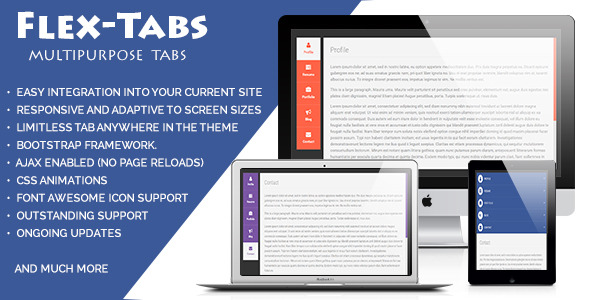
- Fully Responsive & Adaptive Design: Seamlessly transitions between horizontal tabs on desktops and vertical accordions on mobile devices, ensuring optimal readability on any screen size.
- Multiple Layout Options: Choose from vertical and horizontal tab layouts alongside six unique tab styles, allowing you to match your brand’s aesthetic without additional coding.
- Clean, Commented Code: Built with valid XHTML, organized CSS, and well-documented JavaScript, making it easy for developers to understand and extend functionality.
- Bootstrap v3 Compatibility: Integrates effortlessly with Bootstrap frameworks, preserving grid alignment and responsive behavior within existing Bootstrap projects.
- Font Awesome Icon Support: Enhance tab labels with scalable vector icons from Font Awesome, adding visual cues that improve user navigation and content hierarchy.
- Cross-Browser Reliability: Tested across all modern browsers including Chrome, Firefox, Safari, Edge, and Opera, guaranteeing consistent performance for your audience.
- Versatile Content Rendering: Display any HTML content, embedded videos, contact forms, data tables, or custom shortcodes inside tab panels without conflicts.
- Lightweight Performance: Minimal file sizes and efficient jQuery animations prevent page bloat, preserving fast load times and positive Core Web Vitals scores.
Who Is This For? Use Cases
Ecommerce Store Owners
Product pages often require multiple sections: descriptions, specifications, reviews, and shipping details. FlexTabs organizes these into expandable accordions on mobile, preventing endless scrolling and helping customers find critical purchase information faster. This organized layout has been shown to reduce bounce rates and increase add-to-cart conversions.
Corporate and Business Websites
Service pages, team directories, and case studies benefit from tabbed navigation that collapses into clean accordions. Corporate users can present complex data—such as quarterly results or feature comparisons—in a scannable format that respects the limited real estate of tablets and phones.
Bloggers and Content Publishers
Long-form articles frequently include supplementary data, image galleries, or author bios. By using tabs to house these secondary elements, publishers keep the main reading flow uninterrupted while giving readers the option to explore additional resources via the accordion transition on mobile devices.
Developers and Design Agencies
Custom WordPress themes and client projects demand reliable, reusable components. FlexTabs provides a developer-friendly codebase with clear hooks and commented sections, allowing rapid integration into custom builds. Its compatibility with Bootstrap v3 further reduces development time for agencies maintaining multiple client sites.
Technical Details & Compatibility
FlexTabs is built on jQuery and CSS3 transitions, requiring no additional libraries beyond a standard WordPress environment. The plugin has been verified to work seamlessly with WordPress 4.0 and newer versions, including the latest block editor and classic editor modes. It supports Bootstrap v3 grids out of the box, making it ideal for themes built on that framework. Browser compatibility spans Internet Explorer 10+, Microsoft Edge, Google Chrome, Mozilla Firefox, Safari, and Opera. The package includes Font Awesome icons, Animate.css for optional entrance effects, and nicescroll for enhanced scrollbar aesthetics. Regular updates from the developer ensure ongoing compatibility with WordPress core updates and security patches.
Pros and Cons
Pros
- Effortless transition from tabs to accordion without manual breakpoint coding.
- Six pre-designed layouts reduce customization time for non-developers.
- Lightweight codebase improves page speed and mobile performance.
- Works with any content type, including forms, videos, and third-party shortcodes.
- Valid XHTML and clean CSS ensure compatibility with SEO and accessibility standards.
- Affordable one-time purchase with lifetime updates and basic support.
Cons
- Limited to horizontal and vertical tab styles; no circular or radial tab options.
- Custom animation effects require manual CSS adjustments, not available through a visual builder.
- Documentation is thorough but lacks video tutorials for complete beginners.
- Does not natively support WooCommerce product tabs without minor theme integration.
- Support is provided via email rather than live chat or community forums.
Frequently Asked Questions
Is FlexTabs compatible with WooCommerce product pages?
Yes, FlexTabs can be used on WooCommerce product pages, but it requires inserting the tab shortcode or using a custom template hook. The plugin does not automatically override WooCommerce’s default tab system; however, developers can easily wrap product data sections with FlexTabs’ shortcode to create a consistent tab-to-accordion experience across all product pages.
Does FlexTabs include support and updates after purchase?
Absolutely. Every purchase from CodeCanyon includes six months of support from the author, with the option to extend. You also receive lifetime updates, ensuring compatibility with future WordPress versions and security improvements. The developer responds to support inquiries via the user page contact form within 24 to 48 hours on business days.
Can I use FlexTabs with page builders like Elementor or WPBakery?
FlexTabs works with any WordPress page builder that supports shortcodes or raw HTML. You can insert the FlexTabs shortcode directly into Elementor’s Shortcode widget, WPBakery’s Raw HTML element, or any classic block. For advanced customization, you may also embed the generated PHP function within your theme’s template files.
Final Verdict
FlexTabs – Responsive Tabs to Accordion delivers exactly what its name promises: a flexible, performant solution for managing content display across devices without forcing visitors to pinch, zoom, or squint. Its clean codebase, multiple layout presets, and Bootstrap v3 compatibility make it a reliable asset for WordPress site owners, developers, and digital agencies seeking to enhance mobile usability while maintaining a professional aesthetic. The plugin’s ability to handle any content type—from embedded videos to complex data tables—further expands its utility beyond simple text blocks. For an affordable one-time investment, you gain a tested component that supports lifetime updates and responsive design best practices. If your site suffers from cluttered pages or high mobile exit rates due to poor content navigation, FlexTabs offers a straightforward, conversion-focused upgrade. Try FlexTabs today and give your users the clean, organized experience they expect on every screen.