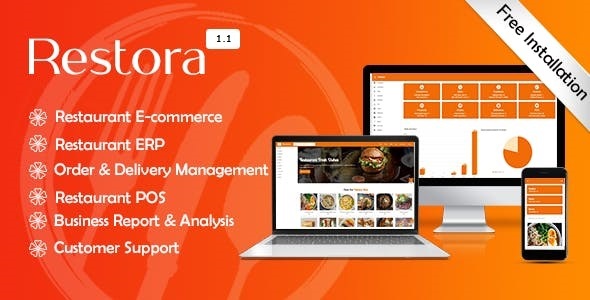
Running a modern restaurant requires more than great food—it demands a streamlined digital infrastructure that handles online orders, customer relationships, and daily operations without breaking a sweat. Restora delivers exactly that by packaging a complete online food ordering system, a robust restaurant management backend, and a polished e-commerce front end into a single, cohesive platform. Built on Laravel and Vue JS, this system is designed for restaurant owners, catering services, and food retailers who want to move beyond static websites and into fully interactive, sales-driven operations.
What sets Restora apart is its three-tier architecture. Customers get a seamless shopping experience with order tracking and purchase history. Managers gain the tools to process orders from pending to complete. Admins maintain full oversight of the business, from menu updates to sales records. This separation of duties ensures that every stakeholder—from the kitchen to the front office—works within a system tailored to their specific needs, eliminating the chaos of managing a food business through scattered spreadsheets and phone calls.
Whether you run a single eatery or manage a growing franchise, Restora provides the foundational framework to accept orders, manage inventory, and analyze performance metrics. The platform’s material design principles guarantee that the interface feels modern and intuitive on any device, which is critical in an era where most customers will interact with your brand from a smartphone. Below, we break down exactly what Restora offers, who it serves best, and why it stands out in the crowded field of restaurant management solutions.
Key Features
Restora is not merely a theme; it is a fully functional application that combines e-commerce capabilities with back-office management. The feature set is designed to address the daily pain points of food service operators. Here are the most critical components:
- Fully Responsive E-Commerce Website: The customer-facing interface is built to convert visitors into buyers. It adapts flawlessly to desktops, tablets, and mobile devices, ensuring that customers can browse your menu, add items to their cart, and checkout from anywhere without encountering layout issues or slow performance.
- Advanced Cart System: The cart is not an afterthought. It handles multiple items, quantity adjustments, and pricing calculations smoothly. This system is engineered to reduce cart abandonment by providing a clear, transparent view of the order before finalization.
- User Account Management: Customers can create personal accounts, save their details, and manage their profile information. This feature fosters loyalty and makes repeat ordering a frictionless process.
- Purchase History: A comprehensive order history is available on the customer panel. Users can review past orders, re-order their favorite meals, and track the status of current deliveries. This transparency builds trust and encourages repeat business.
- Admin Customization: The admin panel is your command center. You have the power to update food items, adjust prices, change images, and modify site content without needing to touch a single line of code. Total control rests in your hands.
- Customer Management: Beyond just listing users, the system allows you to manage customer data effectively. You can track who is ordering, what they are ordering, and how often, enabling you to launch targeted marketing campaigns and loyalty programs.
- Sales Records: The dashboard includes detailed sales analytics and records. You can view daily, weekly, or monthly performance metrics, helping you make data-driven decisions about menu changes and staffing.
- Food Item/Menu Management: Adding new dishes, marking items as sold out, or categorizing your cuisine is intuitive. The menu management system is flexible enough to accommodate complex restaurant offerings.
- Order Management: This is the operational core. Managers have a dedicated workflow to move orders from the “Pending” state to “Complete,” ensuring that kitchen staff and delivery personnel are always aligned on what needs to be prepared.
- Dedicated Manager Panel: While admins handle the big picture, managers get a focused interface to process orders efficiently. This separation of roles streamlines daily operations and prevents unauthorized access to sensitive business data.
Who Is This For? Use Cases
Restora is a versatile tool, but it shines brightest in specific operational contexts. Understanding who benefits most will help you determine if this is the right investment for your business model. The architecture of the system, with its distinct admin, manager, and customer panels, lends itself well to organizations that require clear role definitions.
Restaurant Owners Scaling Online Sales
If you own a standalone restaurant and want to break free from third-party delivery apps that charge exorbitant commission fees, Restora provides a path to direct customer engagement. By hosting your own e-commerce storefront, you retain full control over your brand presentation, customer data, and profit margins. You can manage your physical menu and online menu simultaneously, ensuring consistency across both channels. The advanced cart system and purchase history features help you build a direct relationship with your clientele, encouraging them to order from you instead of through aggregators.
Catering Services and Food Trucks
Catering businesses often deal with large, complex orders that require specific lead times. Restora’s order management system allows your manager to review incoming requests and confirm availability. For food trucks, the mobile-responsive design is a lifesaver. Customers can check the day’s menu and place an order for pickup, reducing wait times at the window and maximizing your sales during peak hours. The ability to update the menu instantly from the admin panel means you can highlight daily specials or remove sold-out items in real time.
Growing Restaurant Chains
For businesses that operate multiple locations, having a central admin panel is non-negotiable. Restora allows you to manage food items and pricing from a single dashboard. While the system currently supports a single-store framework, it provides the tools needed to standardize your operations. Managers at each location can process orders, while the head office maintains oversight of sales records and customer management. This hierarchical approach ensures that your brand standards are upheld across all outlets, eliminating the inconsistencies that often plague multi-location food businesses.
Technical Details & Compatibility
Understanding the technology stack behind Restora is crucial for making an informed purchase decision. You are not buying a simple HTML template; you are acquiring a full-stack application built on modern, reliable frameworks. The system is built using Laravel, a premier PHP framework known for its security, scalability, and robust ecosystem. This ensures that your application is not only fast but also secure against common web vulnerabilities.
The front-end user experience is driven by Vue JS, a progressive JavaScript framework that enables a reactive and smooth interface. This means that user interactions—like adding items to the cart or navigating the menu—happen instantly without full page reloads, which is a massive win for user retention and perceived performance. The inclusion of Chart Js provides you with beautiful, interactive sales charts on the admin dashboard, making financial analysis visual and accessible. Moment Js handles all date and time formatting, ensuring that order timestamps and delivery windows are accurate across different time zones. Finally, Material Icons ensures that the interface uses a consistent, familiar visual language that users instantly recognize, enhancing the overall usability.
Because it is built on these web standards, Restora is compatible with any modern web browser, including Chrome, Firefox, Safari, and Edge. The responsive nature of the design means it functions flawlessly on iOS and Android devices, as well. From a hosting perspective, because it is a Laravel application, it requires a server environment with PHP and a database (like MySQL). It is NOT a simple WordPress plugin; it is a standalone web application. Make sure your hosting provider supports these requirements. The item is available for purchase on CodeCanyon and comes with detailed documentation to guide you through the installation process on your compatible server.
Pros and Cons
No software is perfect, but understanding the strengths and potential limitations of Restora will help you set realistic expectations. We have analyzed the feature set and user feedback to provide a balanced perspective.
Pros
- All-in-One Solution: Combines an e-commerce store and a restaurant management system. You do not need to purchase separate plugins or software for ordering and inventory/order tracking.
- Role-Based Access Control: The separate panels for Admin, Manager, and Customer are a standout feature. It ensures security and clarity—managers don’t have access to core business settings, and customers only see their relevant data.
- Modern Tech Stack: Using Laravel and Vue JS is a massive advantage. This stack is known for performance, security, and longevity, ensuring your application stays relevant for years.
- Free Installation Support: The developer offers direct email support for installation issues. This is a huge relief for non-technical buyers who might struggle with server configuration.
- Customizable Design: The admin panel allows you to tweak the website content and manage food items without coding knowledge, making it accessible to business owners, not just developers.
Cons
- Requires Server Configuration: Unlike a WordPress theme, Restora is a Laravel application. This means installation is more complex and requires a specific hosting environment. Novice users may find the initial setup challenging without the support team.
- No Multi-Location Support Built-In: While it is perfect for single stores or small chains, the system does not natively include a multi-vendor or multi-store marketplace module. You would need to manage multiple installations for distinct locations.
- Learning Curve: The admin dashboard is powerful but not instantly familiar to everyone. It takes a little time to understand the workflow between the admin and manager panels, especially for staff unused to digital management tools.
Frequently Asked Questions
Is Restora compatible with WordPress or WooCommerce?
No, Restora is not a WordPress theme or plugin. It is a standalone web application built on the Laravel PHP framework. It is sold on CodeCanyon, but it cannot be installed like a traditional WordPress theme. It requires a server that supports PHP and a SQL database. If you are looking for a solution to integrate with your existing WordPress site, Restora is not the correct tool; however, if you want a dedicated, independent system for your restaurant, its all-in-one nature is a significant advantage.
Does Restora include the source code and are there recurring fees?
Yes, when you purchase Restora from CodeCanyon, you receive the full source code. There are no recurring licensing fees for the software itself. You are free to modify the code to suit your specific needs. The primary costs are the one-time purchase price and your own web hosting costs. This is a cost-effective model compared to subscription-based SaaS restaurant management platforms that charge monthly fees.
What kind of support is offered after I buy the product?
The developer provides free installation support via email at [email protected]. This is available if you face any technical problems during the installation or setup process. Beyond installation, CodeCanyon offers a standard support timeline where the developer answers queries related to bugs or feature defects. This ensures that you are not left stranded if you encounter a technical glitch with the core functionality.
Final Verdict
Restora is a formidable contender in the restaurant management system market. It offers a rare combination of polished customer-facing e-commerce and robust internal management tools, all wrapped in a modern and secure technical framework. The fact that it is built on Laravel means it is built to last and scale with your business, even as the admin panel gives you the flexibility to update your menu and prices in real-time without waiting for a developer.
For the independent restaurant owner looking to cut out third-party delivery fees, or the catering business needing a centralized order book, Restora provides the structure and workflow necessary to professionalize your operations. The free installation support is a critical safety net that minimizes the risk of a stalled launch. While the setup is not as plug-and-play as a simple WordPress theme, the power and control you gain in return far outweigh the initial learning curve. The developer has built a strong product that is clearly geared toward solving real business problems.
If you are serious about taking your restaurant online and want a solution that handles everything—from the customer’s first click to the manager’s final confirmation—then look no further. Stop relying on manual order taking and fragmented sales reports. Give your business the operating system it deserves. Click the link below to explore the live demo and see how Restora can transform your daily operations today.