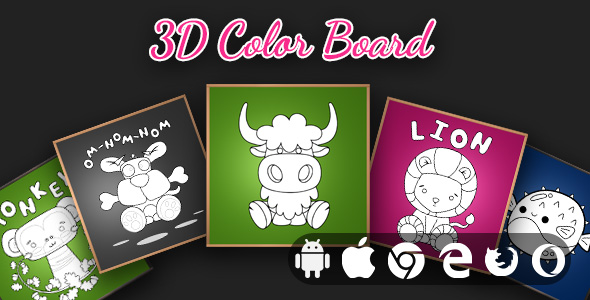
Creativity has found a new dimension, quite literally. 3D Color Board by Raizensoft is a premium, cross-platform educational game that transforms the traditional coloring book into an immersive, navigable 3D experience. Built with WebGL and the three.js library, this isn’t just a simple paint-by-numbers app; it is a full-featured HTML5 game that allows users to rotate, zoom, and paint intricate 3D models of animals and objects in real-time.
Whether you are a parent looking for a constructive digital activity for your children, an educator seeking interactive STEM tools, or a developer searching for a polished, monetizable app template, this product bridges the gap between play and artistic expression. It is engineered for the modern web, functioning flawlessly across desktop browsers, iOS, and Android, and it comes with the source code necessary to convert it into a standalone mobile app using Cordova. This article provides an authoritative breakdown of the 3D Color Board, its technical architecture, and its value proposition in the expanding market of educational 3D applications.
Key Features
To understand the value of this asset, one must look beneath the surface of its vibrant UI. The following features are the core pillars that make this product a standout in the ThemeForest and CodeCanyon ecosystem:
- 50 Unique Coloring Boards: Unlike standard 2D coloring pages, this game offers a diverse selection of 3D models, including various animals, vehicles, and everyday objects. Each model is sculpted to provide a different challenge, ensuring that users never run out of surfaces to explore and color.
- Advanced Color Picker & Swatches: The app features a robust color selection interface that goes beyond a basic palette. It includes 10 distinct color swatches for quick access, but the core utility lies in its precision. Users can select exact hues to ensure their digital masterpiece looks exactly as they envision.
- 50 Built-In Color Schemes: For users who lack inspiration or prefer a cohesive aesthetic, the app provides 50 pre-designed color schemes. This feature is a boon for younger users or those who want a “guided” coloring experience, ensuring that the final product is always color-theoretically sound.
- Real 3D Navigation: This is the defining feature. Users have full control over the camera and viewport. They can rotate the model 360 degrees, zoom in on intricate details, and pan across the workspace. This “real 3D” functionality ensures that painting a model’s back is just as accessible as painting its front, providing a complete spatial experience.
- Artwork Download & Export: Creativity should be shareable. The application allows users to download their final colored artwork directly to their device. This converts the game from a transient digital activity into a source of tangible pride, allowing users to share their creations on social media or keep them as a portfolio.
- Responsive & Adaptive Design: The user interface is fluid, adapting seamlessly to different screen sizes and resolutions. Whether viewed on a 4K monitor or a smartphone, the touch controls, buttons, and tooltips remain intuitive and responsive.
- High-Quality Source Code & Build System: For developers, this is a goldmine. The package includes the full source code with comprehensive commenting, allowing for deep customization. Furthermore, it integrates a complete Grunt build system, streamlining the development workflow and making asset management and minification a breeze.
Who Is This For? Use Cases
The architecture of the 3D Color Board serves a wide spectrum of users, from end-users to developers. The “convertible to mobile app” aspect makes it an exceptional investment with multiple return-on-investment (ROI) paths.
Creative Hobbyists and Relaxation Seekers
In a digital age dominated by fast-paced action games, there is a significant demographic seeking “slow media.” This application serves as a digital stress-relief tool. Adults and teenagers can utilize the calming mechanics of coloring to unwind, focusing on the meditative process of painting 3D objects. The realistic navigation and fluid brush strokes offer a sensory experience that stands in stark contrast to standard coloring applications, providing a level of depth that enhances focus and mindfulness.
Educational Institutions and E-Learning Platforms
The product description categorizes this as an “Educational Game,” and for good reason. Schools and tutoring centers can use this to improve fine motor skills, color recognition, and spatial awareness in young learners. The 3D aspect introduces kids to basic geometry in a tactile way. Furthermore, because it is built on web standards, it easily integrates into e-learning modules or classroom smartboards without the need for heavy software installations.
Mobile App Entrepreneurs and Indie Developers
This is where the true utility of the asset shines. The inclusion of the Cordova framework bridge means that a developer can take this HTML5 game and wrap it into a native application for the App Store and Google Play Store. Instead of spending hundreds of hours coding WebGL interactions and UI components, a developer can purchase this license, rebrand it, and deploy it as a paid app or a freemium app with ads. The Grunt build system ensures that the codebase is production-ready and optimized for mobile CPUs.
Digital Asset Resellers
Agencies and freelancers who specialize in creating custom apps for clients can use this as a base template. Given the “full source code” nature of the product, it is possible to customize the coloring models and the user interface to fit specific client needs—for example, a restaurant might want a 3D burger model, which could be sculpted and integrated based on the developer’s ability to modify the source.
Technical Details & Compatibility
Performance and compatibility are the killers of user experience in web-based games. Raizensoft has addressed these directly through a rigorous technical stack.
The application relies on WebGL and the three.js library to render graphics. This ensures that the 3D experience is hardware-accelerated, providing smooth framerates even on mobile devices. The interface is built with HTML5 and CSS3, ensuring that it doesn’t rely on bloated plugins that often break browser compatibility.
From a compatibility standpoint, the game is designed to be cross-platform. This means it runs on all major operating systems (Windows, macOS, Linux) and across all modern browsers, including Chrome, Firefox, Safari, and Edge. For mobile, it is optimized for touch input on both iOS and Android. The responsive design ensures that the UI scales appropriately, from a 6-inch smartphone screen to a 60-inch smart TV.
For developers, the technical environment is straightforward. The build system uses Grunt, which requires Node.js and an npm installation. The code itself is structured with high-quality commenting, making it easier for developers to locate specific functions related to color picking, model loading, or texture mapping. This focus on maintainability is a significant time-saver during the integration process.
Pros and Cons
An honest evaluation of any product is necessary for an informed purchase. Here are the balanced pros and cons of the 3D Color Board.
Pros
- Unique Value Proposition: It is a difficult niche to enter; most coloring games are 2D. This 3D offering is rare and stands out immediately to consumers.
- Educational & Entertaining: It strikes a balance between fun and learning, which is a huge selling point for parents.
- Incredible Developer Support: The inclusion of a Grunt file and documented source code means this is not a “black box” product. Developers retain full control.
- Monetization Ready: The ability to export via Cordova opens revenue streams through mobile app sales and in-app advertising.
- Visual Polish: The UI and graphics have a “sleek and modern” aesthetic that elevates it above typical indie game templates.
Cons
- Asset Library Limits: While 50 boards are substantial, the specific selection is fixed. Users seeking a specific animal or object that isn’t included may need external developer help to add it.
- Learning Curve for Customization: Editing the 3D assets requires knowledge of 3D modeling software (like Blender) and the three.js framework. It is not a plug-and-play “asset swap” for absolute beginners.
- Device Performance Floor: While optimized for Chrome and Safari, lower-end Android devices may still experience thermal throttling during extended use compared to simpler 2D games.
Frequently Asked Questions
Is the 3D Color Board compatible with modern mobile browsers like Safari and Chrome?
Yes. Because the game is built on HTML5, WebGL, and the three.js library, it enjoys native compatibility with all modern web browsers. It is specifically optimized for touch-screen responsiveness on both iOS and Android devices, so you can play it directly in your mobile browser without needing a plugin or an app store download.
Do I need to know how to code to use this product as a coloring app?
No. For end-users, it is a complete, ready-to-play game. You access the preview link and you can start coloring immediately. However, if you purchase the product to deploy it as a Cordova mobile application or to alter the source code, basic knowledge of JavaScript and the Grunt build system is recommended to ensure a smooth development process.
Does the purchase include the rights to use the artwork on commercial mobile applications?
When you purchase the regular license from CodeCanyon, you are granted permission to use this product in a single end-product for commercial use (like a free or paid mobile app). This means you can use it for a client or for your own app, provided standard licensing rules are followed. For extended distribution rights, you may need to purchase the Extended License.
What are the system requirements to run the game smoothly?
Since it is WebGL-based, your graphics card must support hardware acceleration. Generally, any desktop or laptop manufactured in the last 8 years with updated drivers will run it smoothly. For mobile devices, we recommend smartphones from the mid-range tier and above (Android 7.0+ or iOS 11+) to ensure the 3D rendering maintains a high frame rate.
Final Verdict
The 3D Color Board from Raizensoft is more than just a game; it is a well-engineered software asset that punches far above its price point. It delivers a sophisticated visual experience that appeals to the creative instinct in all of us, while simultaneously offering a robust codebase for developers. The “wow” factor of rotating a 3D animal while painting it is significantly higher than any flat 2D alternative, which is a massive advantage for user retention and engagement.
For developers, the combination of a Grunt build system, high-quality commenting, and Cordova integration means your time-to-market is cut dramatically. You aren’t just buying a game; you are buying a foundation for a business. Whether you aim to launch a paid educational app on the Play Store or simply provide a high-quality web toy for your blog, this asset delivers on performance and aesthetics.
Looking at the broader market, “educational 3D apps” are continuously rising in demand as parents search for safer, more constructive digital environments. By investing in this high-quality asset, you cater to a niche with high demand and low supply. Raise your digital presence from a simple 2D clutter to a professional 3D experience.
Dive in, color outside the lines, and explore the spatial beauty of your own creativity. Check out the live preview to see the graphics in action, and secure your copy to dominate the educational app market today.