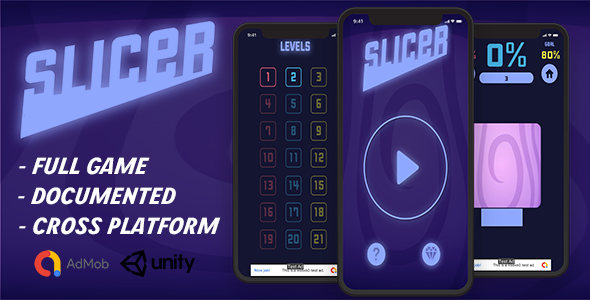
Hyper-casual mobile games live or die by their first impression. A player’s thumb lands on your icon, they tap once, and within three seconds, they decide if your game is worth their time. The physics must feel satisfying, the mechanics must be instantly understandable, and the visuals need to pop. For developers and publishers looking to capitalize on the wildly popular “slice and dice” genre, Slide To Slice – Unity Game Template (Hyper Casual) offers a polished, production-ready foundation. This isn’t just a set of code files; it’s a complete gaming experience engineered for retention, monetization, and rapid deployment. Whether you are an indie developer launching your first title or a seasoned studio testing a new concept, this template allows you to skip the months of prototyping and dive straight into optimization and marketing.
Key Features
This Unity project is more than just a pile of scripts; it is a fully functional 3D game with a core loop that hooks players immediately. Here is a breakdown of the critical components that make this template a stand-out asset on CodeCanyon:
- Complete Unity Project Source Code: You receive the entire source for a playable game, not a grey-box prototype. The scene is set up, the lighting is configured, and the scripts are organized, allowing you to hit “Play” and test the mechanics immediately.
- Core “Slide to Slice” Mechanics: The gameplay is intuitive yet challenging. Players control a blade that navigates a linear path, slicing through colored blocks. The challenge lies in avoiding “obstacles” that break the combo or end the run. This risk-reward loop is the engine of hyper-casual engagement.
- Satisfying Slicing Physics & Feedback: The game delivers crisp, satisfying haptic and visual feedback upon slicing. The blocks react realistically, splitting apart with a clean animation that makes the player feel powerful. This tactile response is crucial for keeping fingers tapping.
- Dynamic Obstacle Variety: The template includes a system for spawning various obstacles that are not sliceable. This creates a “stop or go” decision-making process that raises the stakes. This variety prevents the gameplay from becoming monotonous and increases the skill ceiling for advanced players.
- Prefab-Based Level Design: The level structure relies on modular prefabs. This means you can easily use the Unity Editor to extend the level, create new challenges, and guide the player’s path. You can scale the difficulty with minimal coding knowledge.
- AdMob Integration Ready: While the code is clean, the template is built with monetization in mind. The structure allows for easy integration of banner and interstitial ads, making it a perfect starting point for a passive income stream.
Who Is This For? Use Cases
This template is versatile, but it shines brightest for specific types of developers and business models.
Indie Developers & Hobbyists
If you are new to Unity or game development, building a polished game from scratch can take six months or more. This template gives you a head start. You can study the clean code structure to learn how a commercial hyper-casual game is built. More importantly, you can modify the graphics, change the sounds, and tweak the difficulty to release your first game on the Google Play Store within a week.
Publishing Houses & Marketing Teams
Speed to market is king in the hyper-casual space. Trends change in days, not months. With this template, a marketing team can run multiple user acquisition (UA) campaigns by reskinning the template quickly. The ability to change the theme from “ninja slicing fruit” to “laser cutting ice” in a short timeframe allows you to A/B test different creatives and hooks without investing in separate development cycles.
Freelancers Offering White-Label Services
The description explicitly mentions a Reskin Service, which is a goldmine for freelancers. This template is perfect for agencies that sell ready-made games to clients. You can purchase the standard license, modify the art assets, and deliver a fully branded app to a client. The built-in AdMob support allows you to set up the client’s ad IDs, providing a turn-key solution for non-technical business owners.
Students Learning Game Design
Instead of learning C# by building calculators, you can dissect a real, working game. You can see how UI is wired to the game controller, how the camera follows the player, and how state machines manage the game loop. It is a practical, portfolio-worthy learning tool that transitions you from “coder” to “game developer.”
Technical Details & Compatibility
Before purchasing, ensuring your development environment is compatible is crucial. The requirements are specific to keep the project stable.
- Unity Version: The project is built on Unity 2020.3.24f. This is a long-term support (LTS) release, which means it is incredibly stable. You can open it in this version or upgrade it to higher versions without major issues. It is recommended to use 2020.3.24f or higher to avoid deprecation warnings.
- Platform Build Support: Since this is a touch-based hyper-casual game, it is optimized for Mobile Platforms (Android & iOS). The input system is set up for touch screens, but it is also compatible with mouse clicks for testing within the editor.
- File Structure: You receive a full Unity Engine Project folder. This is what you open directly in Unity Hub. Additionally, a Documentation File is included, guiding you through the setup process, scene hierarchy, and customization basics.
- Graphics & Performance: The assets are designed with a low-poly or minimalistic aesthetic. This ensures the game runs at a high frame rate even on low-end devices, which is an absolute requirement for hyper-casual games where performance drops lead to uninstalls.
Pros and Cons
Transparency is key to a smart purchase. Here is a balanced look at the strengths and potential limitations of this template.
Pros
- Instant Playability: The core loop is addictive and immediately understandable, which is the #1 requirement in this genre.
- Clean Code Architecture: The scripts are neatly separated and commented, making customization far easier than dealing with “spaghetti code.”
- Fast Development Cycle: You save literally hundreds of hours of development time on physics and game logic.
- Monetization Friendly: The AdMob framework is pre-planned, and the session length is designed to encourage multiple impressions.
- Reskin Potential: The art style is generic enough that it can be replaced with any theme (space, jungle, candy) to match your brand or trend.
- LTS Unity Version: Using Unity 2020.3 LTS ensures stability and fewer bugs compared to bleeding-edge versions.
Cons
- Initial Art Style: The current graphics are serviceable but not “AAA.” You will likely want to invest in the Reskin Service or custom art if you want to stand out in the App Store.
- Basic Audio: Like most templates, the included sounds are often placeholders. You will need to license high-quality SFX and background music separately.
- No Backend / Leaderboards: The template does not include cloud saving or global leaderboards out of the box, which requires integration of additional plugins like PlayFab or GameSparks.
- Learning Curve for Non-Coders: While it’s a template, a complete beginner may still struggle with the Unity interface if they attempt major mechanical changes.
Frequently Asked Questions
Is “Slide To Slice – Unity Game Template” ready for iOS and Android?
Yes. The template is a standard Unity mobile app. It uses the mobile touch input system, which translates to both Android and iOS automatically. You simply need to switch the build target in the Build Settings panel and set up your Apple/Google signing keys. The performance is optimized for mobile GPUs, ensuring smooth gameplay on both operating systems.
Can I modify the game to change the character or theme?
Absolutely. The game uses standard Unity prefabs and materials. You can swap out the 3D models (or use simple shapes), replace the textures, and change the color palette directly in the Editor. The “slide to slice” mechanic is independent of the visual theme, meaning you can turn it into a “pizza slicer,” “wood cutter,” or “magic wand” game without touching the core C# scripts. If you do not want to do this yourself, the author offers a Reskin Service to handle this for you.
What exactly is included in the “Reskin Service”?
The Reskin Service is a paid add-on provided by the developer, KingErXSoftware. When you contract this service, they will rebuild the entire visual aesthetic of the game. This includes creating new graphics, recording new sound effects, designing new characters and icons, and crucially, integrating your AdMob ad unit IDs. This is a premium service that ensures your game does not look like a generic template clone, which is essential for app store approval and user trust.
Final Verdict
In the fast-paced world of mobile gaming, opportunity favors the fast. The Slide To Slice – Unity Game Template is a sharp, well-maintained asset that provides immediate value. The developer, KingErXSoftware, has provided clear documentation and a functional product that removes the “risk” of development. You are paying for proven logic and solid architecture, allowing you to divert your energy toward the two pillars of success: user acquisition and monetization. While the asset does require additional work to stand out visually, the foundation is so solid that it warrants a spot in any serious mobile developer’s toolkit. If you want to launch a engaging casual game without the coding headache, grab the template, run a few playtests, and prepare to scale. This is your shortcut to the top of the hyper-casual charts.