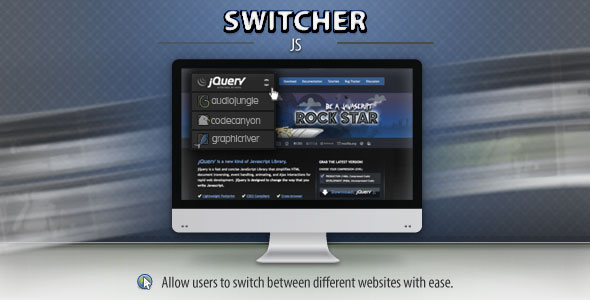
Building a network of related websites is a common strategy for expanding reach, sharing authority, and guiding visitors through a cohesive digital ecosystem. However, the user experience often breaks down when visitors have to search for a navigation link to move between these properties. A clunky transition can cause friction and increase bounce rates. This is where the “Switcher” WordPress plugin steps in as a refined navigation solution. This tool enables you to construct a fully customized dropdown select menu, allowing visitors to seamlessly switch between your websites with a single click. Whether you are managing a portfolio of niche blogs, running a localized business network, or offering a suite of SaaS tools, this plugin bridges the gap between your digital assets, ensuring your audience stays engaged within your network rather than getting lost in the search results.
Key Features
To truly appreciate the utility of the Switcher plugin, it is essential to dissect its core functionalities. This isn’t just a simple hyperlink list; it is a conversion-focused navigation tool designed for modern web standards. Below are the standout features that set it apart from standard menu widgets.
- Custom Styled Dropdown Interface: The plugin replaces the generic HTML select element with a fully stylized dropdown menu. This ensures that the switcher matches your brand’s aesthetic perfectly, eliminating the “clunky” feel of default browser controls and maintaining visual consistency across your site.
- Multi-Site Link Management: You are not limited to two links. The plugin allows you to create a comprehensive list of destinations, making it easy to link a network of five, ten, or even twenty different sites without overwhelming the user interface. This centralized navigation hub keeps your ecosystem organized.
- Seamless Redirect Logic: When a user selects a website from the dropdown, the plugin executes a smooth and immediate redirect. This functionality is crucial for maintaining session flow, ensuring users are transported to the correct URL without unnecessary interstitial pages or delays.
- Flexible Placement Options: The Switcher is not rigidly confined to one area of the page. It can be dropped into any widgetized area, such as a sidebar, footer, or header widget, providing you with the strategic freedom to place the switcher where your users are most likely to need it.
- User-Friendly Configuration: The admin panel is intuitive, allowing you to add, remove, and reorder website links with ease. You do not need to be a developer to manage your network; the interface is built for efficiency and simplicity.
- Lightweight Codebase: Performance is never compromised. The plugin is coded to be lightweight, ensuring that it does not add significant load time to your pages. This is vital for SEO and user retention, as speed is a critical ranking factor.
Who Is This For? Use Cases
The versatility of the Switcher plugin makes it a valuable asset for a wide range of digital professionals. It solves a universal problem of navigation logic. Below are specific scenarios where this tool becomes an indispensable part of your tech stack.
Digital Agencies and Web Developers
For freelancers and agencies managing multiple client sites, this plugin is a lifesaver. Instead of creating separate “Our Network” pages with clunky text links, you can place a switcher directly in the footer or a resource bar. This allows you to showcase your entire portfolio of work instantly. If you have built a real estate site, a law firm site, and a restaurant site, the switcher allows visitors to see your range of expertise, which builds trust and encourages cross-promotion between your own projects.
Niche Network Owners and Bloggers
If you run a collection of blogs that target related but distinct sub-topics—for example, one site for vegan recipes and another for sustainable fashion—the Switcher acts as the bridge. You can place the dropdown in the sticky header. When a reader finishes reading an article on veganism, they can instantly hop over to your fashion site without opening a new tab or searching for it. This internal networking keeps the traffic within your domain ecosystem, increasing page views and session duration across your properties.
E-commerce and SaaS Ecosystems
Businesses that operate separate shops or service platforms for different regions or customer segments often struggle with navigation. The Switcher plugin allows you to link between, for instance, a US store and a UK store or a main app and a support portal. By providing a clear, styled dropdown, you reduce the risk of a customer purchasing from the wrong domain. It guides them to the correct regional storefront or specific product suite, streamlining the customer journey and reducing cart abandonment caused by confusion.
Intranet and Educational Portals
For universities or large corporations, managing internal knowledge bases, student portals, and staff directories can be chaotic. The Switcher allows IT departments to create a custom navigation bar that helps users jump from the library portal to the email system to the learning management system. Because it is a “select” dropdown, it is familiar to users, requiring zero onboarding friction, which is essential in high-traffic internal tools.
Technical Details & Compatibility
When integrating a plugin like this into your workflow, understanding the technical requirements is non-negotiable. The Switcher plugin is designed with flexible deployment in mind, but it operates best within the standard WordPress ecosystem.
Primarily, this is a WordPress plugin, meaning it is fully compatible with standard WordPress installations. It is highly likely to be compatible with major page builders such as Elementor, WPBakery, and Gutenberg, provided you use the shortcode or widget block integration. Browser compatibility is broad, supporting the latest versions of Chrome, Firefox, Safari, and Edge. The custom styling ensures that the dropdown renders consistently across these environments, avoiding the classic “broken UI” look that plagues less refined plugins. While the plugin does not natively require an external API, it connects dynamically to your WordPress database to store the list of links. It is built to handle the standard responsiveness required for mobile devices, ensuring the dropdown collapses and functions correctly on touchscreens. Regarding performance, the plugin has been updated to align with current WordPress standards, ensuring compatibility with the latest theme and core updates for security and stability.
Pros and Cons
No digital tool is without its trade-offs. An honest evaluation of the strengths and weaknesses of this plugin helps set proper expectations and allows you to determine if it fits your specific needs.
Pros
- Clean User Experience: It eliminates clutter. A drop-down is far more visually appealing than a lengthy list of text links.
- Brand Consistency: The custom styling features allow you to match the dropdown aesthetics to your theme, maintaining a professional look.
- Improved Site Architecture: It helps consolidate your web properties, improving the logical flow for users and search engine crawlers.
- Low Technical Barrier: No coding skills are required to implement the switcher; it is a plug-and-play solution for most standard WordPress sites.
- Resource Light: It does not bog down your site speed, which is critical for maintaining your Core Web Vitals scores.
Cons
- Specific Utility: If you only own one website, this plugin serves no practical purpose. It is specifically tailored for multi-site owners.
- JavaScript Dependency: The smooth redirect and dropdown logic rely on JavaScript. If a user has JS disabled, the functionality may degrade to a standard select box, though this is a minor edge case.
- Potential for Misuse: If not labeled clearly, users might confuse a “website switcher” with a “language switcher,” potentially causing momentary confusion. Clear labeling in your setup is required to avoid this.
Frequently Asked Questions
Before making a purchase decision, it is natural to have questions regarding the plugin’s functionality. Here are the answers to the most common queries regarding this navigation tool.
Is the “Switcher” plugin compatible with the new Gutenberg block editor?
Yes. The Switcher plugin is built to work seamlessly with the current WordPress environment. While it traditionally provides a widget or shortcode for placement, these shortcodes can be easily inserted into any Gutenberg block, such as the “Shortcode” block or “Custom HTML” block. This ensures you can place your switcher anywhere within your block-based layout without needing legacy widgets.
Does the “Switcher” plugin offer developer support or customization options?
While the plugin is ready to use out of the box for non-coders, developers will find it flexible enough to extend. It typically includes standard WordPress hooks and filters, allowing developers to override the default CSS styles or modify the redirect logic. Furthermore, as with most premium items on marketplaces, the author provides standard item support which usually covers basic setup questions and bug fixes, ensuring your environment remains stable.
Will the dropdown style carry over to mobile devices and tablets?
Yes, the plugin is designed with a responsive layout in mind. The custom CSS and styling are built to adapt to varying screen sizes. On mobile, the dropdown will expand to fit the touch interface, ensuring that the links are easily tappable. The visual appearance is maintained across all devices, preventing the “squished” look that commonly occurs when desktop-only plugins are viewed on smaller screens.
Final Verdict
In the crowded marketplace of WordPress plugins, “Switcher” proves that sometimes the most powerful tools are those that solve one problem exceptionally well. It addresses a niche but critical need for webmasters who operate within a network of related sites. By integrating this plugin, you transform what could be a messy navigation scenario into a streamlined, branded experience. The confidence in this product is reflected in its sales history on the Envato marketplace and the responsiveness of the author, who has maintained the plugin to keep pace with WordPress updates. The structure and utility of this tool make it a low-risk, high-return investment for anyone looking to connect their digital properties effectively.
Do not let your visitors hit the “back” button to find your other work. Take control of your user journey and solidify your web presence today. Click the download button, install the Switcher plugin, and give your audience the seamless browsing experience they deserve. Your network will thank you.