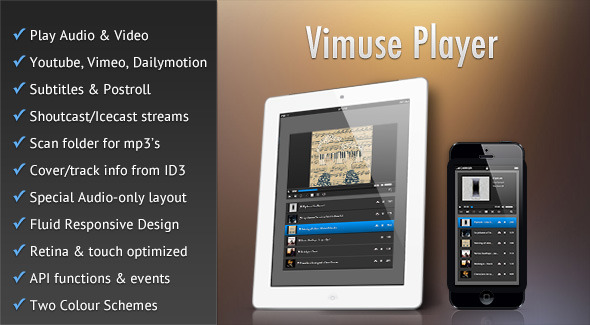
Vimuse is a jQuery-based HTML5 media player that handles audio and video playback from self-hosted files, YouTube, Vimeo, Dailymotion and Shoutcast or Icecast streams inside a single responsive interface. Written in Vimuse javascript and distributed on ThemeForest for $18, it targets developers and site owners who need one embeddable player for mixed media sources rather than several separate components. It is best suited to radio stations, podcast archives, music portfolios and small video libraries where the playlist itself is the main content.
What Vimuse javascript Actually Does Well
The core proposition is source consolidation. Most players handle either local files or a third-party platform, and forcing them to do both usually means stacking two libraries and reconciling their APIs. Vimuse accepts self-hosted MP3 and MP4 files, embeds from the three major video platforms, and live Shoutcast or Icecast streams through one configuration object. For a radio station that publishes both an on-demand podcast archive and a live stream, that removes a meaningful amount of integration work.
Playlist construction is unusually flexible, and this is where the plugin separates itself from simpler alternatives. A playlist can be supplied as a JSON file, passed directly as a javascript object, or generated automatically by scanning a folder for MP3 or MP4 files. For YouTube, Vimeo and Dailymotion, the plugin can pull videos by user, playlist, album, channel, group or search query, which means a site owner can maintain a video library on YouTube and have the player reflect it without manually rebuilding a list on the WordPress side.
Metadata handling is more thorough than the price point suggests. The player reads ID3 tags from MP3 files to extract cover art, track name, artist, album and duration, and it can poll a Shoutcast or Icecast stream at a configurable interval to refresh the currently playing track and its cover art. When a playlist contains audio only, a dedicated layout swaps the video stage for cover art and track details, which is a sensible use of space rather than a stretched video frame with nothing in it.
The configuration surface is broad. Autoplay can be set to fire on load or deferred until the visitor manually starts playback, which matters because browsers increasingly block unprompted audio. Volume, shuffle state, subtitle language, playlist visibility and auto-progression are all initialisable. Playlist items can carry external page links, purchase links, download links and lyrics, with independent controls over whether those links open in new tabs. Durations, file-type icons, thumbnails and delete buttons can each be toggled, and the playlist itself can be sorted by the visitor.
Layout and presentation options cover the practical cases: playlist positioned at the bottom, left or right; a fixed player header when scrolling a bottom-positioned playlist; an optional auxiliary control bar; and dark or light colour schemes. A caching layer stores the generated playlist, which is the right call when the source is a YouTube API call or a folder scan, since both are slow enough to be noticeable on every page load. The vendor states a refresh interval can be configured alongside it.
Where Vimuse Fits, and Where It Does Not
The strongest fit is a site whose primary content is a list of media items. Internet radio stations are the obvious case: a live stream plus an archive of past shows, with track metadata pulled automatically and cover art displayed in audio-only mode. Podcast publishers with a self-hosted MP3 archive benefit from the ID3 extraction and the folder-scan playlist builder, which means dropping files into a directory is enough to populate the player.
Musicians and labels with a catalogue of tracks plus promotional videos get a reasonable single-player solution, particularly with the purchase-link and download-link options in the playlist. Agencies building a client site that mixes a Vimeo channel with locally hosted audio can wire both into one interface without writing custom glue code. Educational or documentation sites that need subtitles and postroll content on video items are also served, though the vendor notes both features apply to video files only.
It is the wrong choice for a site that needs a single hero video with no playlist. The playlist machinery, the JSON configuration and the caching layer are overhead when the requirement is one embedded clip, and a plain HTML5 video tag or a lightweight embed does that job with less code. It is also a poor fit for anyone who needs a no-code solution: Vimuse is a jQuery plugin, and while a WordPress plugin version and a Layers extension are referenced by the vendor, the ThemeForest listing itself is the javascript package and expects the buyer to edit configuration objects. Projects requiring DRM, adaptive bitrate streaming via HLS or DASH manifests, or server-side analytics on playback are outside what the listed feature set covers.
Strengths and Limitations
Strengths
- One player covers local files, YouTube, Vimeo, Dailymotion and Shoutcast/Icecast, which removes the need to run separate libraries for each source.
- Playlist generation by folder scan, JSON file or javascript object gives developers a choice between automation and full manual control.
- ID3 tag extraction and stream metadata polling mean audio items display real track information without manual data entry.
- Playlist caching addresses the performance cost of API calls and folder scans, which is the usual weak point in players of this type.
- Responsive, retina-ready and touch-optimised, with a container-agnostic layout that works at any width.
- Broad initialisation options, including deferred autoplay, which aligns with modern browser autoplay restrictions.
- At $18 with no disclosed sales figures, the price is low enough that the decision rests on fit rather than budget.
Limitations
- Subtitles and postroll content are video-only, so audio publishers get no equivalent capability.
- Flash and Silverlight fallbacks are listed for older browsers, but both technologies are dead in current browsers, so that fallback path has no practical value today.
- The vendor does not state whether the plugin is actively maintained, what jQuery version it requires, or when it was last updated, which is a real risk for a dependency-based product.
- Playlist caching introduces a staleness trade-off: content added to a scanned folder or a YouTube channel will not appear until the cache refreshes, and the vendor does not document a default interval.
- No sales count is disclosed on the listing, so there is no independent signal of adoption or community support.
- Configuration is code-level. There is no visual builder in the javascript package, and the WordPress and Layers versions are separate products.
How Vimuse Compares to Other HTML5 Players
The general category splits into two groups. The first is minimal HTML5 players that wrap a native media element with custom controls: small, fast, easy to drop in, and usually limited to local files. The second is full media platforms with analytics, ad insertion, DRM and CDN integration, priced accordingly and often subscription-based. Vimuse sits between them, closer to the first group in price and deployment but with a feature set that reaches into the second.
Against minimal players, the advantage is source breadth and playlist tooling. A basic player will not read ID3 tags, will not poll a Shoutcast stream for track metadata, and will not build a playlist by scanning a directory. Against enterprise platforms, the gap is in streaming protocols and measurement. Vimuse handles progressive MP3 and MP4 playback plus platform embeds; it does not advertise HLS or DASH support, adaptive bitrate switching, or playback analytics. Buyers who need those should look at a streaming-oriented platform and expect to pay more.
The comparison that matters most is against doing nothing. If a project needs one video, the native element wins on simplicity. If it needs a managed list of mixed media with metadata, the configuration effort Vimuse requires is less than building the equivalent from scratch, and that is the case where the $18 is well spent.
Frequently Asked Questions
Can Vimuse play a live Shoutcast or Icecast radio stream?
Yes. Vimuse supports Shoutcast and Icecast streams and can poll the stream at a configurable interval to refresh the currently playing track and its cover art. That makes it viable as the front end for an internet radio station that also publishes an on-demand archive alongside the live feed.
Does Vimuse require jQuery?
Yes, it is distributed as a jQuery plugin, so jQuery must be loaded on the page before Vimuse initialises. The vendor also references a WordPress plugin version and a Layers extension as separate packages. The ThemeForest listing reviewed here is the javascript package, and it expects configuration through javascript rather than a settings screen.
How is the playlist populated in Vimuse?
Three ways. A playlist can be passed as a javascript object, loaded from a JSON file, or generated automatically by scanning a folder for MP3 or MP4 files. For YouTube, Vimeo and Dailymotion, the plugin can also pull videos by user, playlist, album, channel, group or search query, with caching to reduce repeat API calls.
Does Vimuse support subtitles and postroll content?
It supports both, but only for video files. Audio items cannot carry subtitles or postroll content in this player. The vendor states this restriction explicitly, so podcast and music publishers should not expect an equivalent feature for their audio playlists and should plan around that limitation.
Verdict on Vimuse javascript
Vimuse is worth buying for developers and site owners who need one player to handle a mixed media library drawn from local files, YouTube, Vimeo, Dailymotion and live radio streams, and who are comfortable configuring a jQuery plugin in code. The playlist generation options, ID3 extraction and stream metadata polling are the features that justify the purchase, and at $18 the cost is negligible against the integration work it replaces.
It is not the right choice for a site that needs a single embedded video, for anyone wanting a point-and-click setup, or for projects requiring adaptive streaming, DRM or playback analytics. The lack of published maintenance information and the obsolete Flash and Silverlight fallback are the two points to weigh before committing, particularly for a long-lived project where jQuery dependency and browser support will need revisiting over time.