Modern websites demand navigation that is both visually striking and intuitively functional. For developers, designers, and site owners building with WordPress, Joomla, or custom HTML, the challenge is often finding a menu system that bridges the gap between a sleek, contemporary aesthetic and robust, cross-browser performance. You need a solution that doesn’t just drop a standard list of links into a header but instead elevates the entire user experience.
Enter MetroNav – Metro Navigation Bar ver. CSS, a versatile and flexible plugin designed to create modern, cool, and highly customizable navigation bars for your templates. Unlike rigid, bloated menu plugins, MetroNav focuses on what matters most: delivering a lightweight, stylish, and adaptable navigation solution that fits seamlessly into both light and dark design schemes. Whether you are building a corporate site, a creative portfolio, or a dynamic web application, this tool provides the visual edge needed to make your navigation stand out. Its core strength lies in its balance of simplicity and power, offering a range of styling options that put the creative control back into your hands.
Key Features
MetroNav is packed with features that address the common pain points of web developers and designers. Here’s a breakdown of what makes this plugin a valuable addition to your toolkit:
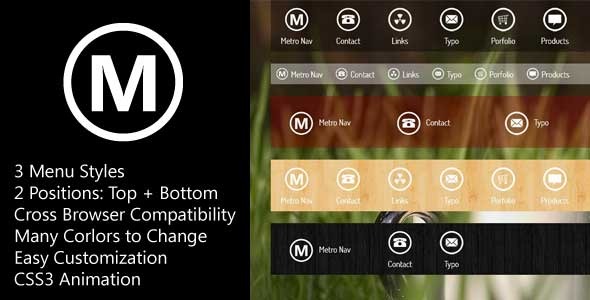
- Three Distinct Navigation Bar Styles: You are not stuck with a single look. Choose from three distinct pre-built styles to match your project’s specific aesthetic, whether you prefer a flat, modern look or a more structured, corporate feel.
- Top and Bottom Positioning: Flexibility is key. This plugin allows you to place the navigation bar at the top of your page for standard browsing or at the bottom for a unique, app-like interface or mobile-first design strategy.
- CSS 3 Animation Effects: Add a layer of polish and interactivity to your menus. While not supported in all legacy browsers, modern users will benefit from smooth, subtle transitions and hover effects that enhance the feel of your site.
- Adapts to Bright and Dark Templates: One of the most significant pain points for designers is a plugin that clashes with their color scheme. MetroNav is specifically engineered to fit both bright and dark templates, ensuring your navigation complements your design instead of fighting it.
- Support for Clickable Menus: Particularly important for modern usability, this feature ensures that parent menu items are clickable (IE9 and above), allowing users to navigate to a landing page for a category, not just an expandable sub-menu.
- Customizable Backgrounds: Go beyond simple color changes. The main menu and sub-menu backgrounds can utilize a variety of solid colors, transparent colors, and even image patterns. This allows for deep integration with your site’s branding and visual identity.
- Easy Customization: Built with ease of use in mind, you can quickly adjust the width, height, and other key parameters without needing to dig through complex JavaScript files. The focus is on a straightforward setup process.
Who Is This For? Use Cases
MetroNav is not a one-size-fits-all solution for every website, but for a specific set of users and scenarios, it is an exceptionally strong choice. It is designed for those who require a high degree of visual customization without sacrificing performance or ease of use.
Web Designers and Freelancers Building Client Sites
If you are a freelancer or agency designer, delivering unique, polished results is your bread and butter. MetroNav allows you to quickly integrate a professional-grade navigation system that can be themed to match the client’s brand. The ability to use transparent backgrounds and image patterns is a huge time-saver. Instead of coding custom CSS for hours to get a specific translucent effect over a hero image, you can achieve this out of the box. This plugin helps you deliver a premium look that justifies your fees and impresses your clients.
Theme Developers Selling on Marketplaces
For developers creating themes for ThemeForest or other platforms, using a reliable, customizable widget like MetroNav as a core component is a smart move. It reduces the amount of original code you need to write for navigation and provides you with a tested, functional module. Since it is compatible with both light and dark styles, it increases the versatility of your theme. Including such a feature-rich component adds value to your theme offering and can be a key selling point when customers compare your product to competitors.
Site Owners with Dark-Mode Aesthetics
Websites that feature a dark background or a “dark mode” toggle often struggle to find navigation plugins that look good without constant CSS overrides. Many plugins are built with white backgrounds in mind, which can look jarring. This Metro Navigation Bar has been specifically developed to handle both ends of the spectrum. Its transparent and solid color options make it possible to create striking, high-contrast menus that pop against dark photography or dramatic backgrounds, giving your site a modern, sophisticated interface.
App Interface and Dashboard Prototypes
The clean lines and flexible positioning of MetroNav make it suitable for more than just traditional blogs or corporate pages. It can be used to build navigation for web application dashboards or SaaS products. The ability to set the menu to the bottom of the screen is particularly useful for creating a “tab-bar” style navigation often seen in mobile apps, making your web app feel more native and familiar to users.
Technical Details & Compatibility
Understanding the technical scope of a plugin is crucial before integrating it into your stack.MetroNav is a CSS-based solution, which means it is inherently fast and lightweight. It does not rely on heavy JavaScript libraries for its core functionality, only utilizing CSS3 for animation effects and conditional support for clickable menus in IE9+.
This plugin is ideal for use within a variety of content management systems, including WordPress, Joomla, and Drupal, and can be easily integrated into custom-coded HTML sites. The documentation provides clear examples of how to embed the necessary code into your files. The plugin supports all modern, evergreen browsers such as Chrome, Firefox, Safari, and Edge. As noted in the features, CSS3 animation effects are not for all browsers—older versions like Internet Explorer 8 and below will see a static version of the menu, which is a graceful degradation rather than a complete break. Compatibility with touch devices is inherent, as the clickable menu feature works to expand submenus on mobile. While the plugin does not have a traditional “last update” log visible in the description, the focus on CSS3 indicates a modern building methodology that aligns with current web standards.
Pros and Cons
No plugin is perfect for every situation. We have compiled a balanced look at the advantages and potential drawbacks of MetroNav to help you make an informed purchasing decision.
Pros
- High Visual Flexibility: The ability to use solid, transparent, or patterned backgrounds on both main and sub-menus is a rare feature that offers excellent value.
- Lightweight and Fast: Because it relies on CSS, it won’t slow down your page load times, which is crucial for SEO and user experience.
- Dual Positioning: The option to place the menu at the bottom is unique and opens up more design possibilities than standard top-only menus.
- Cross-Theme Compatibility: Its built-in support for both light and dark templates saves you hours of troubleshooting and customization.
- Developer Credibility: The author, SOHN, has a strong portfolio of other popular items on CodeCanyon, which speaks to a history of quality and support.
Cons
- Not a Mega Menu: If your site requires a complex mega menu with rich content blocks (images, forms, etc.), this is not the tool for you. It is designed for navigation bars and link-based menus only.
- Legacy Browser Animation Limits: The animation effects and clickable menu feature do not support very old browsers (IE8 and below). If your audience still uses these, they will miss out on some functionality.
- Manual Implementation: While easy to customize, users looking for a “drag-and-drop” WordPress plugin with a GUI settings panel might find the CSS-based approach requires a bit more manual code editing.
Frequently Asked Questions
Here are the most common queries potential buyers have before downloading MetroNav.
Is MetroNav compatible with WordPress?
Yes, you can use MetroNav in WordPress. While it is not a plugin that installs directly from the WordPress admin interface like a widget, you can easily add the CSS and HTML code to your theme’s files. Many users integrate this into their theme’s header.php or use it with a “Custom HTML” block in the theme customizer. The documentation provides clear steps for integration, making it a straightforward “code-in” component.
Does MetroNav support responsive/mobile layouts?
While the original item description focuses heavily on styling, its CSS3 logic inherently supports responsive design principles. Because it is built on CSS, you can use media queries (which a developer would be familiar with) to adjust the menu width and height for mobile screens. The “Clickable Menus” feature also ensures that mobile users can tap to expand submenus, a necessity for touch interfaces.
Can I change the menu height and width easily?
Absolutely. One of the primary selling points is its ease of customization. You can change the width or height of the main menu simply by updating a few values in the CSS file. This allows you to adapt the navigation bar to fit your site’s specific layout and design without needing to rewrite the plugin’s core logic. You also have control over the colors and backgrounds through the same system.
Final Verdict
MetroNav – Metro Navigation Bar ver. CSS is a specialized tool that excels at what it sets out to do: provide a beautiful, flexible, and modern navigation bar. It stands out in a crowded market by offering exceptional background customization options and the rare ability to sit proudly at the bottom of the screen. It is not a giant, bloated navigation suite with everything including the kitchen sink; instead, it is a focused, professional-grade component that respects your time and your site’s performance.
The author, SOHN, has built a reputation for creating polished, usability-focused frontend components, as evidenced by the extensive portfolio of related products like MetroBox and OneSlider. When you purchase from a developer with a consistent track record on CodeCanyon, you are not just buying a file—you are investing in a level of reliability and support that is hard to find with free alternatives. If your current navigation feels generic, clashes with your design, or simply lacks the “wow” factor you need, MetroNav is the solution. It is time to upgrade your site’s interface and give your visitors a navigation experience that looks and feels premium. Head over to the CodeCanyon listing and integrate this flexible, stylish navigation bar into your next project today. Your users—and your design senses—will thank you.