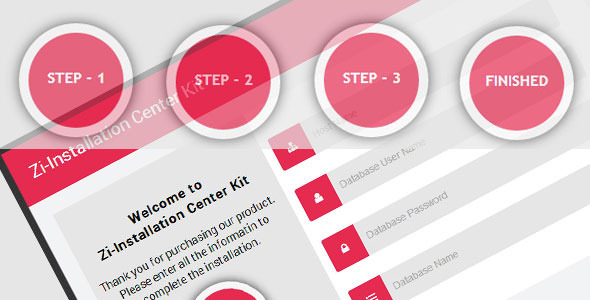
Building a website from scratch or developing a complex web application often involves a tedious onboarding process. For developers and designers, the initial setup phase—where users input database credentials, configure site details, and create admin accounts—can be a major point of friction. This is where the Installation Kit Style by robingnz proves invaluable. It is a sophisticated, user interface-focused style kit developed with CSS3 and HTML, designed specifically to transform the clunky, multi-page setup workflow into a sleek, four-step wizard. Rather than being a functional backend script, this kit provides the visual front-end framework that developers can integrate into their own projects, creating a seamless experience that builds user confidence right from the first click.
For professionals sourcing assets on ThemeForest, this item stands out as a utility that bridges the gap between design and functionality. It is not merely a static mockup; it is a fully interactive template for an installation process that handles form validation and focus states, guiding users through the necessary steps with clarity and precision. By using this kit, you elevate the perceived quality of your own software or theme, ensuring that first impressions are polished, professional, and conversion-friendly. This article explores the intricacies of the Installation Kit Style, detailing its features, ideal use cases, and technical specifications to help you determine if it is the right asset for your next project.
Key Features
The Installation Kit Style is engineered to upgrade the aesthetic and usability of standard setup procedures. Below are the primary features that set this UI kit apart from standard form templates:
- Four-Step Installation Wizard: The kit is structured around a clear, four-phase process: Database Information, Website Details, Admin Details, and the Finish Stage. This logical flow segments what could be an overwhelming amount of information into digestible, user-friendly stages, reducing cognitive load and preventing user abandonment.
- Advanced Field Focus & Form Validation: The kit includes sophisticated field information on focus states. This means that as users click into an input field, they receive contextual highlighting or tooltips. Additionally, the structure supports robust form validation logic within the front-end design, ensuring that users receive immediate feedback on input errors before proceeding to the next step.
- Pure CSS3 & HTML Architecture: Designed specifically for front-end developers, the kit is lightweight and free from bloated JavaScript dependencies. This ensures fast page load times and allows for easy customization of colors, fonts, and spacing directly within the CSS files or via CSS variables.
- Versatile UI Logic: While named an “installation kit,” the design and step-flow architecture are perfectly suited for broader applications, specifically multi-step registration forms. This flexibility means the asset provides value beyond just software setup, making it a strategic purchase for various web projects.
- Professional Visual Hierarchy: The kit features a clean layout with clear navigation indicators—such as step counters or progress bars—that visually inform users of their current position and remaining tasks. This transparency is crucial for maintaining engagement during lengthy processes.
Who Is This For? Use Cases
To fully appreciate the utility of the Installation Kit Style, it is essential to understand the varying contexts in which it excels. It is intentionally designed to be a front-end component, meaning its versatility is only limited by the implementer’s backend logic.
Web Application Developers & Startups
If you are launching a SaaS product or a complex web tool that requires users to connect external databases (like MySQL or PostgreSQL) or set up API keys, this kit provides the perfect user interface. Instead of spending hours designing and coding a custom setup page, you can seamlessly integrate this style to handle the presentation layer while you focus on the server-side logic. For example, a self-hosted analytics tool or a project management system would benefit immensely from the clean, logical layout of the Database Information step.
WordPress Theme & Plugin Developers
Although this is not a script that installs WordPress, it is an ideal asset for developers who require niche configuration wizards. Consider a theme that requires a demo importer setup or a plugin that needs a multi-stage configuration. By utilizing this kit, you can replace the default WordPress settings sidebars with a much more immersive and branded experience. The step for Website Details becomes a powerful tool for gathering user preferences on design or functionality during a one-time setup screen.
E-commerce & Membership Sites (Multi-Step Registration)
Long registration forms are notorious for high drop-off rates. Using the Admin Details phase of the kit, you can adapt this asset into a beautifully structured multi-step signup process. You could divide a user profile creation into distinct sections: account credentials, billing information, and preferences. The “Finish Stage” validates the process and safely redirects users to a confirmation page. This use case is particularly relevant for membership portals and high-ticket E-commerce platforms that need to gather significant data without overwhelming the user.
Technical Details & Compatibility
Understanding the technical constraints is critical for successful integration. This asset is built strictly with modern web standards. The primary requirement is a browser environment that supports CSS3 attributes.
Author and Source: robingnz
File Structure: The item likely contains well-organized HTML files for each step and a dedicated CSS file controlling the visual style and animations.
Browser Compatibility: This is a crucial aspect to note. The author explicitly states that Internet Explorer does not support several CSS3 attributes. While modern browsers like Chrome, Firefox, Safari, and Edge handle the layout perfectly, legacy support for IE is limited. Developers should ensure their target audience utilizes up-to-date browsers to experience the full intent of the design. Potential slight visual degradation may occur on older IE versions.
Specifics: The kit is solely front-end code. It does not rely on server-side languages like PHP or Python, nor does it require javaScript frameworks for the core styling foundation. However, you will need to implement your own backend integration and validation logic to make the data actually save to a database (in the context of a real installation).
Pros and Cons
When deciding to purchase any digital asset, a balanced perspective on its strengths and limitations is necessary. This ensures that the product aligns with the requirements of your specific project.
Pros
- Time Efficiency: Drastically reduces the development time required to “draw” complex installation interfaces.
- High-Quality User Experience: The step-by-step format is proven to increase completion rates compared to scrolling single-page forms.
- Ultra-Lightweight: No heavy scripts mean it will not slow down your loading times.
- Professional Aesthetic: The modern CSS3 design ensures your product looks polished and trustworthy from the moment of setup.
- Versatile Use: It is perfectly reusable across multiple different projects, from software installers to client onboarding forms.
Cons
- Limited Browser Support: The lack of full IE support might be a dealbreaker for enterprise clients still locked into legacy browsers like Windows 7 stock IE installations.
- Not a Full Script: Individuals expecting a “one-click” WordPress or PHP installer to replace their core system will be disappointed, as this strictly provides the skin and layout, not the backend functionality.
- No Heavy JavaScript Anchoring: Unless the author has included validations in a separate script, developers may need to “wire up” the logic themselves to connect the visual focus states to actual backend error messages.
Frequently Asked Questions
Is this an installation script that will automatically install a CMS or WordPress?
No. It is crucial to understand the nature of this asset. The Installation Kit Style is purely a CSS3 & HTML visual design kit. It provides the graphical interface—the “look and feel”—of a multi-step installation process. You cannot use it to automatically unpack a software archive or modify server configurations. It is intended to be integrated into your existing application’s front-end, where you will connect its fields to your own custom backend code to perform the actual installation actions.
Can I integrate this kit with popular page builders like Elementor or WPBakery?
Because this is a standalone HTML and CSS file set, it does not come as a native widget for page builders. To integrate it, you would need to either convert the HTML into a “Raw HTML” widget within your page builder or, more commonly, embed the CSS and HTML directly into your theme’s template files. For WordPress theme developers, this is standard practice—copying the structure into a custom page template. For beginners using simple drag-and-drop tools without coding capabilities, this may require an additional developer’s assistance to integrate properly.
Does the Installation Kit Style work well with PHP frameworks like Laravel or CodeIgniter?
Absolutely. Since the front-end is built with standard HTML, it is virtually platform-agnostic. Whether you are working with Laravel, Django, or standard PHP, this kit acts as your view layer. You will pair the forms with your framework’s CSRF protection and validation methods. The kit simplifies the creation of the wizard interface—such as the split between Website Details and Admin Details—allowing you to easily pass these sections as distinct POST requests to your controllers.
Final Verdict
In the crowded marketplace of front-end templates, the Installation Kit Style offers a specific and essential utility that generic form templates fail to address. It acknowledges that installation is not just a backend process; it is a significant part of the user experience. With its clean, four-step interface covering everything from database setup to admin password creation, this asset removes the dread typically associated with configuration stages. Its versatility as a multi-step registration form further extends its value, making it a smart addition to any developer’s asset library.
If you value creating exceptional user experiences and want to save hours of coding time, the Installation Kit Standard is a low-risk, high-reward investment. The asset is lightweight, coded to high standards, and priced effectively for the value it returns. Enhance your product’s credibility and streamline your users’ setup process. Click the link below to secure the Installation Kit Style today and give your project the professional edge it deserves.