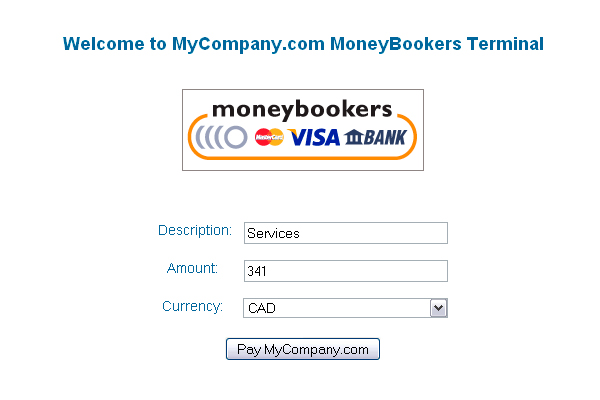
Accepting online payments directly from your clients should never require a degree in web development or a costly third-party subscription. For freelancers, small agencies, and service providers using MoneyBookers (now Skrill), finding a lightweight, self-hosted solution that acts as a straightforward payment collection point is a game-changer. The MoneyBookers Payment Terminal delivers exactly that: a simple, quick, and efficient script designed to let your clients pay for your services directly through your website without the bloat of a full shopping cart or complex membership plugin. This terminal acts as a dedicated payment gateway interface, streamlining the transaction process from offer to invoice settlement in just a few clicks.
Unlike many modern plugins that require intricate setup with APIs and SSL certificates managed by the platform, this script prioritizes simplicity and control. It is an ideal solution for professionals who want a no-fuss, pay-as-you-go payment page. By integrating this terminal, you provide a clear, branded path for customers to complete transactions, reducing friction and speeding up your cash flow. Let’s explore exactly how this tool works, who benefits most from it, and why it remains a relevant option for specific WordPress and web environments.
Key Features
- Ultra-Simple Configuration: The core promise of this terminal is its ease of deployment. Setup revolves entirely around editing a single configuration file. Once you input your MoneyBookers (Skrill) merchant details, the script is ready to accept payments. No complex database migrations or plugin dependencies are involved.
- Direct MoneyBookers Integration: The terminal is hardcoded to work seamlessly with the MoneyBookers/Skrill payment gateway. It creates a reliable bridge between your website and your merchant account, ensuring that transaction data is submitted correctly.
- Quick Payment Collection: Designed specifically for service-based payments, the terminal allows clients to pay fixed amounts or custom invoices quickly. It eliminates the need for clients to navigate through product catalogs, making it perfect for one-off projects, retainers, or service fees.
- Lightweight and Fast: Because this is a standalone script (not a monolithic plugin), it loads exceptionally fast. It does not add overhead to your WordPress admin panel or slow down your site’s frontend. It is a focused tool that does one thing well.
- Cross-Platform Compatibility: The script works on any standard PHP-enabled web server. It can be embedded into a WordPress page using a simple tutorial, or it can run as a standalone page on any site. This flexibility is rare in modern payment tools.
- Proven Tutorial Support: The developer has provided clear, external tutorials (written initially for a PayPal version) that walk you through embedding the script into a WordPress page and even adapting it for single-item selling instead of the terminal mode.
Who Is This For? Use Cases
Freelancers and Independent Consultants
If you are a freelance graphic designer, writer, developer, or marketing consultant, you often send invoices with a unique payment amount. A full ecommerce store is overkill. The MoneyBookers Payment Terminal allows you to send a direct link to your client. They open the link, see your business name, enter the invoice amount, and pay immediately via their Skrill account or credit card. This drastically reduces the time between sending an invoice and receiving funds.
Small Service-Based Agencies
A digital marketing agency that bills monthly retainers or project milestones can use this terminal as a dedicated “Pay Now” button on their client portal. Instead of chasing payments, you direct clients to a simple page that handles the transaction. This reduces administrative overhead and provides a professional, branded payment experience without the cost of a dedicated payment processor’s monthly fee.
Web Developers Building Simple Solutions
For developers who need to add a payment gateway to a client’s site quickly, this script is a lifesaver. You can copy the files, edit the config, and embed it into a WordPress site using a shortcode or iframe method. It is particularly useful for niche applications where a full plugin like WooCommerce is unnecessary—for example, a one-page site for a life coach or a consultant who only sells single sessions or packages.
Sellers of Digital Downloads or Small Fees
While the script functions as a “terminal” for varied amounts, the developer explicitly notes that with the provided tutorial, you can adapt it to sell a single item for a fixed price. This makes it viable for selling an eBook, a PDF guide, or access to a webinar. It offers a lean alternative to larger platforms when you only have one or two products.
Technical Details & Compatibility
This script is built on a fundamental PHP framework, ensuring broad compatibility with most standard web hosting environments. It does not require a specific PHP version beyond basic PHP 5 support, making it compatible with older server setups where modern plugin requirements might fail. The script is not a WordPress plugin by default; it is a self-contained PHP script that can be integrated into WordPress via manual methods like using a page template or an iFrame, as detailed in the linked tutorials.
Compatibility: The script is browser-agnostic, working on all major browsers including Chrome, Firefox, Safari, and Edge. It relies on a server-side configuration file (config.php) that you edit with your MoneyBookers merchant email and site details. The last update and support signals from the author indicate that while the script is stable, it is a legacy solution—it focuses on reliability over frequent feature updates. It is designed for users who value a set-and-forget solution.
Pros and Cons
Pros
- Extreme simplicity: The installation is arguably the fastest of any payment solution available. It is ideal for non-technical users who just need to start accepting money.
- Zero ongoing fees: Beyond the one-time purchase price of the script, there are no subscription costs. You pay only your standard Skrill transaction fees.
- Lightweight footprint: Does not slow down your site. It is a single-purpose tool with no bloat or background processes.
- Reliable foundation: Uses the proven MoneyBookers (Skrill) gateway, which is trusted globally for online payments.
Cons
- Limited functionality: This is not a replacement for a full ecommerce system. You cannot manage inventory, handle subscriptions, or offer coupon codes. It is strictly for accepting singular payments.
- No built-in WordPress integration: Requires manual embedding or following external tutorials to use within WordPress. It is not a one-click plugin install.
- Older interface: The script and its associated images have a dated visual design. It may require some custom CSS styling to match modern website aesthetics.
- Gateway lock-in: It only works with Skrill (formerly MoneyBookers). If you need PayPal, Stripe, or other gateways, you will need a different script.
Frequently Asked Questions
Is the MoneyBookers Payment Terminal a WordPress plugin?
No, it is not a plugin that you can install from the WordPress repository. It is a standalone PHP script. However, the developer has provided external tutorials that explain how to embed this script into a WordPress page. You can achieve this by using a WordPress page template that includes the script, or by using an iframe method. This requires some basic familiarity with editing WordPress files, but the process is well-documented for those who follow the guides.
Does this script work with the current version of Skrill (MoneyBookers)?
Yes, the script is designed to work with the Skrill payment gateway, which was originally called MoneyBookers. As long as you have an active Skrill merchant account, the script will process payments. It uses the standard Skrill payment request protocol. You should double-check with Skrill’s current API requirements if you encounter any issues, but the core functionality remains intact because Skrill has maintained backward compatibility for basic payment requests.
Can I use this to sell multiple products or digital goods?
This script is primarily designed as a “payment terminal” where the user enters the amount to pay. For selling a single item at a fixed price, you can adapt the script using the tutorials provided by the author. However, it is not built for multi-product catalogs or complex shopping carts. If you need to sell ten different digital downloads with individual pricing, a dedicated ecommerce plugin like WooCommerce would be a better fit. For one-off items or variable service fees, this script is perfect.
Final Verdict
The MoneyBookers Payment Terminal fills a specific but valuable niche for service providers who prioritize speed and simplicity. It strips away the complexity of modern payment gateways and returns to the core function of taking money from a client. The script’s enduring value lies in its reliability and its “one-and-done” installation. You do not need to worry about updates breaking your payment flow because the script has remained stable for years. Developed by Convergine, a reputable author on CodeCanyon known for straightforward, functional solutions, this terminal offers a low-risk, high-utility tool.
If you are tired of battling with bloated plugins or are looking for a way to accept payments without a monthly subscription, this is a clear winner. The knowledge that you can have a payment page live in under five minutes is powerful. Stop losing time to invoice chasing and complex checkout flows. Get the MoneyBookers Payment Terminal today and give your clients the quickest, most direct way to pay you for your hard work. It is a small investment for a significant return in operational efficiency.