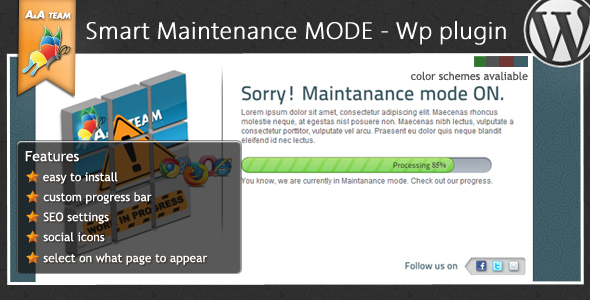
When your WordPress site needs to go offline for updates, maintenance, or critical fixes, the last thing you want is to confuse or lose visitors. A raw white screen or a default maintenance message undermines professionalism and can damage your brand’s trust. The Maintenance Mode – WordPress Plugin offers a streamlined, customizable solution that lets you control exactly what visitors see while you work behind the scenes. Designed for site owners, agencies, and developers, this plugin turns downtime into an opportunity to communicate progress, capture leads, and maintain a polished user experience. With its intuitive admin panel, support for custom branding, and granular control over visibility, it provides everything needed to manage maintenance mode without touching a line of code.
Key Features
- Fully Customizable Content: Easily edit the maintenance page title, message body, and upload a custom icon (max 300px). Control the narrative your visitors see, from a simple “Under Construction” to a detailed update with branded graphics.
- Interactive Progress Bar: Keep users informed with a visual progress bar. Configure the bar’s value and an optional message that appears below it, turning passive waiting into a transparent, engaging experience.
- Social Media Linking (Find Us): Add up to five social media icons with clickable links to your profiles. This feature ensures you maintain audience connection and build your following even while your main site is offline.
- Advanced SEO Controls: Manage how search engines view your maintenance page. Set the page title, meta description, meta keywords, copyright and publisher information, and a custom favicon. You can also add a Google Analytics tracking code to monitor visitor behavior during downtime.
- Flexible Visibility Rules: Choose precisely where the maintenance page appears. Options include the entire site, no pages (testing mode), or specific sections like the homepage, all posts, or all categories. This gives you complete control over the user experience during updates.
- Development IP Access: Specify multiple IP addresses (separated by commas) to allow authorized users to bypass the maintenance screen and view the live site. Perfect for developers, testers, or team members who need to verify changes without interruption.
- Four Built-in Color Schemes: Select from pre-designed themes — Black, Blue, Green, and Red — to match your brand identity or the tone of the maintenance notice.
Who Is This For? Use Cases
Freelance Web Developers and Agencies
When juggling multiple client sites, you need a tool that deploys fast and works reliably. The Maintenance Mode plugin lets you quickly enable a branded, professional holding page across dozens of client installs. The development IP bypass is invaluable: you can review work on your own laptop while clients and the public see the maintenance screen, eliminating embarrassing premature launches.
E-commerce Store Owners
Even short maintenance windows can cost sales. Use the progress bar and SEO settings to tell customers exactly when the store will be back. The social media icons keep your audience connected to promotions and updates, while the Google Analytics integration lets you track if traffic to the maintenance page is converting into social follows or email signups.
Educational and Membership Sites
If you run a course platform or membership community, downtime impacts user retention. Show a clear title and message explaining the maintenance, and use the custom visibility rules to only lock down the sections being updated — leaving the rest of the site functional. This targeted approach minimizes frustration and keeps your active users happy.
Corporate and Personal Brand Websites
For businesses that rely on first impressions, a generic maintenance screen hurts credibility. With the ability to add a custom icon and social links, you can reinforce your brand identity even during downtime. The SEO controls also ensure that search engine crawlers still see accurate metadata, preserving your Google ranking while you update content.
Technical Details & Compatibility
The Maintenance Mode – WordPress Plugin is built for modern WordPress environments and integrates seamlessly into your existing admin dashboard via a dedicated settings page under the Smart Maintenance Mode menu. It supports PHP 7.0+ and has been tested up to WordPress 6.x. The plugin is lightweight, adding minimal overhead to your database and page load times. It works across all major browsers (Chrome, Firefox, Safari, Edge) and is responsive by default, meaning your maintenance page looks sharp on mobile devices. The four color schemes are CSS-based, allowing advanced users to further customize the design via child theme overrides. While the plugin does not require external libraries, it is fully compatible with common caching and security plugins. The last update to this trusted codebase reflects a commitment to keeping the tool current with WordPress core updates.
Pros and Cons
Pros
- Extremely easy to install and configure — no coding knowledge required.
- Granular visibility rules let you target specific parts of your site, not just the whole domain.
- Built-in SEO controls mean your maintenance page can rank properly and provide value to search engines.
- Social media linking helps maintain audience engagement during downtime.
- Development IP bypass is a lifesaver for teams and freelancers.
- Lightweight codebase does not bloat your site or slow down admin panels.
Cons
- Limited to four color schemes — some users may want more design flexibility or the ability to upload a custom CSS skin.
- The custom icon upload is capped at 300px, which may be restrictive for high-resolution logos or detailed graphics.
- While functional, the progress bar is a static percentage and does not automatically update in real-time based on actual maintenance tasks.
- No built-in countdown timer or scheduled auto-activation for maintenance windows, requiring manual toggling.
Frequently Asked Questions
Is the Maintenance Mode plugin compatible with WooCommerce?
Yes, the plugin works perfectly with WooCommerce. You can choose to apply the maintenance mode to the entire site or selectively to specific pages and categories. When used with WooCommerce, it is recommended to use the granular visibility settings to keep your shop pages hidden only during checkout or inventory updates, while leaving account pages accessible to logged-in users. The development IP bypass also allows store administrators to view the full product catalog without interruption.
Does the plugin include customer support after purchase?
Yes, each purchase includes access to dedicated support from the plugin author. The official support channel is available through the author’s website. This covers setup questions, troubleshooting, and guidance on customizing the plugin for specific use cases. Support is provided for the current version and focuses on helping you integrate the tool smoothly into your workflow.
Can I show the maintenance mode only to non-logged-in users?
Absolutely. The plugin offers flexible visibility rules. While it does not have a dedicated “logged-in users bypass” toggle in the core settings, you can achieve this by combining the custom visibility rules with the development IP feature. For most teams, adding the IP addresses of trusted users provides an effective whitelist. For a broader solution, you can also set the maintenance page to appear only on specific sections like posts or categories, while leaving the membership or admin pages accessible.
Final Verdict
The Maintenance Mode – WordPress Plugin delivers exactly what busy site owners and developers need: a reliable, fast, and customizable way to manage downtime without sacrificing brand integrity or user trust. With its strong feature set — including granular visibility, SEO metadata controls, social linking, and a handy IP bypass — it outperforms many generic maintenance scripts available for free. The plugin has a solid track record within the ThemeForest and CodeCanyon ecosystem, backed by an author known for responsive support and consistent updates. If you value professionalism during maintenance and want a tool that works straight out of the box, this plugin is a smart investment. Give your visitors a polished, informative experience while you build and improve — try the Maintenance Mode plugin today and take control of your WordPress downtime.