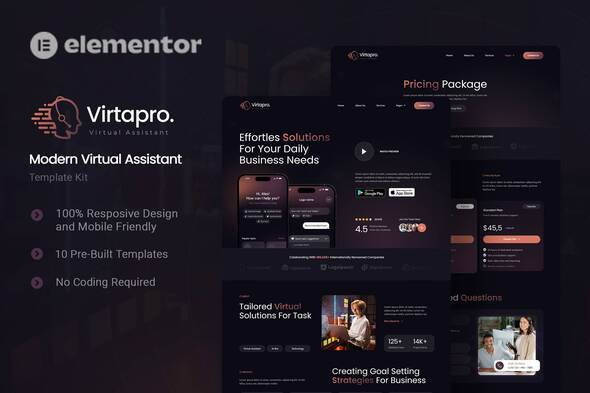
Virtapro stands as a cutting-edge Elementor Template Kit designed specifically for entrepreneurs and agencies aiming to launch professional virtual assistant websites with remarkable efficiency. This comprehensive solution provides a complete design system and ready-to-use templates that transform WordPress into a powerful business platform without requiring coding expertise. Engineered for seamless integration with the free Hello Elementor theme, Virtapro delivers lightning-fast loading speeds and flawless responsiveness across all devices.
Unpacking Virtapro’s Core Capabilities
This template kit revolutionizes website building through its intelligent feature set:
- True drag-and-drop functionality enables real-time visual editing where every change appears instantly, eliminating the need for technical skills
- Centralized design controls allow global font and color adjustments while maintaining granular control over individual components
- Performance-optimized architecture ensures rapid page loading with clean code that doesn’t sacrifice aesthetics for speed
- Universal theme compatibility works seamlessly with most Elementor-supported themes for flexible deployment
- Dark/Light mode adaptability provides sophisticated visual options that align with contemporary design trends
Complete Business Template Ecosystem
Virtapro includes professionally designed page templates covering every critical aspect of a virtual assistant business:
- Conversion-focused Homepage – Clear value proposition with service highlights and CTA placement
- Strategic About Us – Showcase your team’s expertise and unique approach
- Service Catalog – Present offerings with persuasive benefit-driven descriptions
- Pricing Plan Structures – Flexible layouts for tiered service packages
- Team Profiles – Build credibility with professional bios and photos
- Career Opportunities – Attract talent with compelling position listings
- Blog Layouts – Content-ready templates for thought leadership
- FAQ Section – Reduce support queries with organized knowledge base
- 404 Error Page – Branded recovery path for broken links
- Contact Hub – Integrated form, map, and information display
Strategic Design Elements
Virtapro employs carefully curated typography to establish visual hierarchy and enhance readability:
- Poppins – Modern geometric sans-serif for headlines and accents
- Roboto – Highly legible body font optimized for digital screens
The design system balances ample white space with strategic color contrasts, creating an interface that guides visitors through conversion funnels while maintaining aesthetic sophistication.
Essential Plugin Ecosystem
Virtapro integrates seamlessly with powerful WordPress plugins that extend functionality:
- Elementor Pro – Advanced page building capabilities
- ElementsKit – Adds specialized widgets and modules
- Jeg Elementor Kit – Header/footer builder and template management
- Ultimate Addons for Elementor Lite – Expands design element library
- MetForm – Creates conversion-optimized contact forms
Step-by-Step Implementation Guide
Installing Virtapro requires the Envato Elements plugin. Follow this workflow:
- Access Elementor > Template Kits in WordPress dashboard
- Upload the Virtapro .zip file via the Envato plugin interface
- Activate required plugins when prompted during import
Header Configuration
- Navigate to Jeg Elementor Kit > Header Template
- Create new header with “Entire Site” visibility
- Import pre-designed header from My Templates library
- Ensure page layouts use “Elementor Full Width” template
MetForm Integration
- Edit page containing your contact section
- Locate MetForm widget in Elementor navigator
- Initiate new form creation and select blank template
- Import pre-built form from My Templates repository
- Customize field labels and validation rules as needed
Visual Asset Management
The template’s premium demo images require licensing from the Envato Elements collection. For budget-friendly alternatives:
- Replace placeholder images with original brand photography
- Use royalty-free resources from platforms like Unsplash
- Maintain visual consistency by applying uniform filters
- Optimize all images with compression tools before upload
Professional Implementation Tips
Maximize Virtapro’s potential with these pro strategies:
- Establish brand consistency by creating a style guide before customization
- Leverage global colors/fonts to maintain coherence across pages
- Use conditional display settings to show relevant content based on user behavior
- Integrate with CRM systems using MetForm’s Zapier connections
- Implement caching solutions to maintain sub-second load times
For ongoing support, utilize Elementor’s help resources or consult the extensive Envato Elements knowledge base. Virtapro’s modular architecture allows continuous evolution as your business scales, making it a sustainable solution for growing virtual assistant enterprises.