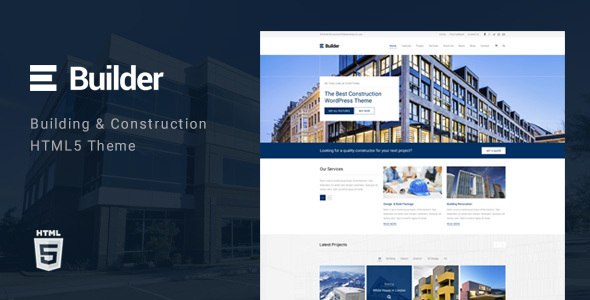
Builder is a static HTML template sold on ThemeForest for $18, aimed at companies that need a marketing site for a Builder business without committing to a CMS. It ships with three homepage layouts, ten header variations, four portfolio styles and three blog layouts, all built on Bootstrap 3, HTML5 and CSS3 by the developer TK-Themes. It suits freelancers and small agencies producing a brochure-style site for a construction, plumbing or engineering firm on a tight budget, and it is a poor fit for anyone who needs a content-managed site or a modern front-end stack.
What the Builder business template actually includes
The core of the package is layout variety. Three distinct homepages mean a construction firm, a subcontractor and a consultancy can each start from a different structure rather than reshuffling the same blocks. Ten header styles is an unusually high number for a template at this price point, and it matters in practice: headers carry the logo, the navigation and the phone number, which is often the primary conversion element on a trade website. Being able to switch between a centred logo, a split navigation or a top bar with contact details gives a designer real room to match the header to the client’s brand.
Portfolio presentation is the second pillar. Four portfolio styles address the way building companies sell work — through photographs of completed projects, often with a short specification list. A grid, a masonry arrangement, a filterable set and a single-project detail layout cover the common cases. The three blog styles are less central to a construction site but useful for firms publishing site updates, safety notices or industry commentary, and they keep the template viable for content marketing rather than pure brochureware.
Under the hood, Bootstrap 3 provides the grid and the responsive behaviour, with HTML5 and CSS3 for markup and styling. Retina-ready assets and responsive breakpoints are standard expectations rather than differentiators, but their presence means the template will hold up on phones and high-density displays without extra work. Font Awesome and Google Fonts are integrated, so icon and typography changes do not require a separate library setup. Sticky menu behaviour is included, which keeps navigation and contact details reachable during long scrolls on project pages.
Layout flexibility extends to boxed and wide modes, and there are three contact page styles. For a trade business, the contact page is often the highest-value page on the site, so having three arrangements — typically differing in how the form, map and address block are positioned — is a practical inclusion rather than padding. The vendor describes customisation as straightforward, which in a static template generally means editing markup and stylesheet variables directly; there is no visual page builder or options panel implied by the listing.
Where this template fits, and where it does not
The clearest fit is a small or mid-sized building company that wants a fixed-scope website delivered quickly. A freelancer quoting a five-page site for a local contractor can use the homepage and portfolio layouts to assemble a credible presence in a fraction of the time a custom build would take. The same applies to plumbers, electricians, engineers and other trades the vendor explicitly names, since the portfolio and services structure maps onto how those businesses present completed jobs.
Agencies producing several trade websites in parallel are another natural audience. The header and portfolio variations let a studio avoid shipping near-identical sites to competing clients in the same region, which is a genuine commercial problem when working within one niche.
It is the wrong choice in two common situations. The first is any project where the client expects to edit content themselves. Because this is a static HTML template with no CMS layer, updating a project gallery or adding a blog post means editing files and redeploying. A WordPress or Joomla equivalent would be the appropriate route. The second is a project with modern front-end requirements — component frameworks, build tooling, or a design system that expects current CSS features. Bootstrap 3 is several major versions behind current releases, and a developer working in a contemporary stack will spend more time working around the template than building with it.
Strengths and limitations of the Builder business template
Strengths
- Unusually deep layout options for the price: three homepages, ten headers, four portfolio styles and three contact styles give a designer enough combinations to differentiate multiple client sites.
- Static HTML output deploys almost anywhere, including cheap shared hosting, with no database, PHP version or plugin dependency to manage.
- Bootstrap 3 grid and responsive behaviour mean the layout adapts to mobile without custom media queries for standard breakpoints.
- Font Awesome and Google Fonts are already wired in, removing two routine setup steps.
- At $18 with 356 sales recorded on the marketplace, the entry cost is low enough that the template can be treated as a starting scaffold rather than a long-term platform.
Limitations
- The last vendor update is dated May 2016. Any project started now is adopting a codebase roughly a decade old, and the vendor listing does not state whether further updates are planned.
- Bootstrap 3 is no longer the current major release, so components, utility classes and JavaScript plugins differ from what a developer familiar with modern Bootstrap would expect. Retrofitting a newer version is not a drop-in change.
- No CMS integration is included. Every content change is a code change, which rules the template out for clients who want to publish independently.
- Support is handled through the marketplace item comments or a direct email address, with stated hours of Monday to Friday, 8:00am to 5:00pm GMT+7. Buyers outside that timezone should expect a delay, and there is no ticketing system or knowledge base described.
- The listing does not state accessibility conformance, browser support matrix, or whether the template has been tested against current browser versions. Those gaps have to be verified manually before a client project is signed off.
How it compares with the wider category of trade and construction templates
Construction and trades templates broadly split into three groups: static HTML packages like this one, CMS themes for WordPress and similar platforms, and site builders or block themes that ship with a visual editor. The static group competes on price, deployment simplicity and raw layout variety. On those terms, Builder is competitive — ten header styles is more than most static trade templates offer, and the portfolio range covers the main ways a contractor presents completed work.
Against CMS themes, the trade-off is control versus convenience. A CMS theme costs more and introduces hosting requirements, update cycles and plugin maintenance, but it hands content editing to the client. Builder gives up that capability entirely in exchange for a lower price and a site that cannot break because of a plugin conflict or a core update.
Against modern block-based themes and site builders, the gap is technical rather than conceptual. Those tools assume current CSS and JavaScript and often include a visual editing layer. Builder assumes Bootstrap 3 and hand-edited markup. For a developer comfortable in that environment the difference is manageable; for one who is not, the friction is constant.
The honest framing is that Builder sits at the value end of the static template market. It is not competing on technology, and it should not be evaluated as though it were.
Frequently Asked Questions
Is Builder a WordPress theme or a plain HTML template?
It is a plain static HTML template, not a WordPress theme. The package contains HTML, CSS and JavaScript files built on Bootstrap 3, with no PHP or database layer. That means it can be hosted on any static or shared hosting account, but content updates require editing the source files directly rather than logging into an admin dashboard.
Can a non-developer update the site after it goes live?
Not realistically, no. Because there is no content management system, changing text, swapping project images or adding a blog post all involve editing HTML files and re-uploading them. A client without markup skills would need developer involvement for every content change, which is a significant ongoing cost that should be factored in before purchase.
How current is the code, and does the age of the template matter?
The vendor’s last recorded update is May 2016, so the codebase is roughly a decade old. It is built on Bootstrap 3, which is several major versions behind current releases. The template will still render, but a developer expecting modern utility classes, current JavaScript plugins or contemporary CSS features will need to adapt their usual workflow.
What kind of support comes with the template?
Support is provided by the developer, TK-Themes, through the marketplace item comments or by email, with stated availability Monday to Friday, 8:00am to 5:00pm GMT+7. The vendor encourages posting questions publicly so other buyers can benefit from the answers. No ticketing system, documentation portal or response-time guarantee is described in the listing.
Verdict on the Builder business template
Buy this if a fixed-scope, brochure-style website for a construction, plumbing or engineering firm needs to be delivered quickly and cheaply, and the person building it is comfortable editing HTML and CSS by hand. The layout variety — particularly the ten header styles and four portfolio arrangements — is the strongest argument in its favour, and 356 sales at $18 suggests it has found a workable niche. Do not buy it if the client expects to manage their own content, if the project needs a CMS, or if the build has to sit on a current front-end stack. The 2016 update date and Bootstrap 3 dependency are the deciding factors, and neither is something the vendor listing addresses.