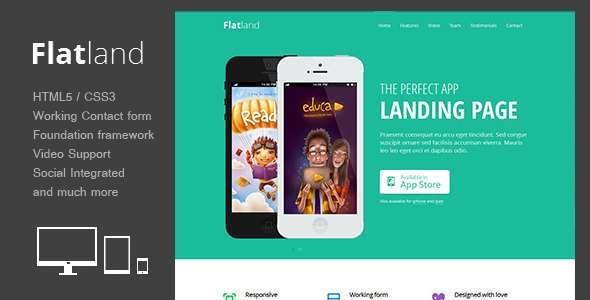
Flatland Landing Pages is a responsive HTML5 template built on the Foundation framework, sold on ThemeForest for $9 and aimed at app developers, startups and freelancers who need a single-page marketing site for a product launch. It ships with a responsive slider, video embeds, a working contact form and a documented file structure that requires no coding to assemble. The template has been purchased 386 times and was last updated by its developer, Theme-Express, in September 2013.
That last detail matters more than any feature list. Flatland is a product of the pre-flexbox, pre-CSS-grid era of front-end development, and anyone evaluating it now needs to weigh a very low price against a codebase that has not moved in over a decade.
What Flatland Landing Pages actually includes
The template’s core proposition is a complete one-page layout for showcasing a mobile or web app. Rather than a multi-page theme with blog templates, archives and widget areas, Flatland concentrates everything into a single scrolling document: hero section, feature blocks, gallery, video, testimonials and a contact form. For a product that only needs a landing page, that focus removes a lot of the configuration work that comes with general-purpose themes.
The responsive behaviour is handled through Foundation, a front-end framework that was widely used before Bootstrap became the default choice. Foundation’s grid gives the layout a defined set of breakpoints, so the page reflows predictably between desktop, tablet and phone widths. Because the grid classes are baked into the markup, adjusting column widths means editing class names rather than writing media queries.
Several features are worth calling out individually because of what they let a site owner do without touching a plugin:
- Responsive slider. The hero area rotates through promotional images or screenshots, and it scales with the viewport instead of being locked to a fixed pixel width. This is the single most important element on most app landing pages, since it carries the product screenshot.
- Video support for Vimeo and YouTube. A demo video can be embedded directly into the page, which suits app marketing where a 60-second walkthrough often converts better than static screenshots.
- Working contact form. The form is functional out of the box rather than a static mockup, so enquiries reach an inbox once the mail handling is configured on the server.
- Rotating quotes. Testimonials cycle automatically, which keeps social proof visible without consuming permanent vertical space.
- Icon font with over 2,000 glyphs. Feature lists can be illustrated with scalable vector icons instead of raster images, which keeps the page light and sharp on high-density screens.
- Social icons. Links to the usual networks are pre-styled and positioned, reducing the amount of custom markup needed for a footer.
The documentation is described by the vendor as complete, and the listing states that no coding knowledge is required. In practice that means the buyer edits text and swaps images inside an existing HTML structure. It does not mean a drag-and-drop builder — there is no page builder, no visual editor and no WordPress admin panel here. Flatland is a static HTML template, and every change is made in a text editor.
Where Flatland Landing Pages fits, and where it does not
The clearest fit is a developer or small studio shipping a native iOS or Android app, or a lightweight web app, that needs a credible one-page presence fast. At $9, the template costs less than an hour of most freelancers’ time, and the Foundation grid means a competent front-end developer can restyle it in an afternoon. It also suits agencies producing throwaway campaign pages, where the goal is a temporary microsite tied to a launch rather than a long-lived brand asset.
A second reasonable use is as a learning artefact. Somebody teaching themselves HTML5 and CSS3 can pull the template apart, see how a Foundation grid is structured, and understand how a responsive slider is wired up. The price makes that a low-risk exercise.
Where Flatland is the wrong choice is any project that needs ongoing content management. Because there is no CMS layer, publishing a new blog post, updating a changelog or swapping a testimonial means editing files and re-uploading them. A team that wants a marketing person to update the page without developer involvement should be looking at a WordPress landing page theme instead. The same applies to anyone who needs e-commerce, multi-language support, membership gating or analytics dashboards built in — none of that exists here, and bolting it on means writing it from scratch.
Strengths and limitations
Strengths
- Very low entry price relative to the amount of layout work it saves on a single-page site.
- Foundation provides a genuinely responsive grid rather than a fixed-width layout with a mobile fallback.
- The feature set maps cleanly onto what an app landing page needs: slider, video, gallery, testimonials, contact form.
- Static HTML means no database, no PHP dependencies and no plugin update treadmill.
- Valid HTML and a documented structure make it straightforward to hand off to another developer.
- 386 sales indicate the template has been used in the wild and is not an untested one-off.
Limitations
- The last vendor update was September 2013. The template predates flexbox and CSS Grid, so its layout relies on float-based columns that are now considered legacy. Anyone extending it will be working in an older idiom.
- Foundation itself has moved through several major versions since; the bundled copy is not the current release, and the vendor does not state which version is included.
- No CMS integration. Every content change is a code change.
- Demo images are explicitly not included in the download, so the page will look unfinished until the buyer sources their own photography or screenshots.
- The contact form’s mail handling is server-dependent. The template provides the form markup, but delivery depends on how the host is configured, and the listing does not document a specific mail library.
- Accessibility is not addressed in the feature list — no mention of ARIA attributes, focus states or keyboard navigation for the slider.
- No page builder, no visual editor and no options panel, which is a limitation for non-technical buyers despite the “no coding knowledge required” claim.
How Flatland Landing Pages compares with the wider category
Landing page templates on marketplaces generally fall into three groups: static HTML templates like this one, WordPress themes with a landing page template built in, and hosted page builders such as dedicated SaaS tools. Flatland sits firmly in the first group, and that placement defines both its appeal and its ceiling.
Against WordPress landing page themes, Flatland loses on content management and wins on weight and simplicity. A WordPress theme brings a database, a hosting requirement, plugin updates and a larger attack surface, but it also lets a non-developer publish changes. For a page that will be edited weekly, the WordPress route is usually the better investment even at ten times the price.
Against hosted page builders, Flatland loses on iteration speed and wins on ownership. A hosted builder lets someone drag sections around and publish instantly, but the output lives on the vendor’s platform and typically carries a recurring subscription. Flatland produces a folder of files that can be hosted anywhere, for free, forever.
Within the static HTML group, the differentiator is the framework. Templates built on Bootstrap have a larger pool of third-party components and Stack Overflow answers to draw on; Foundation has a smaller but generally more disciplined grid system. Neither is decisive at this price point. What separates Flatland from newer static templates is age: a 2013 build competes against templates written with modern CSS, and that gap shows in the markup.
Frequently Asked Questions
Does Flatland require WordPress?
No. Flatland is a static HTML5 and CSS3 template, not a WordPress theme, so it runs on any web host without a database or PHP application. Content is edited directly in the HTML files and uploaded via FTP or a hosting control panel. Buyers who want a WordPress admin interface should look at landing page themes built for that platform instead.
Is Flatland Landing Pages still maintained?
No. The vendor’s last recorded update was September 2013, so the template has not received maintenance for well over a decade. It still functions as static HTML, but it will not have been tested against current browser versions, and any security or compatibility fixes released since then are absent. Buyers should treat it as a frozen codebase.
Can the contact form send email without extra setup?
Not reliably. The template includes a working contact form, but email delivery depends on the server’s mail configuration rather than the template itself. The listing does not document which mail library or method is used, so buyers should expect to configure or replace the sending mechanism depending on their host. Testing on the target server before launch is advisable.
Are the demo images included in the download?
No. The vendor states plainly that the images shown in the live preview are not part of the template package. Buyers receive the layout, stylesheets, scripts and icon font, but must supply their own photography, app screenshots and graphics. Budget time for sourcing or commissioning visuals, since the page will look incomplete without them.
Verdict on Flatland Landing Pages
Flatland Landing Pages is a cheap, competent single-page template that does exactly what it advertises, and it remains a defensible purchase for a developer who wants a Foundation-based app landing page and is comfortable editing HTML directly. The 386 sales and the low price make it a low-risk experiment for a side project, a campaign microsite or a learning exercise.
It is not the right choice for anyone who needs to update content without a developer, for projects requiring a CMS, e-commerce or multi-language support, or for teams that expect modern CSS architecture and ongoing vendor maintenance. The 2013 update date is the deciding factor: this is a finished, abandoned product, not a living one.
Buy it if the price and the feature set match a short-lived, developer-maintained page. Skip it if the page needs to evolve for years, or if anyone other than a coder will be responsible for keeping it current.