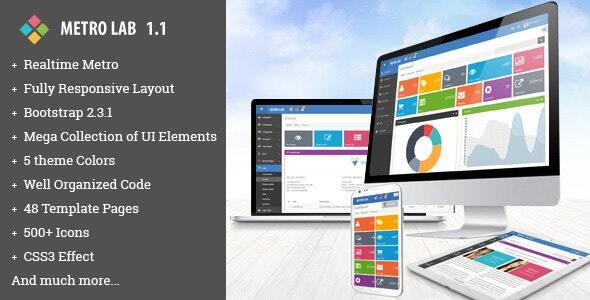
Metro Lab is a responsive admin dashboard template sold on ThemeForest by the developer vectorlab, built on Bootstrap 2.3.1 and jQuery 1.8.3 and priced at $20. Among Metro Lab Admin Templates, this one stands out for a tile-based “metro” visual language and a large set of pre-built pages rather than for modern tooling, which makes it a reasonable pick for a quick internal tool or a legacy project, and a poor fit for anything that needs current framework support.
What Metro Lab Admin Templates Actually Include
The headline feature is the visual system itself. Metro Lab leans on the flat, tile-driven aesthetic that Microsoft popularised with Windows 8 — square and rectangular blocks, bold accent colours, and minimal ornamentation. The vendor ships five theme colours, and the version 1.1 update expanded the palette available in the metro view. For a product at this price point, having a coherent design language rather than a generic Bootstrap skin is the main reason someone would choose it.
Underneath the styling sits a component library that is unusually broad for a template of this vintage. The package contains 48 HTML pages, which is a meaningful number when the alternative is assembling layouts by hand. Those pages cover the standard administrative surface area — dashboards, form layouts, tables, profile screens, and error pages — plus a set of views added in version 1.1: profile view, profile edit, profile activities, profile contact, general portlet, draggable portlet, vector map, and Google map.
Charting and data display are handled through several libraries rather than one. Chart.js, jQuery Peity, jQuery Flot, Easy Pie Chart, and jQuery Sparklines are all bundled, which gives a developer options for different visualisation needs but also means several overlapping dependencies to account for. Data tables are integrated through jQuery DataTables, and the listing specifically mentions editable data tables and multiple table formats.
Form handling is where the template is densest. Included are Dropzone for file uploads, jQuery Validation 1.11.1, Bootstrap date/time/range/colour pickers, Bootstrap wysihtml5 and CKEditor for rich text, Bootstrap inputmask, a Bootstrap form wizard, Bootstrap Chosen for custom select dropdowns, and jQuery Uniform for custom radio buttons, checkboxes, and file inputs. A dual-select component was added in version 1.1. In practice this means most of the fiddly UI work on an admin panel — masked inputs, multi-step forms, file drop zones — already has a working reference implementation.
Navigation and layout utilities round things out: Bootstrap Tree, jQuery Nestable for drag-and-drop hierarchies, jQuery Nice Scroll, jQuery Slim Scroll for custom scrollbars, jQuery ScrollTo, and a pulsing notification indicator. Notifications use jQuery Gritter. Icons come from Font Awesome 3.2.1 and Glyphicons. A photo slider uses jQuery Fancybox. Cookies are handled with jQuery Cookie, which is a small but practical inclusion for remembering sidebar state or theme selection.
Typography is not left to defaults — Myriad Pro is embedded as a font. The vendor also states that the code is well structured and that detailed documentation is included, and the version 1.1 changelog records fixes to top bar alignment and top navigation in mobile view, which suggests responsiveness was actively being corrected rather than merely claimed.
Where Metro Lab Fits and Where It Does Not
The strongest use case is an internal application where the team controls the stack and the priority is shipping a functional back office quickly. A CRM prototype, an inventory tool, a reporting panel, or a content management backend for a small business all map cleanly onto what is included. The 48 pages mean a developer can wire up routes and connect real data without designing screens from nothing, and the broad form component set covers the majority of CRUD interfaces.
It also suits agencies producing a one-off admin panel for a client on a tight budget. At $20 with 893 sales, the cost is negligible against the hours saved on layout and component styling, and the metro aesthetic gives the result a distinct look rather than the default Bootstrap appearance that many competitors share.
Where it is the wrong choice is any project that needs to be maintained for years or integrated with a modern front-end stack. Bootstrap 2.3.1 and jQuery 1.8.3 are both long superseded, and the template has not been updated since July 2019. A team building on React, Vue, or Angular, or one that expects a build pipeline with npm and a bundler, will spend more time unpicking the template’s assumptions than it would spend starting from a component library. The same applies to any project with accessibility requirements, since templates of this era rarely ship with thorough ARIA coverage and the vendor does not claim otherwise.
Strengths and Limitations
Strengths
- The component coverage is genuinely wide for the price — charting, validation, rich text editing, file upload, date pickers, and wizard flows are all present with working examples.
- The metro tile aesthetic is a real differentiator. Most templates in this category default to a flatter, more neutral admin look, so Metro Lab produces a visually distinct result without custom design work.
- Forty-eight pages plus the profile and portlet views added in version 1.1 give a substantial head start on layout.
- Buyer feedback in the listing repeatedly praises file organisation, with one reviewer noting that scripts are not dumped into a single file loaded on every page — a specific and checkable complaint about many competing templates.
- Five theme colours and an expanded metro palette provide reasonable variation without a redesign.
Limitations
- The stack is obsolete. Bootstrap 2.3.1 and jQuery 1.8.3 predate modern responsive utilities, flexbox-based grids, and current accessibility expectations. Retrofitting is possible but manual.
- The last vendor update was July 2019, so there is no indication of ongoing maintenance, security review of bundled plugins, or compatibility testing against current browsers.
- Bundling five separate charting libraries (Chart.js, Peity, Flot, Easy Pie Chart, Sparklines) creates redundancy. A project using only one or two will still carry the weight and maintenance surface of the rest unless files are pruned.
- Font Awesome 3.2.1 is several major versions behind current releases, so icon names and available glyphs will not match modern documentation.
- Documentation quality is asserted by the vendor but not described in detail, so the depth of the written guidance cannot be verified from the listing alone.
How It Compares to Other Admin Templates
The admin template category splits broadly into two groups: legacy Bootstrap-and-jQuery templates like this one, and modern templates built on current framework versions, often with a component framework or a build toolchain attached. Metro Lab sits firmly in the first group, and that positioning is the whole comparison.
Against modern alternatives, it loses on longevity, accessibility, and integration with contemporary development workflows. It wins on price, on the sheer number of pre-built pages, and on having a visual identity that does not look like every other dashboard. A modern template at three or four times the cost typically ships fewer pages but a cleaner dependency story and a support commitment.
Against other legacy templates, Metro Lab’s advantage is the metro design language and the breadth of its form components. Its disadvantage is the same as theirs: an ageing foundation. The practical question is not which template is better in the abstract but whether the project can tolerate Bootstrap 2-era markup. If it can, this is a competitive option. If it cannot, no amount of page count compensates.
Frequently Asked Questions
Is Metro Lab compatible with the latest version of Bootstrap?
No. Metro Lab is built on Bootstrap 2.3.1, which is many major versions behind current releases. Upgrading the framework would require rewriting the grid classes, component markup, and much of the JavaScript, effectively a rebuild rather than an update. Projects needing a current Bootstrap version should look at templates built on it from the start.
Can Metro Lab Admin Templates be used for a React or Vue application?
Not directly. The template is server-rendered HTML with jQuery-driven interactivity, so there is no component structure to import into a modern JavaScript framework. The markup and CSS could be adapted as a visual reference, but the JavaScript would need to be replaced entirely with framework-native equivalents, which removes most of the time-saving benefit.
Does the template still receive updates from the developer?
The vendor’s most recent update is dated July 2019, and the changelog in the listing ends there. No further releases are documented. Buyers should treat Metro Lab as a finished, static product rather than one under active development, and should not expect fixes for browser changes or security issues in the bundled libraries.
What is included in the $20 purchase?
The listing describes 48 HTML pages, five theme colours, a large set of integrated jQuery plugins, Font Awesome and Glyphicons icon sets, an embedded Myriad Pro font, and documentation. The vendor states the code is well structured. Specific licence terms and whether support or future updates are included are not detailed in the product data available here.
Verdict
Metro Lab Admin Templates are worth buying for developers who need a functional, visually distinctive admin panel quickly and who are working within a legacy Bootstrap 2 and jQuery environment. The page count, the breadth of form components, and the metro design language deliver real value at $20, and the 893 sales alongside consistently positive buyer comments about file organisation suggest the product has satisfied its audience. It is not the right purchase for teams building on modern JavaScript frameworks, projects with accessibility requirements, or anything expected to be maintained well into the future, because the underlying stack stopped moving in 2019. The honest summary is that this is a well-executed template from a specific era, and its suitability depends entirely on whether the project lives in that era too.