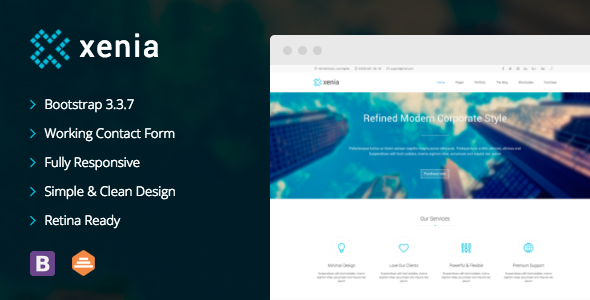
Xenia is a static HTML5 and CSS3 website template built on Bootstrap, sold on ThemeForest for $99 and aimed at agencies and freelancers who need a polished corporate or portfolio site without a CMS behind it. It ships with 23 pre-built pages, a bundled slider, parallax sections and a PHP contact form, so a small marketing site can be assembled by editing markup rather than configuring a theme. Buyers considering a Xenia business deployment should weigh its design quality against the fact that the last vendor update landed in February 2017.
What the Xenia business template actually includes
The package is a front-end template, not a content management system. Everything the buyer receives is a set of HTML files, stylesheets, JavaScript and image assets that get uploaded to a host and edited directly. That distinction shapes every other decision about the product.
The page count is the headline number: 23 HTML documents covering the layouts a corporate site typically needs. The vendor does not publish a page-by-page manifest, so the exact split between home variants, service pages, team pages and utility pages has to be confirmed from the live preview before purchase. What is stated is that the template suits business, corporate, portfolio, product and marketing use cases, which suggests a broad rather than narrowly specialised page set.
Under the hood, the template runs on Bootstrap 3.3.7 with jQuery for interaction. Bootstrap 3 is a well-understood grid and component library, which means anyone with prior Bootstrap experience can orient themselves quickly, and the responsive breakpoints behave predictably across phones, tablets and desktops. The trade-off is that Bootstrap 3 is a legacy major version; the utility classes, grid syntax and JavaScript plugin API differ from Bootstrap 4 and 5, so developers fluent only in newer versions will spend time re-learning conventions rather than building.
Retina readiness is handled through high-density assets, so logos, icons and photography stay sharp on high-PPI displays. The template also bundles Revolution Slider, a commercial slider plugin that would otherwise carry its own licence cost. For a corporate homepage with a rotating hero, that inclusion saves both money and integration work. Parallax scrolling is supported for background sections, and the CSS3 effects layer covers hover states, transitions and animated reveals without requiring a JavaScript animation library.
Navigation supports third-level menus, which matters more than it sounds. Many corporate templates stop at two levels, forcing information architecture compromises on sites with product categories, regional sub-pages or documentation trees. Three levels of dropdown gives room to structure a deeper sitemap without flattening it.
Two smaller features round out the set. A PHP and JavaScript contact form is included, which means the buyer needs a host capable of executing PHP for the form to function; on a purely static host the JavaScript path applies instead, and the vendor does not document how that fallback behaves. A Twitter feed integration is also present, and the changelog shows it was patched for bugs in early releases and again in the 2017 update. Any social feed integration of that vintage should be treated as fragile, since platform API changes since then are unlikely to have been accommodated.
Where this template fits and where it does not
The strongest fit is a small to mid-sized company site with a fixed page count: a consultancy, a design studio, an architecture practice, a recruitment firm or a professional services business that needs a credible five-to-fifteen page presence and does not expect the marketing team to publish weekly. In those cases the absence of a CMS is a feature rather than a limitation, because there is no database to maintain, no plugin update cycle and no admin surface for attackers to target. A freelancer building a portfolio site for a client who wants something visually refined and delivered quickly is squarely in scope.
A second good fit is a prototype or pitch. Because the pages are static, they can be deployed to any cheap host or a staging subdomain in minutes, which makes the template useful for showing a client a realistic design before committing to a full build.
The template is the wrong choice for a content-heavy site. A blog with frequent posts, a news portal, a multi-author publication or any property where non-technical staff need to publish without touching code will outgrow a static template almost immediately. The same applies to e-commerce: there is no cart, no product database and no payment integration, and the vendor does not claim otherwise. Anyone needing those capabilities should be looking at a CMS theme or a hosted platform instead.
There is also a maintenance consideration. A site built on this template inherits Bootstrap 3, an older jQuery and a slider plugin whose bundled version is frozen at the point of the last release. For a brochure site that rarely changes, that is manageable. For anything handling user data, payments or authentication, the outdated dependency stack is a genuine risk.
Strengths and limitations
Strengths
- The design language is genuinely restrained: clean typography, generous whitespace and minimal ornamentation, which reads as professional rather than dated in the way heavily stylised 2014-era templates often do.
- Twenty-three pages is a substantial starting library, reducing the amount of layout work needed for a standard corporate sitemap.
- Revolution Slider is bundled, removing a separate licence purchase and a manual integration step.
- Third-level menu support accommodates deeper information architecture than most templates in this price band.
- Bootstrap 3.3.7 provides a documented, widely understood foundation, so customisation follows familiar patterns.
- Retina-ready assets and CSS3 effects are included without extra configuration.
Limitations
- The last vendor update was 17 February 2017. Nearly a decade without maintenance means no security patches, no dependency upgrades and no compatibility work for browsers or libraries released since.
- Bootstrap 3 is two major versions behind. Grid classes, spacing utilities and JavaScript plugin behaviour all differ from current Bootstrap, so code copied from modern documentation will not work without translation.
- The Twitter feed integration depends on an API surface that has changed substantially since the template was last touched. It should be assumed non-functional until proven otherwise.
- No CMS. Every content change requires editing HTML and re-uploading files, which rules out non-technical editors.
- The contact form requires PHP hosting; the vendor does not document the JavaScript fallback path or its behaviour on static hosts.
- No e-commerce, membership or multi-language tooling is included.
- At $99 the price sits at the upper end for a static template of this age, and it buys no ongoing support commitment beyond whatever the marketplace enforces.
How it compares with the wider template category
Static Bootstrap templates occupy a specific niche: cheaper than a custom build, faster to deploy than a CMS theme, and free of the hosting and maintenance overhead a database-backed site carries. Within that niche, the differentiators are page count, design quality, bundled plugins and how current the underlying stack is.
Xenia competes well on the first three. Its page library is larger than many single-purpose corporate templates, the aesthetic holds up better than most of its contemporaries, and Revolution Slider adds real value. Where it falls behind the category as it exists now is currency. A buyer comparing it against a recently released static template is choosing between a more refined design on an ageing foundation and a less distinctive design on a current one. That is a legitimate trade-off, but it should be made consciously rather than by default.
Against a WordPress corporate theme, the comparison is different in kind rather than degree. A CMS theme costs more in hosting and maintenance attention but hands content control to non-developers and keeps security patching in the hands of an active maintainer. Xenia wins on simplicity and upfront cost; it loses on flexibility and long-term upkeep.
Frequently Asked Questions
Does the Xenia template require WordPress?
No. Xenia is a standalone HTML5 and CSS3 template that runs on any web host without a database or CMS installation. The vendor listing mentions a WordPress version exists, but the product described here is the static HTML package. Buyers who need WordPress should confirm separately which package they are purchasing before checkout.
Is the Xenia business template still safe to use in 2025?
For a static brochure site with no user accounts, logins or payment handling, the practical risk is low because there is no server-side application to exploit. The bundled JavaScript libraries and slider plugin are outdated, though, and any site collecting personal data through the contact form should be reviewed by a developer first.
How many pages come with Xenia?
The vendor states 23 HTML pages. The listing does not break down which layouts those are, so the exact mix of home variants, service pages, portfolio grids, team pages and utility pages is not documented. Checking the live preview is the reliable way to confirm the page set matches a specific project.
Can the Xenia template be customised beyond the demo design?
Yes, within the constraints of its stack. Colours, typography, spacing and layout can be changed through the CSS, and Bootstrap 3.3.7 provides a familiar grid for restructuring sections. Deep customisation means working directly with HTML, CSS and jQuery, so a developer or someone comfortable with front-end code is required.
Verdict
Xenia is worth buying for a developer or agency that needs a refined, static corporate site with a fixed page count and no content-management requirement. The design quality, page library and bundled slider justify the price for that use case, and the 496 sales recorded on the marketplace indicate a reasonable number of buyers have taken the same view. It is not suitable for anyone who needs a CMS, e-commerce, multi-language support or an actively maintained dependency stack, and the February 2017 last-update date should be treated as the deciding factor rather than a footnote. A Xenia business site built today will look good and work, but it will be built on a foundation nobody is patching. Buyers who accept that trade-off knowingly will get a solid result; those who need ongoing vendor maintenance should look elsewhere.