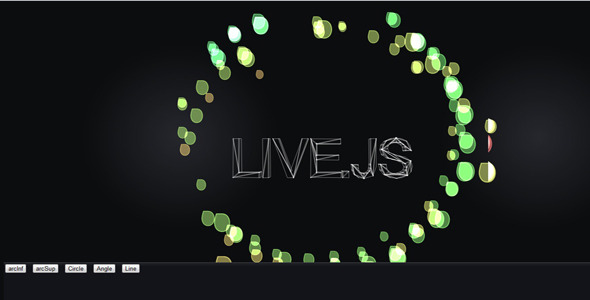
Creating immersive, interactive web experiences no longer requires a deep background in complex 3D programming or reliance on deprecated plugins like Flash. For front-end developers, digital artists, and creative coders seeking to push the boundaries of canvas animation, the Animated Presentation & Special Effects Library offers a powerful suite of tools. This JavaScript package is engineered to deliver stunning particle systems, fluid text motion, and dynamic geometric effects directly within the HTML5 2D context. It bridges the gap between simple jQuery animations and full-scale WebGL frameworks, providing a lightweight yet robust solution for adding a ‘wow’ factor to any website or web application. By harnessing the efficiency of requestAnimationFrame and the mathematical precision of bezier curves, this library enables developers to build visually spectacular animations without sacrificing performance or cross-browser compatibility.
Key Features
This asset is not a single-purpose plugin but a comprehensive animation toolkit. Its true power lies in the flexibility of its components, allowing developers to mix and match effects to create unique visual narratives. The following features highlight its core capabilities:
- Bezier Curve Special Effects: The library excels at creating smooth, organic movement paths using the bezierCurveTo canvas API method. This allows for the generation of complex, non-linear animations for text, images, and shapes, moving far beyond simple linear translations.
- Dynamic Text Motion: Transform static typography into kinetic art. The scripts facilitate the movement of text along dynamic paths, with support for staggering, scaling, and rotation, making headlines and call-to-action elements truly engaging.
- Circular & Semicircular Effects: Easily generate orbiting image clusters, radial particle bursts, and semicircular upper/lower reveals. This is perfect for creating framing devices, loading indicators, or elegant content transitions that wrap around the viewport.
- Line Corner & Straight Line Effects: Create sharp, architectural animations using animated lines. The library supports line corner effects for drawing dynamic UI elements, borders, or geometric patterns, as well as straight line effects for clean, minimalistic motion design.
- Image Masking & Clipping: Beyond simple sprites, developers can use the particle system to create special effect images. By feeding image data into the particle engine, you can generate stunning disintegration or reassembly effects where images break into thousands of moving points.
- OnClick Block Animation: Built-in event handlers enable interactive animations triggered by user clicks. This provides immediate visual feedback, enhancing user engagement and making the experience feel responsive and alive.
- No Flash or WebGL Dependency: Operating purely on the HTML5 Canvas 2D context, this library ensures maximum compatibility. It avoids the heavy GPU overhead of WebGL while still delivering complex particle counts, making it ideal for a wider range of hardware.
Who Is This For? Use Cases
This animation library is a versatile asset for anyone involved in modern web development. Its lightweight nature and focus on 2D canvas effects make it a strategic choice for projects where high-end 3D isn’t necessary but buttery-smooth 2D motion is paramount.
Creative Front-End Developers & Digital Agencies
For agencies looking to deliver high-impact, custom websites, this library serves as an immediate accelerator. Instead of coding complex particle systems from scratch, developers can integrate the library to create dynamic hero sections with animated typography, interactive backgrounds that react to mouse movement, and unique page transition effects. It allows teams to prototype and launch visually rich sites in a fraction of the time, impressing clients with out-of-the-box creativity while maintaining clean, maintainable code.
Web Developers Building Interactive Landing Pages
Conversion-focused landing pages benefit immensely from motion. The OnClick Block Animation feature is perfect for gamified elements or interactive forms. By linking button clicks to rewarding visual feedback—like particles bursting into a circular special effect—you can significantly increase user dwell time and engagement. The line corner effects are ideal for highlighting promotional offers or creating a modern, tech-forward aesthetic that sets a brand apart from competitors.
Portfolio Enthusiasts and Digital Artists
Artists showcasing their work online can utilize the image mask effects to animate their portfolios. Instead of static gallery grids, images can float, dissolve, and reassemble in fluid, dynamic patterns. The ability to create movement of text alongside image parameters allows for bold, immersive digital art pieces that serve as interactive exhibits, demonstrating not only the art itself but also the technical prowess of the creator.
E-learning and Gamification Platforms
Educational platforms require engaging interfaces to hold student attention. The physics of the Tween.js and Sparks.js libraries can be used to create interactive simulations or gamified quizzes. Animations that respond to correct answers, with straight line progress bars morphing into complex particle rewards, make learning more enjoyable and visually stimulating.
Technical Details & Compatibility
Understanding the technical underpinnings ensures smooth integration. This product is a collection of vanilla JavaScript files designed to work harmoniously, bridging the gap between low-level canvas APIs and high-level animation logic.
- Core Scripts: The package includes RequestAnimationFrame.js, which provides a cross-browser polyfill for the native requestAnimationFrame API. This is crucial for optimizing performance and ensuring battery-friendly animations. It also includes Tween.js, a lightweight engine for calculating intermediate values based on easing equations, and Sparks.js, a specialized library for creating 3D-looking particle effects within the 2D canvas context.
- 3D Engine (Optional but Included): A minimalistic Three.js version is bundled. While the primary effects use the 2D context, this inclusion allows developers who are familiar with Three.js to create dedicated 3D objects or scenes and render them using canvas, SVG, or WebGL, offering a scalable path for future project needs without downloading a full engine separately.
- jQuery Integration: The library is built to work seamlessly with jQuery, which is included in the package. However, the core animation logic is framework-agnostic, meaning the event bindings and DOM manipulation are handled via jQuery for convenience, while the animation math remains pure JavaScript.
- Browser Support: Because it relies on standard HTML5 canvas and JavaScript APIs, it functions flawlessly in any modern browser, including Chrome, Firefox, Safari, Edge, and Opera, across both desktop and mobile devices. The absence of WebGL dependencies removes a common barrier to entry on older machines or specific corporate networks.
Pros and Cons
To make an informed decision, it is essential to weigh the strengths and potential limitations of this animation toolkit.
Pros
- High Performance: The use of requestAnimationFrame ensures animations are smooth and synchronized with the display refresh rate, preventing jank and saving CPU cycles compared to legacy JavaScript timers.
- Extremely Lightweight: Without the overhead of WebGL, the library remains small in file size, ensuring that adding these spectacular effects won’t drastically impact page load times—a critical factor for SEO and user experience.
- Broad Compatibility: “Works in any modern browser” is a huge selling point. It negates the “Works on Chrome only” issue, ensuring a consistent experience for all users regardless of their choice of browser.
- Visual Depth (“Spectacular” Effects): The combination of Sparks.js and Tween.js allows for the creation of particle systems that look three-dimensional, offering the ‘wow’ factor typically associated with heavy 3D libraries.
- Developer Support: The inclusion of dedicated documentation files (as indicated by the TECNOCAL SUPPORT) helps developers get started quickly and troubleshoot integration issues efficiently.
Cons
- Needs Canvas Knowledge: This is not a drag-and-drop visual builder. It is a code-first tool. Developers must be comfortable with JavaScript, the Canvas API, and understanding how to manipulate coordinates and drawing context to modify effects.
- Not a Full 3D Solution: While it creates 3D-looking particles, it cannot replace WebGL for true 3D mesh rendering or high-polygon scenes. If your project requires a real 3D environment, this will not scale to that level.
- No Visual Editor: Adjusting parameters like easing curves, particle velocities, and colors must be done in the code. There is no GUI to see live updates of the effect settings, which might slow down the creative iteration process for some users.
- Documentation Style: The documentation focuses on the source files (JS), which is excellent for developers but less useful for designers who might want to tweak effects without digging into the logic.
Frequently Asked Questions
Is the “Animated Presentation & Special Effects Library” compatible with WordPress and major page builders?
Yes, absolutely. Since this is a vanilla JavaScript and jQuery-based library, it can be enqueued in any WordPress theme or a custom plugin. It will work fine alongside page builders like Elementor, WPBakery, or Divi. You would typically use a “Custom HTML” widget or enqueue the scripts in your theme’s functions.php file and call the initialization functions via a small custom script on the specific page, module, or component you wish to animate.
Does the library support responsive design and mobile touch events?
Yes, it is designed to work responsively. The effects are generally resolution-independent because they rely on the canvas dimensions which can be set dynamically via JavaScript or CSS. For mobile, the library can capture click events and, with some minor modification, can also bind to touch events for triggering the OnClick Block Animation. Since it uses the standard canvas 2D context, it performs efficiently on modern mobile browsers, ensuring that the special effects are preserved across tablets and smartphones.
How much technical support is included with the purchase?
According to the documentation provided by the author, designated as TECNOCAL SUPPORT, technical assistance is included with the item. This means you can get help with installation issues or bugs related to the core functionality of the scripts. While the support does not include custom development or extensive modifications for your specific project, it ensures that the library remains stable and functional, giving you peace of mind and a reliable resource for troubleshooting.
Final Verdict
In a digital landscape saturated with template-like designs, visual differentiation is paramount. This library stands out not just as a collection of scripts, but as a creative engine capable of transforming standard web pages into interactive art. It strikes an excellent balance between the raw power of WebGL and the simplicity of CSS animations, offering a “sweet spot” for developers who need high-performance particle effects without the architectural overhead. The ability to create special effects with bezierCurveTo, coupled with the included easing and particle libraries, provides an impressive arsenal for engaging storytelling. While it requires a competent hand in JavaScript, the visual payoff is substantial, allowing for the creation of interactive image reveals and kinetic typography that captivates audiences.
If you are ready to elevate your web projects with smooth, captivating, and cross-browser friendly animations that don’t rely on outdated plugins, this toolkit is a wise investment. It offers the perfect blend of performance, creativity, and compatibility. Don’t settle for static pages—unlock the potential of dynamic particle motion and interactive UI elements. Experience the difference that professional-grade, lightweight animation can make for your clients and users. Add the Animated Presentation & Special Effects Library to your development toolkit today and start creating web experiences that are truly spectacular, pushing the boundaries of conventional web design.