Managing a brand’s presence across multiple social networks is a full-time job, but displaying that activity cohesively on a WordPress website is an entirely different challenge. AX Social Stream by axentmedia is a premium WordPress plugin designed to aggregate feeds from Facebook, Instagram, YouTube, TikTok, X (Twitter), RSS, and more into a single, unified display. Instead of juggling iframes or manual updates, website owners can pull in posts, videos, and images from numerous accounts and present them through eight distinct layouts, including a masonry wall, carousel, and timeline. With over 4,100 sales on CodeCanyon and a track record of regular updates, this plugin positions itself as a robust solution for anyone looking to turn scattered social activity into an engaging, centralized hub on their site.
Key Features
AX Social Stream is packed with functionality that goes beyond a simple feed aggregator. Below are the core features that define its utility and flexibility for WordPress users.
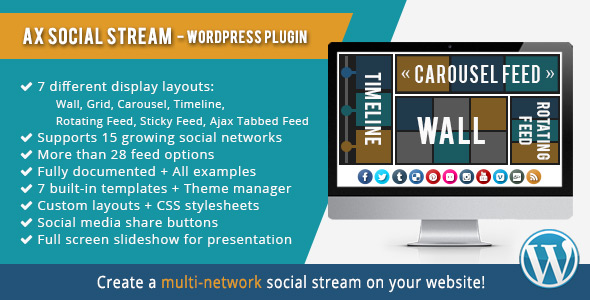
- 8 Display Layouts: Choose from Wall (Masonry), Grid, Carousel, Timeline, Rotating Feed, Sticky Rotating Feed, Ajax Tabbed Feed, and Sticky Ajax Tabbed Feed. This variety allows you to match the presentation style to your site’s design and content strategy.
- Multi-Network Support: The plugin currently supports 13+ social networks, including Facebook, Instagram, YouTube, Pinterest, Flickr, Vimeo, Tumblr, Deviantart, RSS, SoundCloud, VK, TikTok, and WordPress.
- Extensive Feed Options: Go beyond simple page feeds. Pull Facebook album photos, Instagram hashtag searches, YouTube playlist uploads, Pinterest board pins, and specific Vimeo album feeds. You can even create a news aggregator from multiple RSS feeds.
- Six Integration Methods: Embed your social wall via a shortcode in posts/pages, a PHP function in theme files, a dedicated widget, or through the WPBakery, Elementor, and Cornerstone page builder panels.
- Advanced Filtering & Search: Allow visitors to filter your stream by social network or use a search phrase to find specific content, making large volumes of posts more navigable.
- Full Responsiveness & Lightbox: The output is fully mobile-friendly, and images/videos open in an auto-resizing lightbox. A dedicated slideshow presentation view is also available for wide-screen displays.
- Performance & Caching: Built-in caching reduces load times, while lazy loading for images and infinite scroll options ensure smooth browsing even with heavy media content.
- Customization Suite: A Theme Manager with 6 built-in templates and custom CSS support lets you style the stream to match your brand. You can control colors, fonts, borders, and even the size of images and videos.
Who Is This For? Use Cases
AX Social Stream is not a niche tool for a single type of user. Its versatility makes it suitable for a wide range of scenarios, from corporate websites to niche content hubs. Here are the primary use cases where this plugin excels.
Digital Marketers & Brand Managers
For those managing multiple client accounts or a single brand with a heavy social presence, this plugin solves the problem of content silos. Instead of sending visitors to different platforms, you can create a social wall that broadcasts news, photos, and videos from all your channels in one place. This is particularly effective for product launches or live events where a real-time feed of hashtags and mentions adds social proof to your website.
News Portals & Magazine Blogs
If you run a news site, the RSS feed reader functionality is a game-changer. You can aggregate headlines from multiple sources you curate, creating a centralized news stream. Additionally, you can pull in your own WordPress posts by category or tag, enabling you to create dynamic content sections without manual HTML editing.
Creative Portfolios & Media Galleries
Photographers, videographers, and digital artists often rely on platforms like Flickr, Deviantart, and Instagram to showcase work. AX Social Stream allows you to create a multi-network photo or video gallery directly on your portfolio site. The Grid and Masonry layouts are perfect for visual content, while the lightbox feature ensures high-resolution viewing without leaving your domain.
Community & Event Hubs
For community managers, the ability to pull content based on a specific search term or hashtag is invaluable. You can display a live feed of tweets, Instagram posts, and YouTube uploads related to a conference, a local meetup, or a specific campaign. This creates a sense of community and encourages attendees to post using your event hashtag, knowing it will be featured on the main site.
Technical Details & Compatibility
Before purchasing any plugin, it is crucial to verify that it aligns with your server environment and WordPress setup. AX Social Stream has specific requirements that you should review to ensure a smooth installation and operation.
- WordPress Version: Requires WordPress 5.0.0 or higher.
- PHP Version: Requires PHP 7.2.5 or higher. Recent changelogs indicate fixes and compatibility for PHP 8.x environments.
- PHP Extensions: Requires the mbstring and iconv extensions (usually enabled by default). The XML extension is required, and cURL is recommended for optimal API communication.
- Page Builders: Natively integrates with WPBakery, Elementor, and Cornerstone.
- Hosting: Compatible with WordPress.com servers (business plans) and standard self-hosted WordPress.org installations.
- Multilingual: Translation-ready with .po/.mo files. Includes translations for English, German, Spanish, French, Italian, Dutch, Portuguese, Russian, Ukrainian, Danish, Thai, and Turkish.
The developer, axentmedia, maintains a consistent update schedule, with recent releases addressing API changes for TikTok, Instagram, and X (Twitter). This indicates active maintenance and a commitment to keeping the plugin functional as social networks evolve their API restrictions.
Pros and Cons
To help you make a balanced decision, here is a breakdown of the strengths and potential drawbacks of using AX Social Stream on your website.
Pros
- Exceptional Versatility: The sheer number of supported networks (13+) and feed types (30+) is rare in this plugin category. Whether you need Facebook videos or SoundCloud tracks, it covers the major platforms.
- Multiple Layout Options: The 8 different display styles mean you are not locked into a single look. You can use a Grid for your homepage and a Tabbed Feed for a dedicated social page.
- Granular Control: From setting cache times to defining image dimensions and controlling the number of words in descriptions, the plugin offers deep customization for performance and design.
- Page Builder Integration: Native support for Elementor and WPBakery makes it easy for designers to add feeds without touching code.
- Active Development: With a changelog showing updates through 2026, axentmedia actively patches bugs and adapts to breaking API changes from social networks.
- Value for Money: Priced at $24.00, it offers a one-time cost for a feature-rich tool that would otherwise require multiple specialized plugins.
Cons
- API Limitations: The plugin is heavily dependent on third-party APIs. As noted in the description, Twitter hashtag searches only return posts from the last 7 days, and Instagram hashtag queries are limited to 30 unique tags per week. These are platform restrictions, not plugin flaws, but they affect functionality.
- Learning Curve: The massive number of options and settings can feel overwhelming initially. While documentation is extensive, configuring multiple feeds with specific filters requires a time investment.
- Authentication Complexity: Connecting accounts (especially Facebook and Instagram) requires following specific steps for access tokens and app connections, which may be challenging for non-technical users.
Frequently Asked Questions
Is AX Social Stream compatible with the Elementor page builder?
Yes. AX Social Stream is natively integrated with Elementor. Once the plugin is installed and activated, you will find an AX Social Stream widget or element within the Elementor editor panel. You can drag it into your layout and configure the feed source, layout style, and display options directly from the Elementor interface without needing to write shortcodes manually.
Does AX Social Stream work with the new Instagram API for business accounts?
Yes. The plugin has been updated to support the Instagram API for business and professional accounts. In version 3.11.2 (December 2024), the developer replaced the deprecated Instagram Display API with the newer business/professional API structure. This ensures that you can continue to pull user posts and hashtag feeds, provided your Instagram account is set up as a Business or Creator account and connected properly.
Can I use AX Social Stream to display my RSS feeds only?
Absolutely. While the plugin is primarily known for social networks, it includes a robust RSS feed reader option. You can input any valid RSS feed URL and have it displayed in any of the 8 layouts, such as the Wall or Timeline. This is particularly useful for creating a news aggregator or mixing your own blog posts with external content sources in a single unified stream.
Final Verdict
AX Social Stream stands out in the crowded WordPress social plugin market due to its sheer breadth of features and the flexibility of its display options. It is not just a simple feed embedder; it is a comprehensive content aggregation engine that supports a wide range of networks and offers granular control over how that content is presented. The plugin’s longevity is evidenced by its 4,112 sales and the developer’s consistent release history, which is critical in the ever-changing landscape of social media APIs. While the initial setup may require some technical attention—especially regarding API tokens—the payoff is a seamless, unified social hub that keeps visitors engaged on your site rather than sending them away to external platforms.
Given the $24.00 price point, the return on investment is substantial when you consider the alternative of purchasing separate plugins for each network or hiring a developer to build a custom solution. If you are serious about leveraging your social media presence to enhance your website’s content and user experience, AX Social Stream offers the tools, performance, and reliability needed to get the job done effectively. It handles the heavy lifting so you can focus on creating the content that matters.