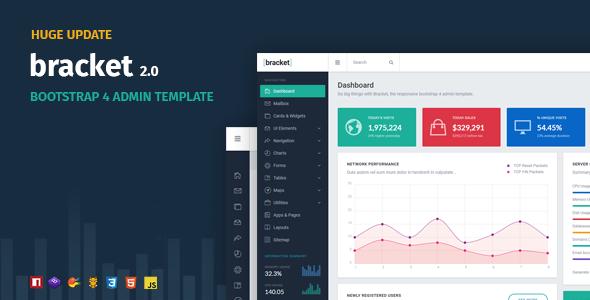
Building a robust admin dashboard from scratch is a time-consuming endeavor that often involves stitching together dozens of disparate plugins, wrestling with responsive breakpoints, and debugging cross-browser inconsistencies. For developers and project managers, this process can eat up weeks of development time that could be better spent on core business logic. The Bracket Responsive Bootstrap 4 Admin Template, crafted by the reputable developer themepixels, offers a compelling shortcut. This isn’t just another static HTML theme; it is a comprehensive UI toolkit designed to accelerate the development of web applications, CMS backends, and SaaS platforms. With a modern, flat aesthetic and a fully responsive framework, Bracket provides the structural foundation needed to launch a professional-grade admin panel quickly, efficiently, and without the usual technical headaches.
This article provides an in-depth analysis of the Bracket template, exploring its feature set, ideal use cases, and technical specifications. By the end, you will have a clear understanding of whether this premium dashboard solution is the right investment for your next project.
Key Features
The Bracket template is packed with a wide array of features that cater to both front-end developers and UI/UX designers. Its strength lies in the seamless integration of essential plugins and a clean, navigable codebase. Here are the standout features that define this product:
- Built on Bootstrap 4: The template is constructed using the latest (at the time of release) version of the world’s most popular CSS framework. This ensures a stable, grid-based layout, consistent styling, and a familiar environment for developers. It guarantees that your project starts on a solid, well-documented foundation.
- Fully Responsive and Retina Ready: The layout is fluid and adapts flawlessly to different screen sizes, from desktops to tablets and mobile phones. The retina-ready graphics ensure that icons and images remain sharp and crisp on high-DPI displays, providing a premium user experience on modern devices.
- SASS Support: For developers who prefer a modular and maintainable CSS workflow, Bracket includes SASS files. This allows for easy customization of colors, spacing, and typography through variables, making it simple to rebrand the dashboard to match your company’s identity without hunting through thousands of lines of CSS.
- Valid HTML5 & CSS3: The code is written to web standards, ensuring cross-browser compatibility. This reduces the risk of layout breaking in older or less common browsers and makes the template more accessible and SEO-friendly.
- Extensive Form Components: Forms are the backbone of most admin panels, and Bracket provides a rich set of tools including enhanced checkboxes, toggle switches, time and date pickers, form validation, a form wizard for multi-step processes, and a WYSIHTML5 editor for rich text input.
- Diverse Graph & Chart Options: Data visualization is handled through multiple libraries such as Flot, Morris, and Sparkline. This variety allows you to choose the right chart type for your data, from simple line graphs to complex interactive plots, without loading unnecessary third-party scripts.
- Comprehensive UI Elements: The template includes a vast library of interface components including buttons, icons (Font Awesome), typography styles, alerts, notifications, tabs, accordions, modals, and sliders. This “kitchen sink” approach ensures you have the right tool for any UI requirement.
- Integrated Maps: Location-based features are covered with support for both Gmaps and JQVMap, allowing you to embed custom maps or display geographical data with ease.
Who Is This For? Use Cases
The Bracket Responsive Bootstrap 4 Admin Template is a versatile product designed for a wide range of digital professionals. Its primary goal is to eliminate the repetitive work of building a UI from scratch, making it a valuable asset for those who want to focus on functionality.
Web Developers and Agencies
Freelancers and digital agencies often juggle multiple client projects with tight deadlines. Bracket provides a consistent, professional starting point for any back-end project. Instead of building a user interface for a client’s CMS or booking system from zero, developers can purchase this template, customize the SASS variables to match the client’s brand, and integrate the necessary backend logic. This drastically reduces project turnaround time and allows agencies to take on more work without scaling their team proportionally. The inclusion of a sign-in page, sign-up page, and an asset manager simplifies the creation of standard user flows.
SaaS Startups and Product Teams
For startups building a Software as a Service (SaaS) platform, the dashboard is the face of the product. It needs to be intuitive, fast, and visually appealing to retain users. Bracket offers a clean and modern flat design that looks contemporary without being distracting. The pre-built widgets and panels allow product teams to quickly prototype new features and present data in a clear, actionable format. The template’s compatibility with various charting libraries is particularly useful for SaaS products that rely on analytics and user reporting.
Internal Tool Builders
Large organizations often require custom internal tools for managing inventory, employees, or customer relations. These tools are frequently built on a tight budget and require a pragmatic approach. Bracket is an ideal solution here because it provides a professional look and feel that improves employee morale and usability, without the high cost of a fully custom design. The “To-Do List” widget and email template are handy additions for building communication and task management features directly into an internal system.
Technical Details & Compatibility
Understanding the technical foundation of a template is crucial before committing to it. While the template has evolved, the latest version (2.0) is a complete rebuild on the Bootstrap 4 framework. This is a significant upgrade from the earlier Bootstrap 3 versions, ensuring that users get the benefits of the newer Flexbox grid system and improved components.
The template is built with valid HTML5 and CSS3, ensuring compliance with modern web standards. It includes SASS files for advanced CSS customization. For JavaScript functionality, it relies on jQuery and a suite of well-maintained plugins including jQuery UI, Flot Charts, Morris Charts, and jQuery Chosen. The responsive design ensures compatibility with all modern browsers and handheld devices, including phones and tablets. The changelog indicates a history of regular updates, with version 2.0 released on November 22, 2017, as a major overhaul to incorporate Bootstrap 4. While the template has not been updated recently, the core code remains stable and functional for projects that do not require the latest Bootstrap 5 features.
Pros and Cons
To make an informed decision, it is important to weigh the strengths and potential limitations of the template.
Pros
- Mature and Stable Codebase: With a development history dating back to 2014, the template has been refined and bug-fixed extensively. The changelog shows a commitment to fixing edge cases and improving user experience.
- Excellent Value for Money: Priced at just $12.00, this template offers a massive return on investment. Sourcing and integrating the included plugins (Charts, Maps, Forms, Editors) individually would cost significantly more in development time and licensing fees.
- Comprehensive Plugin Integration: The template includes over 30 different plugins, from data tables to code editors. This saves developers the hassle of ensuring plugin compatibility and reduces the risk of JavaScript conflicts.
- Clean and Modern Aesthetic: The flat, minimal design is timeless and professional. It doesn’t impose a heavy visual style, allowing the content and data to take center stage.
Cons
- Lack of Recent Updates: The last major update was in 2017. This means it does not include the latest Bootstrap 5 features or newer jQuery alternatives like vanilla JS components. Users must be comfortable using Bootstrap 4.
- Dependency on jQuery: While jQuery is still widely used, modern web development is moving towards lighter, framework-agnostic solutions. This template is not suitable for projects that specifically require a React or Vue.js component library.
- Limited Pre-Built Page Variety: While it includes essential pages like Login, Sign Up, and an Asset Manager, it may not include specific niche pages (e.g., a dedicated e-commerce dashboard) without customization.
Frequently Asked Questions
Is the Bracket template compatible with WooCommerce or WordPress?
No, the Bracket template is a standalone HTML template. It is not a WordPress theme and does not come with a WordPress version. It is designed to be integrated into custom web applications or used as a static front-end for a CMS. If you are using WordPress, you would need to convert the HTML files into a theme or use it as a custom page template, which requires development knowledge.
Does the purchase include the PSD UI Kit mentioned in the changelog?
The changelog for version 1.3 mentions the addition of a PSD UI Kit. However, as the product has evolved and the latest version is a complete rebuild on Bootstrap 4, the availability of the PSD files may be limited to the older versions of the package. It is recommended to check the “Included Files” tab on the ThemeForest download page to see the exact contents of the current version before purchasing if design source files are a requirement.
Can I customize the colors and fonts easily?
Yes, the template supports SASS, which makes customization straightforward. You can modify the SASS variables to change the primary colors, fonts, and other design tokens. For those who prefer not to use SASS, the compiled CSS files can be edited directly, although this is less efficient for large-scale changes. The template also includes font options that allow you to switch between different typefaces with relative ease.
Final Verdict
The Bracket Responsive Bootstrap 4 Admin Template remains a solid, reliable choice for developers who value a clean, functional, and cost-effective starting point. Despite the absence of recent updates, the core architecture built on Bootstrap 4 is stable, and the extensive collection of integrated jQuery plugins covers most standard admin panel requirements. The developer, themepixels, has a track record of delivering quality code, and the 2,808 sales count is a testament to the template’s popularity and trust within the Envato community.
For the price of $12.00, you are not just buying a few HTML files; you are purchasing a development accelerator that saves you hours—potentially days—of repetitive coding. It is an ideal investment for freelancers, agencies, and startups looking to launch a professional dashboard without the overhead of a custom design. If you are ready to skip the boilerplate and dive straight into building your application’s unique features, the Bracket template is a pragmatic and affordable solution. Click the link to download Bracket today and give your next project the head start it deserves.