Key Features
For designers, developers, and creative professionals who demand absolute precision in color selection, the Web Color Visualization Tool offers a transformative approach to reviewing and presenting web colors. This utility moves beyond standard color pickers, providing a full-screen immersive experience that lets you evaluate hues without distracting interface elements. Whether you are finalizing a brand palette or demonstrating hex codes to a client, this tool ensures you see the true impact of each color.
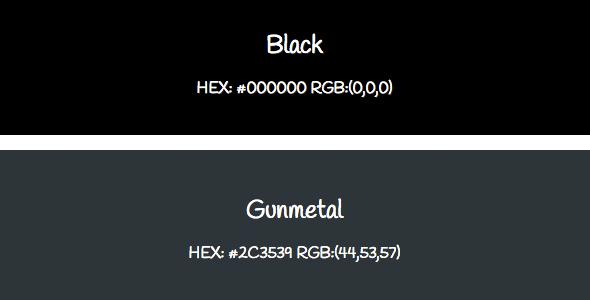
- Full-Screen Color Immersion – Simply scroll, tap, or click on any color swatch, and the selected color instantly expands to fill your entire screen. No toolbars, no panels—just pure, uninterrupted color for precise evaluation.
- Dual View Modes: Wide and Narrow – Choose between a wide layout for desktop monitors with ample horizontal space or a narrow layout optimized for smaller windows and side-by-side workflows. Both views offer the same full-screen interaction.
- Built-in Color Library with 330 Preloaded Colors – The tool comes populated with a JavaScript-driven array of 330 carefully curated web-safe and modern CSS colors. No external database or internet connection is required after the page loads.
- Sort and Filter Functionality – Navigate the extensive color list efficiently using sorting and filtering options. Group colors by hue family, brightness, or alphabetical order to find the exact shade you need in seconds.
- Mobile-Responsive Design – The interface adapts fluidly to touch-enabled devices including smartphones and tablets. The full-screen tap interaction works flawlessly on both iOS and Android browsers.
- Zero Configuration, Instant Use – Because the tool is built purely on static HTML, CSS, and JavaScript, there is no installation, database setup, or server-side processing required. Open the file, and it works immediately.
Who Is This For? Use Cases
Web and UI/UX Designers
When designing a user interface, the difference between a good color and the right color is often subtle yet critical. This tool allows designers to isolate a single color on a full screen and view it in context-free conditions, making it easier to evaluate its perceived brightness, saturation, and emotional tone. Use it during the early stages of style tile creation or when auditing an existing color system to ensure all hex values perform as expected.
Front-End Developers
Developers frequently need to debug color values, test contrast ratios, or verify that a CSS variable renders correctly across different screen sizes. This tool provides a rapid visual check without opening an image editor or browser dev tools. You can quickly load a list of candidate colors, scroll through them, and confirm that each shade matches the required specification before implementing it in your stylesheet.
Creative Agency Teams and Client Meetings
One of the most powerful applications of this tool is during live client presentations. Instead of showing mockups with tiny color swatches, you can demonstrate brand colors at full screen in a conference room or shared monitor. Clients often have preconceived notions of what a color “looks like,” and projecting it at full scale removes ambiguity. This can significantly reduce revision cycles and client pushback, helping you get the right color approved the first time.
Print and Digital Content Creators
Graphic designers, videographers, and digital artists who work across media can use the tool to pre-visualize how web-centric colors will appear on various displays. While print and broadcast have their own color models, understanding how an sRGB hex value behaves on a standard monitor is essential for maintaining brand consistency across platforms.
Technical Details & Compatibility
The Web Color Visualization Tool is built entirely on client-side web technologies. It consists of static HTML files (wide.html and narrow.html) that load a JavaScript array containing 330 color definitions. Because there are no server-side dependencies, the tool works reliably in any modern web browser, including Google Chrome, Mozilla Firefox, Apple Safari, and Microsoft Edge, on both desktop and mobile operating systems.
- Version: The tool is delivered as a single, self-contained package. There are no versioning conflicts or update prompts—simply download and use.
- Compatibility: Fully compatible with Windows, macOS, Linux, Android, and iOS devices. No special plugins or drivers are required.
- Browser Support: Works with all modern browsers (Chrome 90+, Firefox 88+, Safari 15+, Edge 90+). Legacy Internet Explorer is not supported.
- File Structure: The package includes two HTML files (narrow and wide views) and an embedded JavaScript file with the color data. No external network requests are made after initial page load.
Pros and Cons
Pros
- Intuitive and frictionless user experience: The single-click or tap interaction to full-screen mode is remarkably satisfying and requires zero learning curve.
- Excellent for client communication: Presenting colors at full screen dramatically reduces misunderstandings about hue and tone during review sessions.
- Large built-in color library: With 330 pre-loaded colors, most common web palettes are covered out of the box, saving you the hassle of manual entry.
- No internet needed after load: Once the page is loaded, all functionality is local, making it ideal for offline work or presentations in low-connectivity environments.
- Lightweight and portable: The entire set of files is small enough to email, store on a USB drive, or embed in a project repository.
Cons
- Limited to the included 330 colors: While the selection is robust, you cannot add custom hex values directly to the array without editing the JavaScript source file. This may be a limitation for advanced users who need to visualize their own proprietary palettes outside the provided list.
- No color picking from the screen: The tool does not include an eyedropper or color-picker feature, so you cannot sample colors from external web pages or images.
- Static and non-editable swatch appearance: The swatches are rendered as simple colored blocks. There is no option to view color gradients, opacity levels, or overlay with text for contrast testing.
Frequently Asked Questions
Can I add my own custom colors to the visualization tool?
Yes, you can extend the color library by editing the JavaScript array included in the HTML files. The color data is stored in a simple JavaScript array of hexadecimal strings (e.g., "#1a2b3c"). You can open the file in any text editor, locate the array, and append your own hex values. This requires basic knowledge of HTML and JavaScript syntax but is a straightforward process.
Does the tool work on mobile devices like iPhones and Android tablets?
Absolutely. The interface is designed to be fully responsive and touch-friendly. On smartphones, the narrow view is recommended for a better fit, but both views adapt to screen size. Tapping a color swatch triggers the full-screen immersion just as clicking does on a desktop. The tool has been tested on major mobile browsers including Safari Mobile and Chrome for Android.
Is there any ongoing subscription or renewal fee for this product?
No. The Web Color Visualization Tool is a one-time purchase with no recurring fees. Once you download the files from ThemeForest or the respective marketplace, you own the license for the version you acquired. There is no subscription model, no cloud dependency, and no hidden costs for using the tool across multiple projects or devices.
Final Verdict
This Web Color Visualization Tool fills a specific but critical gap in the digital creative workflow: the ability to evaluate web colors in an environment free from interface clutter. Its dual-view system, large built-in color library, and instant full-screen interaction make it an essential companion for design reviews and client presentations. The tool is sold by a respected author on ThemeForest, where it has maintained positive ratings for providing exactly what is promised—a simple, effective, and beautifully executed utility. The one-time purchase model and offline functionality further enhance its value for professionals who need reliability without recurring costs.
If you spend even a modest amount of time matching colors, debugging CSS, or persuading clients to approve a palette, this tool will pay for itself in saved frustration and faster approvals. Download it today, take it to your next meeting, and experience the difference that full-screen color evaluation makes.