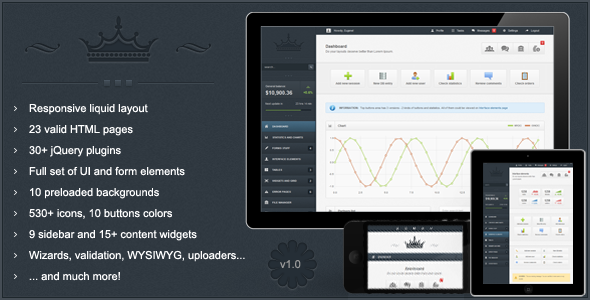
Crown Admin Templates is a premium responsive admin panel theme sold on ThemeForest by the developer Kopyov, priced at $14, that provides a pre-built interface layer for backend systems, dashboards and custom web applications. It is aimed at developers and agencies who need a finished visual shell — navigation, forms, tables, charts and widgets — so they can spend their time on application logic instead of styling. The template has been purchased 1,466 times and carries a strong buyer rating on the marketplace.
The most recent vendor update landed in mid-2015, which matters when assessing whether it still suits a new project. The feature list, however, is unusually deep for the price, and the underlying markup is plain HTML, CSS and JavaScript with jQuery plugins, so it is not tied to a framework that can fall out of support.
What Crown Admin Templates Actually Delivers
The core of the package is a liquid two-column layout that adapts to phones and tablets. The vendor is candid about one compromise here: an early approach to responsive tables using horizontal scrollbars with fixed headers was abandoned because Android does not support scrolling inside block elements, so the tables use a percentage-based layout instead. That is a real engineering decision rather than a marketing claim, and it means wide data tables reflow rather than scroll on Android devices.
Navigation is handled in two distinct ways. There is a fixed top bar with dropdown menus, and there is a sidebar with its own dropdown system that keeps every opened item visible at once. A second sidebar variant exists as a widget, so a project can choose between top-level user navigation and an in-sidebar user block. Breadcrumbs also support dropdown menus, which is a small detail that makes deep hierarchies easier to traverse.
For data presentation, the theme bundles Flot charts covering line, vertical and horizontal bar, and pie types, plus an auto-updating chart that refreshes without a page reload. Statistics are treated as first-class components: there are three layout styles for statistic rows, including large colour-icon buttons, compact inline buttons, and a richer block combining a dropdown, tooltip, progress bar and bar chart. Progress bars appear in three colours with tooltips, and there are additional variants showing percentages, timers, and a delayed start.
Forms are where the template is most thorough. Text inputs cover placeholders, hover tooltips, read-only and disabled states, character limits, icons and grid layouts. Textareas support character counters and auto-growing. Beyond that there are tag inputs, masked inputs, spinners with mousewheel support, styled checkboxes and radios, filtered multi-selects, and a file uploader that detects HTML4 or HTML5 support and upgrades itself — drag-and-drop, progress bar, file size and multi-select on HTML5; a single-file uploader with a status bar on older browsers. A WYSIWYG editor, a validation engine, and separate validation for wizards round out the set.
The interface element library is broad: four notification block styles with a hide-and-slide effect, date and colour pickers in both inline and popup forms, thirteen AJAX loaders, ten button colours, growl notifications in four behaviours, two tab layouts, jQuery UI dialogs and sliders, four tooltip directions, autocomplete, a source code viewer, and a content grid. There are also six error pages, three wizard types (AJAX submit, validated, and standard submit), a calendar with scheduling, a file manager, an image gallery, and a sizeable icon set — 237 colour icons in two sizes and 300 standard icons in two colours.
Where Crown Admin Templates Fits — And Where It Does Not
This is a strong fit for internal tools. Admin panels for CRM systems, inventory dashboards, reporting back ends, booking management screens and analytics consoles all map directly onto what the template provides. A freelancer building a bespoke client portal can assemble the shell in days rather than weeks, and an agency shipping several small back-office products can reuse the same base across them.
It also suits developers who need charting without designing a charting UI. The Flot integration and the statistics blocks mean a reporting screen can be assembled from existing pieces, including the auto-updating chart for live data.
It is the wrong choice for anyone who needs a single-page application built on a modern JavaScript framework. There is no React, Vue or Angular version here, and no component library in that sense — the markup is server-rendered HTML with jQuery. Teams whose stack assumes a framework will spend more time unpicking the structure than building on it.
It is also a poor fit for projects with strict accessibility requirements. The listing does not mention ARIA roles, keyboard navigation guarantees or WCAG conformance, and a 2015-era jQuery interface is unlikely to satisfy an audit without substantial remediation work. Buyers with that constraint should treat accessibility as work they will have to add.
Strengths and Limitations of Crown Admin Templates
Strengths
- At $14, the breadth of pre-built components — forms, tables, wizards, charts, widgets, icons and error pages — is disproportionate to the price.
- Two complete navigation paradigms (fixed top bar and sidebar with persistent dropdowns) give real flexibility in information architecture.
- The form element coverage is genuinely comprehensive, including masked input, tag input, filtered multi-selects and a self-upgrading file uploader.
- Plain HTML, CSS and jQuery means no framework lock-in and no build tooling to configure.
- Six error pages, a file manager, a calendar and a gallery ship in the box, which removes several small design tasks from a project.
- 1,466 sales and a strong marketplace rating indicate the code has been exercised by a large number of buyers.
Limitations
- The last vendor update was 30 June 2015. Any dependency updates, browser fixes or new components since then are the buyer’s responsibility.
- Responsive tables use percentage layouts rather than the fixed-header scrolling approach the developer originally intended, because of Android limitations. Complex wide tables will reflow in ways that may not suit dense data views.
- No framework editions are offered, so the template cannot be dropped into a React or Vue codebase as components.
- Accessibility provisions are not documented by the vendor, and the age of the codebase makes retrofitting them non-trivial.
- The changelog is short — version 1.0 and 1.1 only, with 1.1 adding a searchable select dropdown and minor bug fixes. There is no evidence of a long maintenance history.
- Support is stated as Monday to Friday, 09:00–20:00 CET, which is a limited window for buyers in other time zones.
How Crown Admin Templates Compares to the Wider Category
Admin templates generally split into three groups: framework-specific kits, modern standalone HTML5 themes, and older jQuery-based themes. Crown sits firmly in the third group, and that positioning is the whole comparison.
Against framework-specific kits, Crown loses on integration. A React or Vue admin kit plugs into an existing application’s component model, shares state management, and can be tree-shaken. Crown cannot do any of that — it is a set of pages and styles that a server-rendered application wraps around.
Against modern standalone HTML5 admin themes, Crown loses on currency. Contemporary themes in this category typically ship with flexbox or CSS grid layouts, documented accessibility behaviour, and active changelogs. Crown’s percentage-based table layout and 2015 update date are visible disadvantages here.
Where Crown still competes is raw component count per dollar. Very few templates at the $14 price point include a file manager, a scheduling calendar, an image gallery, three wizard variants, thirteen AJAX loaders, and over 500 icons. For a developer who wants maximum surface area for minimum spend and is comfortable working in plain jQuery, the value calculation is straightforward. For anyone who needs a maintained, accessible, framework-integrated base, the cheaper option is not actually cheaper once remediation is priced in.
Frequently Asked Questions
Is Crown Admin Templates still maintained?
No. The vendor’s last recorded update was 30 June 2015, and the changelog lists only versions 1.0 and 1.1. Buyers should assume the code is frozen and plan to handle browser compatibility, dependency updates and security patches themselves rather than expecting new releases.
What technology stack does Crown Admin Templates use?
It is built with HTML, CSS and JavaScript on top of jQuery and jQuery UI plugins, including Flot for charting. There is no React, Vue or Angular edition. That makes it suitable for server-rendered applications in PHP, Ruby, Python or .NET, but not for component-based single-page applications.
Does Crown Admin Templates work on mobile devices?
Yes, the layout is responsive and targets phones and tablets, with a liquid two-column structure. One caveat: tables use percentage-based layouts rather than horizontally scrolling blocks with fixed headers, because Android does not support scrolling inside block elements. Dense data tables will reflow rather than scroll.
How much does Crown Admin Templates cost and what is included?
It costs $14 as a one-time ThemeForest purchase. The package includes the full template, all interface elements, form components, Flot chart integrations, wizards, a file manager, a calendar, an image gallery, six error pages, and the icon sets, along with documentation and vendor support on weekdays.
Verdict on Crown Admin Templates
Buy Crown Admin Templates if the project is a server-rendered back office, an internal dashboard or a client admin panel, and the priority is assembling a large number of finished components quickly at minimal cost. The form library, charting integration and dual navigation options are the strongest reasons to choose it, and the 1,466 sales with a high rating suggest the code holds up in practice.
Do not buy it if the project requires a modern JavaScript framework, documented accessibility conformance, or a template with an active maintenance record. The 2015 update date is the deciding factor in those cases, and no amount of component variety compensates for a codebase nobody is patching. For everyone in between — a developer comfortable in jQuery who wants a broad starting point and accepts ownership of the code — the price makes the trade-off easy to justify.