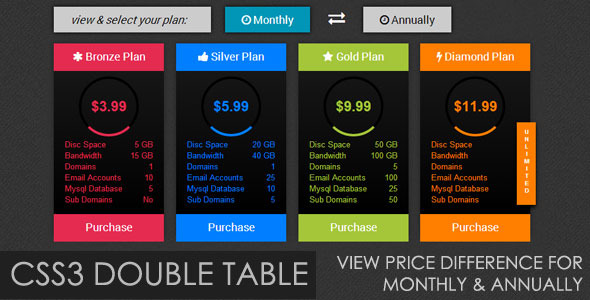
The CSS3 double table is an innovative pricing display solution that elegantly showcases both monthly and annual subscription options in a single, interactive interface. This modern design approach helps businesses present pricing tiers while allowing customers to easily compare payment frequencies with a simple click interaction.
Key Features of CSS3 Double Pricing Tables
These dynamic pricing tables offer several advantages for modern websites:
- Dual display functionality: Toggle between monthly and annual pricing without page reloads
- Visual differentiation: Clear contrast between payment options using CSS3 transitions
- Responsive design: Adapts to various screen sizes while maintaining usability
- Four color schemes: Professional styling options to match different brand aesthetics
Implementation Considerations
When integrating CSS3 double tables into your website, keep these technical aspects in mind:
Browser Compatibility
While modern browsers like Chrome, Firefox, and Safari fully support these tables, Internet Explorer has limitations with certain CSS3 properties. Consider these fallback options:
- Implement graceful degradation for IE users
- Use feature detection to provide alternative displays
- Consider polyfills for critical functionality
Performance Optimization
To ensure smooth animations and transitions:
- Minimize complex box shadows and gradients
- Use hardware-accelerated properties like transform and opacity
- Optimize JavaScript event handlers for the toggle functionality
Design Best Practices
Maximize the effectiveness of your double pricing table with these design principles:
Visual Hierarchy
- Make the active pricing option (monthly/annual) visually dominant
- Use color contrast to highlight savings on annual plans
- Maintain consistent spacing between price points
Microinteractions
Enhance user experience with subtle animations:
- Smooth transitions when switching between pricing modes
- Hover effects on call-to-action buttons
- Visual feedback when plans are selected
Customization Options
The four included color schemes can be easily modified to match your brand:
- Primary color: Adjust the main accent color
- Secondary highlights: Modify supporting colors
- Typography: Change font families and weights
- Border radius: Adjust corner rounding for different styles
Conversion Optimization Tips
Leverage these psychological principles to improve sign-ups:
- Position annual plans as the default view to emphasize savings
- Use percentage savings indicators (e.g., “Save 20% with annual billing”)
- Include limited-time offers for annual subscriptions
- Add subtle social proof near the pricing options
Technical Implementation Guide
For developers implementing this solution:
HTML Structure
<div class="pricing-container">
    <div class="toggle-options">
        <!-- Monthly/Annual toggle buttons -->
    </div>
    <div class="pricing-tables">
        <!-- Individual plan cards -->
    </div>
</div>
Key CSS Properties
transformfor smooth sliding animationstransitionfor elegant state changesbox-shadowfor depth and emphasis@mediaqueries for responsive behavior
Accessibility Considerations
Ensure your pricing tables are usable by all visitors:
- Provide sufficient color contrast (minimum 4.5:1 for text)
- Include ARIA attributes for screen readers
- Ensure keyboard navigation works for the toggle functionality
- Add focus states for interactive elements
By implementing these CSS3 double pricing tables with attention to design, performance, and accessibility, you can create an effective pricing presentation that converts visitors while providing an excellent user experience across devices and browsers.