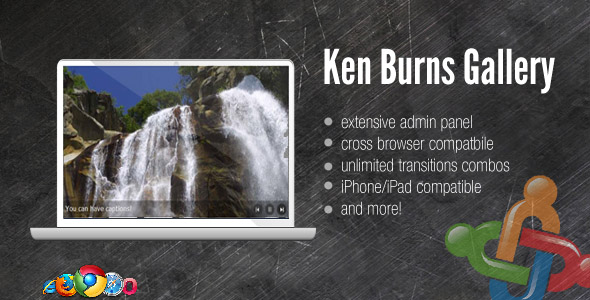
For Joomla site owners and developers seeking to elevate their visual storytelling, the Ken Burns Gallery plugin offers a powerful and elegant solution directly within the CMS. This extension brings the iconic, cinematic Ken Burns effect—a slow pan and zoom across still images—to Joomla, transforming static photo galleries into dynamic, engaging slideshows. Unlike traditional Joomla gallery components that require manual file management, this plugin integrates a dedicated admin panel, putting full creative control over images and transitions directly into the hands of the content manager. It represents a significant step up from basic sliders, providing a professional motion effect that can captivate visitors and enhance portfolio, hospitality, or creative agency websites.
Key Features
- Integrated CMS Administration Panel: Manage your entire gallery without ever touching the server’s file system. You can select images, upload new ones, and customize all transition effects directly from a user-friendly interface within the Joomla backend, streamlining the workflow significantly.
- Signature Ken Burns Effect: The core feature is the ability to apply the classic, smooth pan-and-zoom motion to your images. This effect adds a layer of professional polish and narrative depth, making photo collections feel more like a curated film.
- Flexible Functionality as a Simple Slider: The plugin doesn’t force the effect on every image. You can choose to use it as a standard, static-image slider. As noted in the description, you can disable the effect on a per-image basis, offering versatility for different types of content within the same gallery.
- Comprehensive Support and Updates: Purchasers receive free updates for life, ensuring the plugin remains compatible with future Joomla versions and gains new features. Dedicated, fast support is provided through the author’s official forum, a valuable resource for troubleshooting and installation.
- Clean Code and MVC Structure: Built following Joomla’s Model-View-Controller (MVC) best practices, as credited in the tutorial link, which generally leads to more stable, maintainable, and standards-compliant code that integrates well with the core system.
Who Is This For? Use Cases
The Ken Burns Gallery plugin serves a specific niche of users who need more than a basic image display. Its primary audience is Joomla administrators, designers, and developers who manage content-rich sites where visual impact is a key conversion factor.
Photographers and Creative Portfolios
For photographers, artists, and designers, a website is a digital portfolio. The Ken Burns effect allows them to present their work not as a static grid, but as a flowing visual experience. It can draw attention to details in a photograph, create a mood, and keep visitors engaged longer on gallery pages, increasing the likelihood of a client inquiry.
Tourism, Hospitality, and Real Estate Businesses
Hotels, resorts, tour operators, and real estate agents rely heavily on high-quality imagery to sell an experience or a property. A slideshow with a gentle Ken Burns effect on room photos, amenities, or property landscapes can make the visuals more immersive, giving potential customers a better sense of space and atmosphere than a static image alone.
Corporate and Event Websites
Companies can use the plugin on their “About Us” or “History” pages to animate timeline images, or on their homepage to showcase client logos, team members, or project highlights in a more dynamic way. Event organizers can create compelling recaps of past conferences or gatherings.
Joomla Developers and Agencies
For developers building sites for clients, this plugin is a valuable tool in the arsenal. It offers a premium feature (the Ken Burns effect) with a client-friendly administration panel. This means after hand-off, clients can easily update the gallery images themselves without needing to understand FTP or complex folder structures, reducing future support requests.
Technical Details & Compatibility
The plugin is explicitly marked as compatible with Joomla 2.5, a major long-term support release. The update history mentions a bug fix for Joomla 1.5, indicating the author has maintained support across older versions. For current users, it is critical to verify the plugin’s compatibility with newer Joomla versions (3.x and 4.x) on the sales page or by contacting the author, as the provided description snippet is from an earlier era of Joomla development. The plugin is a front-end component, meaning its performance and browser compatibility are largely tied to the JavaScript that powers the Ken Burns animations. It should function across all modern browsers that support standard JavaScript and CSS3 transitions. The inclusion of a dedicated admin panel suggests it requires standard Joomla permissions and does not need special server modules beyond what a typical Joomla installation provides.
Pros and Cons
Pros
- Unique Visual Appeal: The Ken Burns effect is a proven cinematic technique that immediately elevates the professionalism of a standard image gallery.
- Streamlined In-Admin Management: The integrated CMS panel is a major advantage, removing the technical barrier of manually uploading images to server folders.
- Operational Flexibility: The ability to toggle between a Ken Burns gallery and a simple slider provides great creative control for different types of images and pages.
- Strong Support Promise: Free lifetime updates and dedicated forum support from the author (Digital Zoom Studio) provide long-term value and peace of mind.
- Built on Joomla Standards: Adherence to MVC principles suggests a well-structured codebase that is less likely to conflict with other extensions.
Cons
- Potential Compatibility Lag: The description highlights Joomla 2.5 and 1.5 compatibility, which are outdated. Buyers must diligently check for current Joomla 3/4 compatibility before purchase.
- Possible Performance Consideration: Like any JavaScript-driven animation, if overused or with very high-resolution images, it could impact page load times on slower connections or devices. Optimization is key.
- Niche Use Case: The Ken Burns effect has a specific aesthetic; it may not be suitable for every website or gallery type where a fast, snappy slider or masonry grid is preferred.
- Dependency on Author Support: While support is offered, the long-term viability of the plugin hinges on the author’s continued activity and updates for new Joomla releases.
Frequently Asked Questions
Is the Ken Burns Gallery plugin compatible with the latest version of Joomla?
The provided item description confirms compatibility with Joomla 2.5 and mentions an update for 1.5. However, Joomla has progressed through versions 3.x and is now on 4.x. It is absolutely essential to visit the official ThemeForest/CodeCanyon item page to see the “Compatibility” section, which the author should update. You can also check the changelog for recent updates or contact the author via their support forum to confirm current Joomla 4 compatibility before purchasing.
Does the plugin include support, and what is the best way to get help?
Yes, the plugin comes with free support. The author specifically directs users to their support forum at digitalzoomstudio.net for the fastest assistance. This is a common and efficient practice for digital marketplace authors, as it creates a public knowledge base. For installation issues or bug reports, using this forum is the recommended first step. Be sure to check existing threads before posting, as your question may already be answered.
Can I use the plugin as a regular slider without the Ken Burns effect?
Absolutely. One of the key features is its flexibility. You can disable the pan-and-zoom transition effects entirely, using the plugin as a straightforward, cross-fading image slider. Furthermore, you have granular control, allowing you to apply the effect to some images while leaving others static within the same gallery, as demonstrated in the description where the third image has no effect.
Final Verdict
The Ken Burns Gallery for Joomla is a thoughtfully crafted extension that solves a clear problem: adding cinematic motion to still images with backend ease. Its standout feature is the integrated administration panel, which aligns perfectly with Joomla’s core philosophy of user-friendly content management. When you weigh the unique visual appeal, the streamlined workflow, and the commitment to free updates and support, the plugin presents a strong value proposition for the right user.
It is particularly compelling for Joomla professionals building sites for clients in visually-driven industries, as it delivers a “wow” factor while remaining manageable for the end-client. The primary caution is to verify its compatibility with your specific version of Joomla, as the core description references older releases. Assuming compatibility is confirmed, this plugin is a robust tool for transforming standard image displays into engaging, narrative-driven experiences. If your Joomla site relies on powerful imagery to tell a story, engage visitors, or showcase work, investing in the Ken Burns Gallery plugin is a strategic move to enhance both aesthetics and user engagement.