Flaty Mobile is a flat-design HTML5 mobile template sold on ThemeForest for $12, built for developers who need a touch-optimised front end for a website or a PhoneGap/Cordova web app rather than a WordPress theme. It ships with a large set of pre-built pages, jQuery-driven components, eight colour schemes and an icon pack, and it targets iOS 6+, Android 4.4+, Windows Mobile 8+ and RIM 7.1+. It suits freelancers and small agencies producing brochure sites, portfolio apps or simple content apps on a tight budget, and it is a poor fit for anyone who needs a CMS-driven site or a framework that is still actively maintained.
What Flaty Mobile Actually Delivers
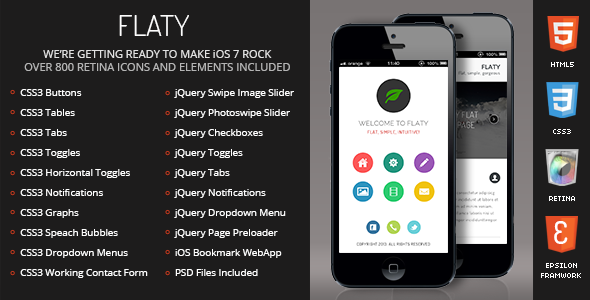
The template’s core value is breadth rather than depth. Instead of a handful of demo pages, Flaty Mobile bundles a wide catalogue of layouts covering the common mobile screens: landing pages, media and image galleries, portfolio variations, staff and quote sliders, and contact pages. For a freelancer quoting a fixed-price mobile site, that breadth removes a meaningful amount of layout work — most of the structural decisions have already been made and the job becomes content replacement and colour adjustment.
The interaction layer is handled with jQuery rather than a modern JavaScript framework. In practice this means page preloading, device detection, a CSS3-and-jQuery navigation system, toggles, accordions, tabs, image sliders, a quote slider and a staff slider, plus a share panel that pops up from the bottom of the screen. None of these are unusual, but they are the components that mobile sites actually need, and having them wired up and styled consistently saves time.
The contact form is the most substantial piece of backend logic included. It is described as CSS3/PHP/Ajax with field validation, which means it can post without a full page reload and gives immediate feedback on invalid input. That is a reasonable baseline for a template at this price, though it also means the form depends on PHP being available on the host — a constraint worth checking before purchase if the project is destined for static hosting.
Typographically, Flaty Mobile leans on Google Fonts for rendering, and the CSS layer is unusually complete for a template of this vintage. It includes multiple heading styles, drop caps, highlights, styled tables and quotes, plus a full set of form controls: fields, checkboxes, radios, and three button variants (3D, squared and rounded) alongside social buttons. Responsive images, videos and maps are all handled with aspect-ratio preservation, which prevents the layout breakage that typically appears when a client pastes in a YouTube embed or a Google Map.
The design layer covers eight colour schemes, retina-ready graphics, a pixel-perfect icon pack, and the platform-specific assets needed to make a web app feel native: iOS and Android home screen icons and splash screens. Touch optimisation and “ergonomic navigation” are claimed rather than measurable, but the underlying approach — larger tap targets, bottom-anchored navigation, slide-in panels — is the correct one for handheld use.
Where Flaty Mobile Fits and Where It Does Not
The strongest use case is a small marketing or brochure presence that needs to feel app-like without being an app. A restaurant, a personal portfolio, a single-product landing page or an event microsite can all be assembled from the included pages, wrapped in PhoneGap or Cordova, and shipped to the App Store or Play Store as a lightweight container. The splash screen and home icon assets exist specifically to support that workflow, and the $12 price makes the economics straightforward for a client project billed at any normal rate.
A second fit is prototyping. Because the pages are static HTML with CSS3 and jQuery, a developer can demonstrate navigation patterns, form behaviour and gallery layouts to a client quickly, then either extend the template or rebuild in a production stack once the design is signed off.
The template is the wrong choice in several common situations. It is not a WordPress theme, a Shopify theme or a React/Vue application scaffold, so any project that needs a CMS, a database-driven product catalogue or a modern component architecture should look elsewhere. It is also a poor fit for accessibility-critical work: the markup predates current WCAG expectations, and no accessibility conformance is stated by the vendor. Finally, anyone who needs long-term vendor support should weigh the last-updated date carefully — the item was last touched by the author in June 2019, which is a long time in mobile browser terms.
Strengths and Limitations of the Flaty Mobile Template
Strengths
- A genuinely large page library for the price, covering galleries, portfolios, sliders and contact flows rather than a single demo.
- PhoneGap and Cordova compatibility is built in, with the iOS and Android icon and splash screen assets already prepared.
- Responsive images, video and maps preserve aspect ratio, which removes a frequent source of layout bugs on small screens.
- Eight colour schemes and a complete CSS3 component set (toggles, tabs, accordions, notifications, form controls) mean most UI needs are already styled.
- Retina-ready graphics and an included icon pack reduce the asset work required before launch.
- 311 sales and a strong rating history on ThemeForest give some indication that buyers have found it usable in practice.
Limitations
- The last vendor update was June 2019. Mobile browsers, iOS and Android have all moved substantially since then, and no statement is made about ongoing compatibility testing.
- The stated OS floors — iOS 6+, Android 4.4+, Windows Mobile 8+, RIM 7.1+ — are historical. Windows Mobile and RIM/BlackBerry are effectively dead platforms, so a meaningful part of the compatibility claim is no longer relevant.
- jQuery-based interaction is functional but dated. Projects expecting modern build tooling, ES modules or a component framework will be working against the template rather than with it.
- The contact form requires PHP. On static or serverless hosting it will not work without rewriting.
- No accessibility conformance is claimed, and the CSS3-era markup is unlikely to satisfy a formal audit.
- Customisation beyond colour schemes and content replacement means editing static HTML files directly; there is no theme options panel or build pipeline.
How Flaty Mobile Compares With the Wider Category
Mobile templates on marketplaces generally fall into three groups: static HTML5 templates like this one, CMS themes, and full application starters built on a JavaScript framework. Flaty Mobile sits firmly in the first group, and that positioning determines most of the trade-offs.
Against CMS themes, it loses on content management. A client who wants to update their own gallery or blog posts will need a WordPress or similar theme, because Flaty Mobile has no admin layer at all. Against modern application starters, it loses on tooling and maintainability — no npm workflow, no component model, no TypeScript. What it wins on is immediacy and cost. A static HTML template can be opened, edited and deployed without a build step, a database or a hosting plan beyond basic shared hosting, and at $12 the risk is minimal.
The PhoneGap and Cordova angle is where Flaty Mobile differentiates most clearly from generic responsive templates. Most mobile templates are designed for the browser only; this one anticipates being wrapped and distributed through app stores, and supplies the platform assets that wrapping requires. For a developer whose deliverable is an app-store listing rather than a URL, that is the deciding factor.
Frequently Asked Questions
Is Flaty Mobile a WordPress theme?
No. Flaty Mobile is a static HTML5, CSS3 and jQuery template, not a WordPress theme or any other CMS theme. It has no admin panel, no database layer and no content management interface. Site owners who need to edit content themselves without touching code should choose a CMS theme instead, or use this template as a design reference for a custom build.
Can Flaty Mobile be used to build a real mobile app?
Yes, within limits. It is built to be compatible with PhoneGap and Cordova, which wrap HTML, CSS and JavaScript into installable packages for iOS and Android. The template also includes home screen icons and splash screen assets for those platforms. The result is a web-view app, not a native one, so performance and offline behaviour depend on how the wrapper is configured.
Does Flaty Mobile work with current versions of iOS and Android?
The vendor lists iOS 6+, Android 4.4+, Windows Mobile 8+ and RIM 7.1+ as requirements, which are historical baselines rather than current guarantees. The item was last updated in June 2019, so no assurance is given about behaviour on recent iOS or Android releases. Buyers should test the template on their target devices before committing to a client project.
How much customisation does the Flaty Mobile template allow?
Customisation is done by editing the HTML, CSS and JavaScript files directly. Eight colour schemes are provided for different elements, along with a large library of pre-styled components, so visual changes are mostly a matter of adjusting variables and swapping assets. There is no options panel, so structural changes require working in code rather than through a settings screen.
Verdict: Who Should Buy Flaty Mobile
Flaty Mobile is worth buying for developers who need a ready-made, touch-optimised static front end that can be wrapped with PhoneGap or Cordova and shipped to an app store, and who are comfortable working directly in HTML, CSS and jQuery. The page library, component set and platform assets represent solid value at $12, and the sales and rating history suggest buyers have found it workable. It is not the right purchase for anyone needing a CMS, a modern JavaScript build pipeline, verified accessibility, or a template with recent vendor maintenance. The June 2019 update date is the single most important caveat: treat Flaty Mobile as a stable, frozen codebase rather than an actively evolving product, and budget time for testing on current devices before promising it to a client.