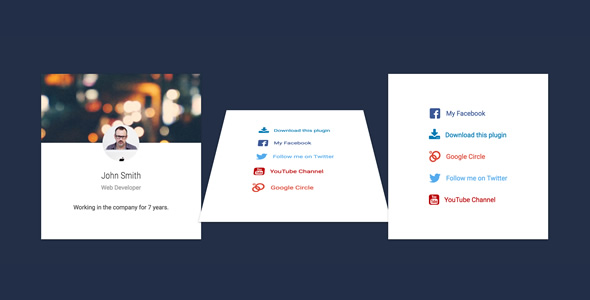
Flip Box V2 is a small extension for WPBakery Page Builder that adds a two-sided flip card element to the page builder’s element list. Each card shows a front face built from an icon or image, a heading and short text, then rotates on hover or after a timed delay to reveal a back face that can hold a list of icon-and-title rows or longer rich text. It is aimed at WordPress site owners, freelancers and agencies already committed to WPBakery who want a lightweight visual element without switching builders or installing a heavier addon bundle.
The plugin is sold on ThemeForest for $11 under the Add Ons category. It is a single-purpose tool rather than a general page-building suite, and the vendor explicitly points buyers toward a larger All In One addon package instead. That positioning matters when weighing whether Flip Box V2 Add Ons are worth the separate purchase. Sales figures are not disclosed on the listing, and no rating is shown, so there is no public adoption data to lean on here.
What Flip Box V2 Add Ons actually add to WPBakery
The core mechanic is a fixed-height container with two faces. The front face is the resting state visitors see first; the back face is the reward for interacting with it. The vendor gives each face independent styling controls, which is where most of the practical value sits.
Front face composition
The front box accepts a header image, an optional overlay colour and an optional avatar. The avatar can be either an uploaded image or an icon, which means the same element covers a team-member card, a service tile and a feature highlight without needing three different plugins. Background colour is configurable, so the card can be blended into an existing palette rather than fighting it.
Back face content that goes beyond a single sentence
Many flip card plugins treat the reverse side as one text field. This one supports multiple items on the back, and each item can pair an icon with a title or carry a block of rich text. In practice that allows the back of a card to hold a short bulleted capability list, a set of contact methods, or a compact pricing breakdown — content that would otherwise need a separate list element layered on top.
Trigger behaviour and transitions
Cards can flip on hover or automatically after a configurable delay. The auto-delay option is the more interesting of the two, because it lets a row of cards cycle through their back faces without requiring pointer input, which is useful on touch devices where hover states are unreliable. Four transition styles are offered, along with built-in colour presets and custom colour overrides.
Performance and compatibility claims
The vendor states that JavaScript and CSS assets are enqueued only on pages where the element is actually used, which keeps unused pages from carrying the extra payload. The listing also claims compatibility with current jQuery and WordPress versions and includes retina-ready output. Those are sensible engineering choices, though the listing does not specify which WordPress or PHP versions have been tested, so buyers on very recent or very old stacks should confirm before relying on it.
Where this flip box extension fits, and where it does not
The clearest fit is an existing WPBakery site that needs a small number of interactive cards — a services grid, a team section, a features row, or a set of linked callouts on a landing page. Because the element is self-contained and asset loading is conditional, it slots into a site that is already live without forcing a rebuild. Agencies maintaining several WPBakery client sites may find the $11 price easy to justify per project, particularly where the alternative is hand-coding CSS transitions for each build.
It is also a reasonable pick for freelancers who want one specific interaction and resent installing a large multi-purpose addon pack just to get it. The single-element scope keeps the admin interface uncluttered.
The wrong choice is anyone not running WPBakery. This is an addon, not a standalone plugin, and it does nothing on Gutenberg, Elementor, Beaver Builder or a hand-coded theme. It is equally a poor fit for projects that need many distinct card layouts with different behaviours on the same page — a dedicated card or post-grid plugin will cover more ground. And buyers who expect ongoing expansion should read the vendor’s own note carefully: the listing recommends purchasing the All In One addon package instead, which signals that this standalone item is not the vendor’s primary development focus.
Strengths and limitations of Flip Box V2 Add Ons
Strengths
- Two independently styled faces. Front and back can carry different backgrounds, images, overlays and avatars, so the flip reads as a deliberate design decision rather than a gimmick.
- Multi-item back face. Icon-and-title rows or rich text blocks on the reverse side make the card useful for real content, not just a slogan.
- Auto-delay flipping. Timed flips solve the touch-device hover problem that breaks many flip card implementations.
- Conditional asset loading. Scripts and styles are only enqueued where the element appears, which is the right default for performance-conscious sites.
- Low price and documented support material. At $11 with an FAQ and source code in the package, the cost of trying it is minimal.
- Four transitions with colour customisation. Enough variety to match most brand styles without a CSS override.
Limitations
- Hard dependency on WPBakery. The element is worthless the moment a site migrates to another builder, and migration is common enough that this is a real forward risk.
- Fixed-height containers. The vendor specifies a fixed height for the box. Longer back-face content or larger text sizes can overflow, and responsive breakpoints may need manual height tuning per device.
- No stated version compatibility matrix. The listing claims compatibility with the latest WordPress and jQuery but does not name tested versions, which leaves buyers to verify against their own stack.
- Superseded by the vendor’s own bundle. The listing itself recommends the All In One package, which implies this standalone addon may receive less attention in future updates.
- No public sales or rating data. There is no adoption signal to gauge how the element behaves across the range of real-world WPBakery setups.
- Accessibility is unaddressed. Flip interactions triggered on hover are difficult for keyboard and screen-reader users, and the listing says nothing about focus handling or reduced-motion support.
How it compares with the wider flip card and addon category
Flip card functionality arrives in three broad forms: standalone flip card plugins, multi-element addon packs for a specific builder, and general-purpose card or grid plugins that include a flip option among many layouts. Flip Box V2 sits squarely in the second group, and that placement defines its trade-offs.
Against standalone flip card plugins, the advantage is native WPBakery integration — the element appears in the builder’s own interface with the standard editing workflow, rather than requiring a shortcode or a separate settings screen. The disadvantage is that a standalone plugin usually works across multiple builders or in Gutenberg, so it survives a rebuild.
Against multi-element addon packs, the advantage is focus and a smaller footprint. A pack bundling dozens of elements adds admin clutter and, often, more assets to load. The disadvantage is breadth: a pack typically includes the flip box plus tabs, accordions, carousels and pricing tables, so one purchase covers several future needs. Given that the vendor here points buyers toward its own All In One package, that comparison is worth taking seriously rather than dismissing.
Against general card and grid plugins, the difference is specialisation. A grid plugin will handle post loops, filtering and pagination but may treat the flip as a secondary effect with fewer controls on the reverse face. Flip Box V2 Add Ons win on back-face content flexibility; they lose on anything involving dynamic content or large numbers of cards.
Frequently Asked Questions
Does Flip Box V2 work without WPBakery Page Builder?
No. It is an addon that registers a new element inside WPBakery, so it requires that builder to be installed and active. On a site running Gutenberg, Elementor or any other builder, the plugin will not produce a usable flip box. Buyers should confirm their builder before purchasing.
Can the flip be triggered automatically instead of on hover?
Yes. The element includes an auto-delay option that flips the card after a set interval without any pointer interaction. This is the more reliable setting for touch devices, where hover states either do not fire or fire unpredictably. Hover-triggered flipping remains available for desktop-focused layouts.
What content can go on the back of the card?
The reverse face supports multiple items rather than a single text field. Each item can combine an icon with a title, or hold a block of rich text. That allows the back to carry a short feature list, a set of contact details or a compact pricing summary instead of one short sentence.
Is the flip box accessible to keyboard and screen-reader users?
The vendor does not state any accessibility provisions. Hover-triggered flips are generally problematic for keyboard navigation and assistive technology, and the listing makes no mention of focus states, ARIA attributes or reduced-motion handling. Sites with accessibility obligations should test the element carefully or place critical content on the front face.
Verdict on Flip Box V2 Add Ons
Buy this if the site already runs WPBakery and needs a small number of well-styled, content-rich flip cards without the overhead of a large addon pack. The independent front and back styling, multi-item reverse face and auto-delay trigger cover the practical cases most projects run into, and $11 is a low-risk outlay for that scope.
Do not buy it if the build is on another builder, if the project needs many varied card layouts, or if long-term flexibility across a rebuild matters. The fixed-height container and the vendor’s own preference for the All In One bundle are the two points to weigh hardest. For a narrow, current need inside WPBakery, the extension does its job; as a long-term foundation for card design, it is a stopgap.