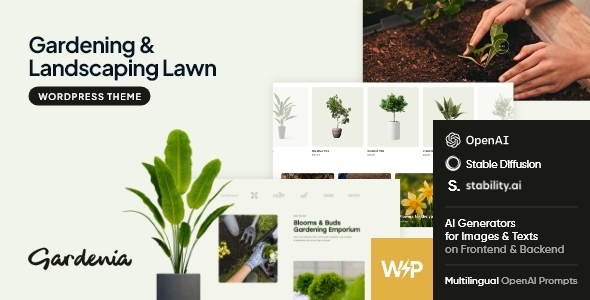
Gardenia is a vibrant WordPress theme specifically designed for gardening enthusiasts, landscapers, and plant lovers. This feature-rich theme combines aesthetic appeal with powerful functionality, offering a perfect digital platform for sharing horticultural knowledge, showcasing garden designs, or running a plant-related business.
Why Choose Gardenia for Your Gardening Website?
With its lush green color schemes and nature-inspired design elements, Gardenia creates an immediate visual connection with gardening content. The theme’s responsive design ensures your website looks stunning across all devices, from desktop computers to mobile phones.
Key advantages include:
- Specialized design tailored for gardening and landscaping content
- Multiple layout options to showcase plants, garden designs, and outdoor spaces
- Built-in features for plant care tutorials, seasonal gardening tips, and landscape photography
- E-commerce integration for selling gardening tools, plants, or landscaping services
Core Features That Make Gardenia Stand Out
Visual Presentation Options
Gardenia offers five distinct homepage designs, each optimized to highlight different aspects of gardening content:
- Featured plant spotlight layouts
- Seasonal gardening tips carousels
- Before-and-after landscaping project displays
- Plant care tutorial grids
- Garden photography showcases
Content Management Capabilities
The theme includes specialized post formats perfect for gardening content:
- Gallery formats for plant collections
- Video formats for gardening tutorials
- Audio formats for plant care podcasts
- Quote formats for gardening wisdom
Technical Specifications and Compatibility
Gardenia is built with modern web standards and integrates seamlessly with essential WordPress plugins:
Essential Integrations
- Elementor Page Builder: Drag-and-drop design for custom layouts
- WooCommerce: Complete e-commerce functionality for garden shops
- Revolution Slider: Stunning visual presentations for garden tours
- AI Engine: Smart content suggestions and automation
Performance Optimization
The theme includes several performance-enhancing features:
- Retina-ready image support for high-quality plant photography
- Optimized code for fast loading times
- Lazy loading for image-heavy content
- Built-in caching solutions
Specialized Gardening Website Features
Plant Database Functionality
Gardenia supports custom post types ideal for creating:
- Plant care guides with growth requirements
- Seasonal planting calendars
- Pest and disease troubleshooting databases
- Landscaping project portfolios
Community Engagement Tools
Built-in social features help grow your gardening community:
- Instagram feed integration for garden photos
- Social sharing buttons for popular platforms
- User-submitted garden photo galleries
- Commenting system with plant expert badges
Customization Options
With 750+ Customizer options, you can tailor every aspect of your gardening website:
Design Customization
- 20+ post animations for engaging content presentation
- Flexible color schemes matching different garden styles
- Custom typography options for elegant plant descriptions
- Multiple header and footer layout options
Layout Flexibility
Choose from various display configurations:
- Right/left sidebar or full-width layouts
- Boxed or wide page versions
- Custom widget areas for garden tools, weather widgets, etc.
- Responsive design that adapts to any screen size
E-Commerce Capabilities for Garden Businesses
For those selling gardening products or services, Gardenia offers:
WooCommerce Integration
- Specialized product display options for plants and tools
- Seasonal promotion banners
- Wishlist functionality for plant collectors
- Cryptocurrency payment options via elegro
Service Showcase Features
- Portfolio layouts for landscaping projects
- Service package displays
- Before-and-after sliders
- Client testimonial sections
Recent Updates and Improvements
The theme receives regular updates with new features and improvements:
Version 3.7 Highlights (May 2025)
- Enhanced compatibility with WordPress 6.8
- Improved shortcode and widget layouts
- Fixed sticky sidebar positioning issues
- Updated Vimeo video embedding functionality
AI Integration Enhancements
Recent versions have added powerful AI features:
- AI-powered gardening content suggestions
- Automated plant care tips generation
- Image recognition for plant identification
- Chatbot for answering common gardening questions
Getting Started with Gardenia
Setting up your gardening website is straightforward:
Installation Process
- Upload the theme files to your WordPress installation
- Install required plugins (Elementor, ThemeREX Addons)
- Import demo content for quick setup
- Customize colors, fonts, and layouts to match your brand
Recommended Plugins
Enhance your gardening website with these specialized plugins:
- Plant Encyclopedia plugins for detailed plant databases
- Weather widgets for local gardening advice
- Garden planning tools with drag-and-drop interfaces
- Seasonal content schedulers
Support and Documentation
Gardenia comes with comprehensive support resources:
- Detailed setup guides for gardening-specific configurations
- Video tutorials for visual learners
- Responsive support team familiar with gardening websites
- Regular updates addressing user feedback
Whether you’re a gardening blogger, landscaping professional, or plant shop owner, Gardenia provides all the tools needed to create a beautiful, functional online presence that resonates with fellow plant enthusiasts.