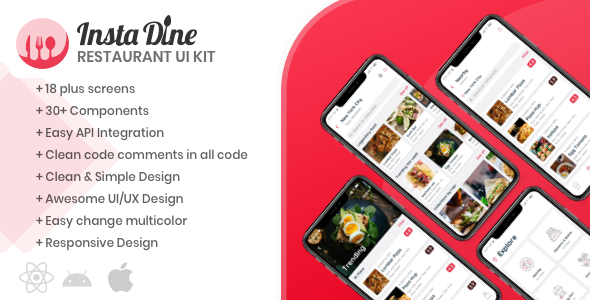
Building a restaurant app from scratch is a monumental task. You are not just designing a few screens; you are architecting a complete user journey that involves browsing menus, customizing orders, managing a cart, processing checkouts, and tracking deliveries. The gap between a static design file and a functional, polished React Native frontend is often filled with hundreds of hours of repetitive styling, state management, and pixel-pushing. This is where InstaDine steps in, not as a simple template, but as a comprehensive frontend kit designed to collapse your development timeline from weeks to days.
InstaDine provides a robust collection of 20+ distinct layout screens and reusable components, specifically engineered for the food delivery and restaurant directory niche. For developers, freelancers, and agencies, this means bypassing the boilerplate and diving straight into the unique aspects of your brand. This kit is more than a collection of pretty interfaces; it is a strategic asset that enables you to launch a high-fidelity MVP, impress stakeholders with a clickable prototype, or deliver a white-label solution to a restaurant client without draining your resources. With a live Expo demo available for immediate interaction, you can experience the fluidity and design language before writing a single line of code.
Key Features
Understanding the depth of a UI kit is crucial before committing to it. InstaDine is packed with functionality that targets the specific pain points of mobile app development. Here are the standout features that make this kit a valuable investment for your React Native projects:
- 20+ Pre-Built Layout Screens: This is the core of the kit. Instead of starting with a blank canvas, you have access to a diverse range of screens covering the entire user flow. From the initial onboarding experience and user authentication to the final order tracking and payment confirmation, the kit provides a visual blueprint for the entire customer lifecycle.
- Reusable & Modular Components: The kit is not a monolithic code dump. It is built on a modular architecture where components such as menu cards, category filters, cart buttons, and restaurant info tiles are decoupled. This allows you to mix, match, and modify components without fear of breaking the global structure, ensuring your final product feels custom rather than templated.
- Modern Restaurant Directory UI: Specifically tailored for discovery, the design emphasizes high-quality imagery (sourced from Unsplash) and clear typography. The layouts are optimized to showcase menu items and restaurant details in a way that drives conversions, focusing on visual appetite appeal and intuitive navigation.
- Full Checkout & Cart Integration: A common pitfall of many UI kits is ignoring the transactional flow. InstaDine includes detailed screens for cart management, address selection, and payment processing, ensuring that your development team has a clear path to implement secure and seamless payment gateways.
- Dark & Light Theme Compatibility: The design system is built with modern aesthetics in mind, utilizing a color palette that adapts well to both light and dark mode—a critical feature for reducing eye strain and matching user system preferences on iOS and Android.
- Clean Codebase with React Native: The code is written in standard React Native, ensuring that it is compatible with both iOS and Android platforms from a single codebase. It leverages functional components and hooks, which is the industry standard for modern React Native development, making it easier to integrate with backend APIs.
Who Is This For? Use Cases
InstaDine is a versatile asset, but it shines brightest for specific user groups. Understanding your profile will help you determine if this kit aligns with your workflow.
Indie Developers and Freelancers
If you are a solo developer or a freelancer juggling multiple clients, time is your most valuable currency. Often, you lack the luxury of a dedicated UI/UX designer. InstaDine empowers you to take on diverse projects—from a local pizza delivery service to a high-end restaurant booking app—without sacrificing quality. You can use the kit to rapidly prototype a concept for a client pitch, demonstrating the look and feel of the final product within a day. Once the contract is signed, the same code becomes the foundation of the MVP, allowing you to allocate your budget to backend development and business logic rather than frontend styling.
Startups Launching an MVP
In the startup world, speed to market is often the difference between success and failure. You need to validate your business model with real users as quickly as possible. InstaDine allows you to launch a Production-Ready MVP that looks polished and feels premium. Instead of waiting three months to build a native interface, you can have a functional frontend in days. This speed enables you to secure seed funding with a working demo or gather user feedback early in the development cycle, allowing you to pivot based on data rather than speculation.
Digital Agencies & White-Label Services
For agencies managing a portfolio of restaurant clients, maintaining a consistent “wow” factor is challenging. Starting from scratch for each client is not scalable. InstaDine offers a white-label solution where you can rebrand the kit with your client’s colors and logos, significantly reducing project turnaround times. This allows you to handle a higher volume of orders simultaneously, increasing your agency’s revenue per project. The modular nature of the code means you can add custom features for specific high-value clients without needing to refactor the entire application.
UI/UX Designers Bridging the Gap
As a designer, you might excel in Figma or Sketch, but struggle to translate your designs into functional code. InstaDine acts as a bridge between design and development. It provides you with a codebase that is structured and organized, helping you understand how components are assembled and styled in a real-world environment. This kit can also serve as a design library to pull inspiration from when creating custom mockups for clients who want a modern, food-focused interface.
Technical Details & Compatibility
Here is a breakdown of the technical specifications that you need to know before integrating InstaDine into your environment:
- Framework: Built exclusively with React Native and JavaScript (ES6+). It does not require TypeScript, keeping the learning curve accessible for most React developers.
- Navigation: The structure is compatible with React Navigation, the de facto standard for handling stack, tab, and drawer navigations in the React Native ecosystem.
- UI Library: The styling is implemented using the StyleSheet API built into React Native, eliminating the need for heavy external UI libraries like NativeBase or UI Kitten. This ensures faster load times and fewer dependency conflicts.
- Demo Access: A live Expo demo is available at https://expo.io/@webilestudio/InstaDine. You can scan the QR code with your Expo Go app to test the UI on your physical device or run it in a simulator.
- Cross-Platform: The code is fully cross-platform, ready for deployment on iOS (iPhone/iPad) and Android devices. No platform-specific code is required to render the primary layouts.
- Asset Management: The kit utilizes high-quality images from Unsplash and vector icons from TheNounProject, ensuring that the visual content remains crisp on high-PPI (Retina) displays.
Pros and Cons
Every product has its strengths and limitations. We have analyzed InstaDine to provide a transparent breakdown that helps you set realistic expectations.
Pros
- Speed of Development: The primary advantage is the massive reduction in frontend coding time. You can save several days, if not weeks, of development effort on a typical restaurant app project.
- Ready-to-Use UI: The screens are professionally designed with a modern user interface that aligns with current UX standards for food delivery, reducing the need for a dedicated designer.
- Interactive Expo Demo: The ability to test the app live in the Expo Go environment is invaluable. You can check the navigation flow and feel of the app before purchasing to ensure it meets your quality standards.
- Clean Component Structure: The use of reusable components promotes code reusability and maintainability. This makes it easier to update the design or add new features later without a complete code rewrite.
- Affordability Compared to Custom Design: When you consider the cost of a freelance UI/UX designer’s hourly rate versus the one-time price of this kit, it offers considerable value for budget-conscious developers.
Cons
- Lacks Backend Integration: This is a frontend kit only. You will need to implement your own Backend-as-a-Service (like Firebase) or custom REST/GraphQL APIs to fetch restaurant data, process payments, and handle user accounts.
- JavaScript (Not TypeScript): For teams that strictly use TypeScript for type safety, this kit will require a refactoring effort to introduce types. This is a potential hurdle for large enterprise codebases.
- Design Customization Limits: While the components are modular, heavily customizing the visual aesthetic (e.g., changing the entire layout structure) might require as much effort as building that feature from scratch, given the fine-tuned styles.
- Niche-Specific: The kit is specifically tailored for restaurants and food delivery. It is not a generic multipurpose template, so if your project shifts to a different industry (e.g., grocery delivery or e-commerce fashion), the design patterns may not fit perfectly without extensive modification.
Frequently Asked Questions
When evaluating a UI kit, specifically one for React Native, developers often have specific questions regarding integration and scope. We have answered the most common queries to clarify any confusion.
Is InstaDine compatible with Redux or Context API?
Because InstaDine is a frontend UI kit, it is architecture-agnostic. The components are built as “dumb” or presentational components, meaning they render data passed to them via props. This design makes it incredibly easy to integrate with any state management library you choose. Whether you prefer the predictability of Redux, the lightweight nature of Zustand, or the built-in React Context API, you can wire them up to the InstaDine screens without needing to modify the core component logic. The focus is on the visual presentation, leaving the data flow and business logic entirely up to you.
Does the kit include an admin panel or backend for managing restaurants?
No, the InstaDine kit strictly covers the mobile customer-facing interface. It does not include a web-admin dashboard or a backend server. For the full ecosystem to function, you will need to develop a separate admin portal (using tools like React Admin or a custom web app) that allows restaurant owners to update menus, manage orders, and set delivery zones. The kit provides the frontend shell for the customer, but the data must be supplied via your own API endpoints connected to your database.
Can I submit this code to the Apple App Store and Google Play Store?
Absolutely. The code is written using standard React Native primitives. Once you have connected your backend and replaced the mock data with your API endpoints, you can run the standard build commands react-native run-ios or react-native run-android. After that, you can archive the build and submit it via Xcode or Android Studio following the standard Apple and Google submission guidelines. The template itself does not contain any restricted APIs or SDKs that would prevent store approval, though you will need to ensure your final app complies with store policies regarding data privacy and payment processing.
Final Verdict
InstaDine addresses a very specific and painful gap in the React Native ecosystem: the lack of high-quality, affordable, and functional UI kits dedicated to the restaurant niche. By providing a substantial library of screens and components, it enables you to focus your engineering hours on the “secret sauce” of your app—the logic, the backend, and the unique features that differentiate your brand—rather than on aligning pixels and styling buttons.
While the absence of a backend and TypeScript support might be a dealbreaker for some, for the vast majority of indie hackers, freelancers, and agencies, the speed and polished aesthetic outweigh these limitations. The ability to see and feel the kit via the Expo demo before investing is a testament to its transparency and quality. This is a tool designed to get you to launch faster and more efficiently.
If you are ready to reclaim your weekends and deliver a stunning restaurant app in record time, stop building from scratch and let InstaDine do the heavy lifting. The kit is available for immediate download on CodeCanyon. Take the plunge today and transform your development workflow—your team and your clients will thank you for it.