Delivering a polished and professional photo editing experience inside a mobile app requires more than just a few filters slapped onto a stock interface. Users expect seamless performance, intuitive navigation, and a suite of tools that actually work without crashing. The Photo Editor Template for iOS with PSD is a complete, ready-to-deploy solution designed to help developers and designers skip the months of UI/UX groundwork and jump straight to building a high-quality application. Whether you are creating an app for virtual try-ons, themed photo booths, or a general-purpose image editor, this template provides the architectural backbone and the visual assets needed to get your product on the App Store quickly. It combines the structural reliability of Objective-C with the design flexibility of a layered PSD file, ensuring your final application looks as good as it performs.
Key Features
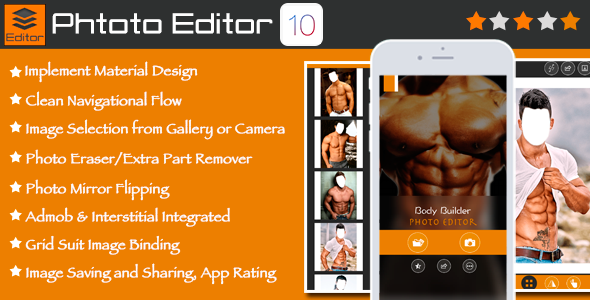
- Full Material Design Implementation: The template adheres to Material Design guidelines, ensuring a modern, clean, and consistent user interface that feels familiar to iOS users. This design philosophy prioritizes tactile surfaces, bold graphic design, and purposeful motion, which translates directly into a more engaging user experience.
- Seamless Image Source Integration: Users can pull images directly from their device gallery or capture a new photo using the built-in camera. This eliminates friction and allows for immediate editing without navigating away from the core experience.
- Advanced Photo Manipulation Tools: Go beyond basic cropping. The template includes robust features like image mirror flipping, a dedicated eraser tool for removing unwanted background elements, and full support for scaling, rotating, and translating images. It even handles front-and-back image layering, which is crucial for creating realistic composite photos.
- Grid-Based Suit Image Binding: This is a standout feature for specialized applications. The template includes logic for binding a user’s headshot onto a predefined suit or costume template using a grid system. This makes it exceptionally powerful for creating “man in suit” or “women fashion suit” applications where the user’s face needs to align perfectly with the background image.
- Multi-Platform iOS Support: The template is fully optimized for the entire Apple ecosystem, including iPhone, iPod Touch, iPad, and iPad Mini. This ensures a consistent visual experience across different screen sizes and aspect ratios without requiring separate builds for each device.
- Built-in Monetization Hooks: The code includes pre-integrated support for AdMob banner ads and Interstitial ads. This means you can start generating revenue from the moment your app goes live without needing to integrate third-party SDKs from scratch.
- Social Sharing and App Growth Tools: Users can save their edited photos directly to the device gallery or share them instantly on Facebook, Twitter, and WhatsApp. Furthermore, the template includes social word-sharing functionality and an in-app rating prompt, helping you leverage user satisfaction to drive organic downloads.
- Clean, Well-Documented Code: The project is written in Objective-C with Storyboard, a mature and stable language for iOS development. The code is kept clean and organized, and is accompanied by comprehensive documentation, making it easy for developers of varying skill levels to customize and extend the template.
Who Is This For? Use Cases
This template is not a one-size-fits-all solution; it is a targeted toolkit for specific, high-demand application categories. Its unique feature set makes it ideal for the following use cases:
Developers Building Themed Photo Apps
The core strength of this template lies in its grid suit image binding feature. This makes it the perfect foundation for building a “Man in Suit” app, a “Kids Wear” photo booth, or a “Women Fashion Suit” virtual dressing room. Instead of writing complex image processing algorithms to align a face with a body template, the grid system handles the heavy lifting. You can focus on sourcing high-quality outfit images and branding the app to your target audience, while the code takes care of the technical photo composition.
Entrepreneurs Launching a Niche Photo Editor
If you have identified a gap in the App Store for a specific type of photo editor—perhaps one focused on corporate headshots, costume parties, or event photography—this template provides a rapid launchpad. The inclusion of 26 pre-built frames, ad integration, and social sharing means you can have a fully monetized, market-ready product in a fraction of the time it would take to build from scratch. The template’s clean code allows you to swap out the default frames for your own custom assets with minimal effort.
Designers Who Need a Technical Foundation
A common pain point for UI/UX designers is finding a developer who can translate a static design into a fully functional iOS app. The Photo Editor Template for iOS with PSD solves this by providing both. The layered PSD file allows designers to tweak every visual element—buttons, sliders, frames—to match their brand identity. The developer can then take the documented Xcode project and implement those changes without needing to redesign the entire user flow. This bridges the gap between design vision and technical reality.
Technical Details & Compatibility
This template is built for reliability and longevity. It is programmed in Objective C with Storyboard, a combination that offers a stable, well-supported development environment. The project is designed to support the latest Xcode and is confirmed to be compatible with iOS 14. This forward-looking compatibility means your app will run on the vast majority of current devices. The template also supports iPhone, iPod, iPad, and iPad Mini, ensuring you capture the entire iPhone and iPad user base. For developers concerned with code quality, the template boasts “Clean Code” and is “Well Documented,” which significantly reduces the learning curve and speeds up the customization process.
Pros and Cons
Pros
- Feature-Rich from Day One: Includes a comprehensive set of editing tools (eraser, flip, rotate, scale) that would take weeks to develop independently.
- Built for Monetization: Pre-integrated AdMob support and social sharing tools mean you can deploy a revenue-generating app immediately.
- Complete Design Assets: The inclusion of a layered PSD file alongside the Xcode project gives designers full control over the visual identity of the app.
- Optimized for a Niche: The grid binding feature is highly specialized for suit and costume apps, providing a significant competitive advantage in that market segment.
- Clean and Documented: The code quality is highlighted as a key feature, which is a strong indicator of maintainable and scalable software.
Cons
- Objective-C Codebase: Developers who are exclusively proficient in Swift will face a learning curve, as the project is written in Objective-C.
- No SwiftUI or Swift Support: The template does not leverage modern SwiftUI frameworks, which means it may feel slightly dated in terms of modern iOS architecture.
- Narrow Focus: While excellent for suit/fashion apps, the grid binding feature might be over-engineered for a general-purpose photo editor, and the template may require more work to repurpose for completely different use cases.
- Licensing Limitations: The standard license allows for a single application. Expanding to multiple applications requires purchasing the Extended License, which is an additional cost.
Frequently Asked Questions
Is this template compatible with the latest version of Xcode and iOS?
Yes. The description explicitly states that the template supports the latest Xcode and is compatible with iOS 14. This ensures that your app will meet the current App Store submission guidelines and run smoothly on modern Apple devices. It is built on a stable foundation that will remain functional for at least the next few iOS iterations.
Can I customize the frames and suit templates to create my own themed app?
Absolutely. The template comes with 26 pre-included frames, but these are designed to be swapped out. The grid suit image binding system is built to accept your own high-resolution images. As long as you maintain the correct grid dimensions and layering logic (which is detailed in the included documentation), you can easily replace the default assets with your own designs for a “Man in Suit,” “Kids Wear,” or any other costume-based application.
Does the template include ad integration, or do I need to set that up separately?
The template includes pre-integrated support for AdMob banner ads and interstitial ads. This is a significant time-saver, as the code for requesting, displaying, and dismissing ads is already implemented. You will only need to insert your own AdMob publisher ID into the appropriate configuration file. This allows you to start generating ad revenue from the first day your app is on the App Store.
Final Verdict
The Photo Editor Template for iOS with PSD delivers exactly what it promises: a fast, accurate, and feature-complete launchpad for creating a professional photo editor app. It eliminates the tedious and expensive process of designing a UI from scratch and writing complex image manipulation code. The inclusion of a specialized grid binding system makes it an exceptional value for anyone building a themed costume or suit application. With clean, documented code, pre-integrated monetization tools, and comprehensive social sharing capabilities, this template removes the most common barriers to a successful app launch. The developer has clearly prioritized quality and reliability, making this a low-risk, high-reward investment. If you are ready to bring a photo editing app to the iOS App Store without spending months in development, this template provides the perfect foundation. Do not overthink it—grab the template and start building your next bestseller today.