Key Features
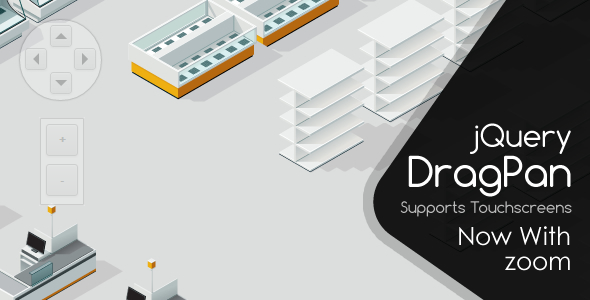
This powerful JavaScript panning script is engineered to solve a common user experience problem: navigating content that exceeds the browser window. Instead of forcing users to wrestle with clunky default scrollbars, it offers a smooth, intuitive drag-to-pan interface. Its lightweight, primarily CSS-based design ensures fast load times and a responsive feel, making it an ideal solution for developers building interactive maps, plans, or any large content area.
- Primarily CSS-Based Rendering: The plugin relies heavily on CSS for visual styling rather than heavy image files. This results in faster page loads, smoother animations, and easier customization for developers who are already comfortable with stylesheets.
- 22 Customizable Options & 3 Callbacks: Offers granular control over behavior and appearance. From the speed of the return animation to the color of the scrollbar, you can tailor the experience precisely. The 3 callbacks allow you to trigger custom JavaScript functions during key events (like pan start, pan end, or position change), enabling deep integration with other site scripts.
- Programmatic Map Positioning: The ability to programmatically move the map to a specific coordinate is a standout feature. This allows you to create “Jump to” navigation links (e.g., “Find the Food Court”) or smoothly guide a user’s attention to a particular area of the map.
- Smart Bounce-Back Boundary: Unlike scripts that clip the content harshly, this plugin implements an intelligent boundary system. Users can comfortably drag beyond the map’s edge, but the viewport smoothly bounces back to center the map once they release, providing a natural and forgiving user interaction.
- Customizable Scrollbars: Built-in scrollbars (colors easily changed via CSS) adjust dynamically to the current zoom level. This provides a secondary navigation method and gives users a clear indication of their position within the larger context.
- Copyright & Help Overlay: You can embed a custom copyright notice or a brief help message directly into the map interface. This is an excellent way to brand your map or provide instant tips to new users.
- Panning Restrictions: Offers the ability to restrict movement to either horizontal or vertical panning only. This is ideal for simple seating charts (horizontal) or narrow timelines (vertical).
- Cursor Customization: Fully customize the cursor that appears when users hover over the map area and when they are actively dragging it. You can use standard CSS cursor values or custom images.
- Return Animation Speed: Control how quickly the map bounces back to its boundary limits. A slower speed can feel smoother; a faster speed ensures the user loses minimal time.
- Inertia & Momentum: After a user flicks the map to the side, the inertia setting defines how far it “glides” before stopping. This mimics the physics of real-world objects and adds a premium feel to navigation.
- Viewport Restriction: Prevents the user from dragging the map so far that it leaves an empty void in the browser window. The map always stays anchored to at least one edge of the viewport.
- New Zoom Functionality: The much-requested zoom feature allows users to get a closer look at fine details or zoom out for an overview. This is essential for detailed maps like theatre seating or airport terminals.
Who Is This For? Use Cases
This JavaScript panning script is for any web developer, designer, or site owner who needs to present a large, visually rich piece of content in a user-friendly way. It is a direct upgrade to the standard scrollbar experience for any interactive layout.
Building Interactive Maps for Large Venues
Imagine a shopping mall website with an interactive store directory. Users can drag the map to browse shops, zoom in on the food court, or click a “Find My Car” button to programmatically pan to the parking garage. The same concept applies perfectly to museums, convention centers, and zoos.
Seating Plans and Event Layouts
Static seating charts are a pain on mobile devices. This plugin turns a seating plan into an explorable interface. Users can drag to see all rows at a theatre, zoom in to read seat numbers, and pan sideways to view a festival’s stage layout. The horizontal restriction feature is perfect for this scenario.
Floor Plans and Site Maps
Real estate agents can use this to display interactive floor plans for apartment complexes. Corporate intranets can display large office layouts. Facility managers can use it for safety evacuation plans. The ability to programmatically jump to a specific office or exit point makes it far more useful than a static PDF.
Large Infographics or Data Visualizations
Let users explore a massive timeline, a complex process flow, or a detailed infographic without having to click “next page.” They can drag and explore at their own pace, with the inertia feature adding a fluid, engaging feel to the experience.
Technical Details & Compatibility
This plugin is a lightweight JavaScript solution designed to work with plain HTML content. It does not require a specific framework like React or jQuery, though its straightforward API makes it easy to integrate into most modern projects. The “Update 1.2” version added the highly demanded zoom capability and replaced arrow images with CSS for better performance. Earlier updates (1.1) focused on refining the inertia and viewport restriction features, showing a developer actively responding to user feedback. It is compatible with all modern browsers (Chrome, Firefox, Safari, Edge) that support standard HTML5 and CSS3 features. There are no special server requirements.
Pros and Cons
Pros
- Lightweight and Fast: Minimal reliance on images leads to excellent performance out of the box.
- High Customizability: The 22 options and 3 callbacks give developers extensive control to match it to any design.
- Excellent User Experience: Inertia, smart bounce-back, and zoom create a fluid, modern navigation feel that standard scrollbars cannot match.
- Programmatic Control: The ability to move the map to a specific location programmatically enables advanced features like “jump to” search results.
- Strong Update History: The developer has shown commitment by adding key features like zoom and inertia based on user requests.
Cons
- Customization Requires CSS Knowledge: Styling scrollbars and cursors requires direct CSS manipulation, which may be a step for absolute beginners.
- Primarily for Static HTML Content: It is designed for navigating rendered HTML, not for dynamically tiling map images like a Google Maps alternative. It is not a GIS solution.
- No Built-in Markers System: While you can programmatically move the map, the script itself does not come with a UI system for pinning markers. You would need to build that overlay yourself using its callbacks.
Frequently Asked Questions
Can I use this plugin on mobile devices and tablets?
Yes, it is fully touch-compatible. Users can drag and pinch-zoom (if enabled) on mobile devices, providing a native-app-like experience. The scrollbars also provide an alternative for desktop users who prefer clicking.
Does this script work with WordPress or other CMS platforms?
Yes, you can use it within any WordPress site by embedding the script in your header or footer and applying it to the specific HTML container of your map or seating plan. It is a pure JavaScript solution and works independently of the backend system.
Can I change the speed of the inertia effect?
Absolutely. The “inertia” option is one of the key customizable parameters. You can control how much momentum is preserved after a user flicks the map, allowing you to create a “sticky” feel or a fast, slick glide.
Final Verdict
This JavaScript panning script is a mature, reliable, and highly flexible solution for any web developer needing to present content that is larger than the browser viewport. Its strength lies in its balance of power and simplicity. It delivers a premium map navigation experience without forcing you to learn a complex framework or rely on heavy third-party libraries. The strong feature set—including programmatic movement, zoom, and inertia—along with a proven update history, demonstrates a product built for the long haul.
If you manage a venue map, a seating plan, or any large interactive content area, this plugin is the most efficient way to replace clumsy scrollbars with a fluid, intuitive drag interface. Eliminate user frustration and make your content explorable. Purchase it today to give your site a modern, professional edge that keeps visitors engaged.