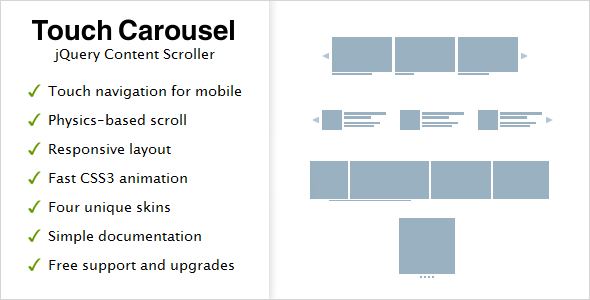
When you need to showcase a series of images, products, or text snippets on a website, the difference between a static block and an interactive carousel is night and day. However, the real challenge lies in finding a slider that feels natural on both a desktop monitor and a smartphone screen. TouchCarousel – jQuery Content Scroller and Slider by GalleryForge is a purpose-built solution for developers and designers who require a fluid, touch-optimized scroller without the bloat of a full-featured slider plugin. This lightweight tool is engineered to handle everything from simple image galleries to complex banner rotators, all while maintaining the snappy, physics-based feel that modern users expect from native mobile apps.
With over 5,500 sales on CodeCanyon, this plugin has established itself as a reliable asset for web professionals. It is not just about moving content horizontally; it is about delivering a frictionless user experience. Whether you are building a portfolio for a design agency or integrating a product showcase into an e-commerce store, this scroller prioritizes performance and touch responsiveness. Let’s take a detailed look at why this remains a popular choice for developers who need a dependable, no-nonsense content scroller.
Key Features
The success of any jQuery plugin hinges on its feature set and how seamlessly it integrates into existing projects. TouchCarousel is packed with functionality that bridges the gap between mobile and desktop interactions. Here are the core features that define its utility:
- Touch Navigation & Mouse-Drag Support: The plugin is built for touch devices like iPads, iPhones, and Android tablets, but it also extends drag-and-drop functionality to desktop users via mouse-drag. This creates a uniform user experience across all platforms. Notably, you can disable mouse-drag if you prefer a click-only interface on desktop.
- Physics-Based Scrolling & Free-Scroll Mode: Unlike rigid step-by-step sliders, TouchCarousel mimics the inertia of native scrolling. It supports both a “paging” mode, where the carousel snaps to specific items, and a “free-scroll” mode, which allows users to glide through content fluidly without snapping.
- Fluid Width & Full-Width Capability: In free-scroll mode, the carousel can be set to a fluid width, meaning it stretches to fill the container perfectly. This is ideal for full-width banner rotators where the design demands edge-to-edge imagery.
- Hardware Accelerated CSS3 Transitions: The plugin leverages CSS3 transitions for animations, which offloads processing to the GPU. This results in smooth, 60fps animations that are critical for maintaining a professional feel, even on lower-powered devices.
- SEO-Friendly Structure: A common problem with sliders is that they hide content from search engines. TouchCarousel keeps all content in the DOM, ensuring that your images and text are fully indexable by Google. This is a significant advantage for SEO-conscious site owners.
- Smart Autoplay (Slideshow): The autoplay feature is intelligent—it automatically pauses when the user hovers over the carousel and stops entirely if the user interacts with it. This prevents the annoying “fighting the slider” scenario and improves conversion rates.
- Powerful API & Customization: Developers get access to a documented API with public methods, properties, and callbacks. This allows for deep integration, such as triggering carousel actions based on external events or building custom navigation controls.
- Configurable Item Snapping & Scrolling: You have granular control over how many items scroll into view per action. Whether you want to scroll one item at a time or three, the “items per scroll” setting handles it precisely.
- Multiple Skins & Easy Styling: It includes four unique skins with accompanying Photoshop files for customization. The CSS file is heavily commented and organized, making it simple for developers to override styles and match their brand identity.
- Keyboard Navigation: For accessibility and desktop convenience, optional keyboard navigation (arrow keys) is supported, allowing users to cycle through content without a mouse.
Who Is This For? Use Cases
TouchCarousel is not a general-purpose “everything slider” that does 50 things poorly. It excels specifically at horizontal content scrolling. Its target audience is broad, ranging from novice site owners to seasoned developers, but it shines brightest in specific scenarios.
Web Design Agencies & Freelancers
For agencies building high-end portfolios or client sites, this plugin offers a polished, native-app-like feel. The ability to run multiple carousels with different skins on a single page allows designers to create dynamic layouts for testimonials, client logos, or project galleries without loading multiple heavy libraries. The fluid width mode is particularly useful for creating immersive, full-screen hero sliders that look stunning on retina displays and mobile devices.
Email Newsletter Companies & Marketers
While email clients don’t support JavaScript, marketing teams often need to build landing pages that complement their campaigns. The “Banner Rotator” use case is strong here. The smart autoplay feature ensures that promotional banners cycle through automatically, but pauses when a user shows interest by hovering—preventing the dreaded “banner blindness” that occurs when content moves too fast. The SEO-friendly aspect ensures that promotional text within the banners is still crawled by search engines, which is crucial for PPC landing page quality scores.
Educational Institutions & Non-Profits
Schools and non-profits often have limited technical resources. The simple documentation and easy-to-style CSS make it accessible for a webmaster who isn’t a hardcore JavaScript developer. They can use it to display event photos, news headlines, or sponsor logos in a way that is professional and doesn’t require constant maintenance. The lightweight nature of the plugin (compared to heavyweight frameworks) ensures that it won’t slow down pages for visitors on slower school networks.
E-commerce & Product Showcases
While TouchCarousel is not a WooCommerce-specific plugin, it is perfectly suited for building custom product carousels. Since each item can contain “any HTML content” (excluding video), developers can inject product titles, prices, and “Add to Cart” buttons into the slides. The drag-and-click distinction is vital here—users can drag to scroll through products, but they can still click a “Buy Now” button without accidentally triggering a scroll action.
Technical Details & Compatibility
Understanding the technical boundaries of a plugin is just as important as knowing its features. This particular script has specific design parameters that you should be aware of before implementation.
Core Compatibility: The plugin is built on jQuery and requires jQuery 1.9.0 or later (as confirmed by the changelog fixing compatibility for this version). It is a client-side script that does not depend on any specific server-side language, making it compatible with WordPress, Joomla, Drupal, or even static HTML sites.
Device Testing: The developer has explicitly tested this on a range of devices, including Mac, PC, iPad 2, iPhone 4, HTC Desire, and Blackberry PlayBook. This indicates a focus on legacy mobile devices, which is a boon for developers targeting users with older hardware. The plugin is designed to “not block default browser scroll on touch devices,” meaning vertical page scrolling works naturally even when your finger is on the carousel.
Responsive Caveat: It is crucial to note that TouchCarousel is not fully responsive in the traditional sense. According to the developer, it is “responsive only in full-width free-scroll mode (for width).” This means that if you need a slider that adjusts the number of visible items based on the viewport width (e.g., showing 3 items on desktop, 1 on mobile), this plugin will not do that out of the box. The developer explicitly recommends their other product, RoyalSlider, for users who need that kind of adaptive behavior.
Content Limitations: While items can hold any HTML content, the documentation specifies that video content is not supported within the slides. This is a limitation to consider if you plan to embed YouTube or Vimeo videos inside the carousel.
Pros and Cons
To give you a balanced view, let’s break down the strengths and weaknesses of this plugin based on the provided documentation and typical user feedback.
Pros
- Superior Touch Experience: The physics-based scrolling and inertia feel significantly smoother than standard jQuery sliders. The distinction between click and drag is handled elegantly, preventing broken links.
- Lightweight & Fast: By utilizing CSS3 transitions and avoiding heavy image preloaders, the plugin maintains a small footprint, which aids in page load times—a critical factor for SEO and user retention.
- Excellent Value: At $11.00, this is a cost-effective solution for a niche need. Considering that custom development of a touch-scroller would cost hundreds of dollars, this is a bargain for the functionality provided.
- SEO Friendly: The fact that content is not hidden in a JavaScript-generated layer is a huge plus. Search engines can crawl the HTML directly, ensuring your images and keywords are indexed.
- Proven Reliability: With 5,597 sales and a clear changelog (including fixes for iOS6 timer bugs and IE7/8 date issues), this is a mature product that has been battle-tested in production environments.
Cons
- Not Fully Responsive: This is the most significant drawback. The plugin does not resize item widths based on screen size in paging mode. You must use the full-width free-scroll mode to get fluid behavior, which limits layout flexibility.
- No Video Support: If your carousel requires embedded video, this plugin is not the right choice. You would need to look at a more comprehensive slider solution.
- Unclear Rating: The rating data is not provided. While sales volume is high, the absence of a visible star rating makes it slightly harder to gauge immediate user satisfaction without checking the comments section on CodeCanyon.
- Legacy Focus: The emphasis on testing on older devices like Blackberry PlayBook and iPhone 4 suggests that the plugin may not utilize the latest modern CSS features for cutting-edge browsers, though this is a minor point for most use cases.
Frequently Asked Questions
Before purchasing, developers often search for specific answers to integration questions. Here are the three most common queries regarding this plugin.
Is TouchCarousel compatible with WordPress?
Yes, because it is a standalone jQuery plugin, it can be integrated into any WordPress theme. You will need to enqueue the jQuery library and the plugin files in your theme’s functions.php file or use a custom code snippet plugin. It does not come with a “WordPress plugin” admin panel, so you will need to initialize it manually via JavaScript. It works well with page builders that allow custom HTML/JS, like Elementor or Divi, but you must be comfortable with a bit of code.
Does TouchCarousel support responsive layouts?
Partially. It is fully fluid in width when set to “free-scroll” mode, meaning the carousel container will stretch to 100% of its parent. However, it does not automatically adjust the number of visible items based on the viewport width. For example, it will not automatically change from showing 4 items on a desktop to 2 items on a tablet. If you require that level of adaptive responsiveness, the developer recommends using their other product, RoyalSlider.
Can I use links inside the carousel items?
Absolutely. One of the standout features of TouchCarousel is its ability to “understand the difference between click and drag.” This means users can click on a hyperlink inside a slide without accidentally triggering a drag action. This is a critical feature for e-commerce or portfolio sites where each slide needs to link to a detail page. However, remember that video embeds are not supported within the items.
Final Verdict
TouchCarousel – jQuery Content Scroller and Slider is a specialized tool that excels at what it does: providing a smooth, touch-friendly horizontal scrolling experience for web content. It is not a jack-of-all-trades slider, but rather a master of the carousel format. The plugin’s 5,597 sales volume stands as a testament to its reliability and the trust that developers like GalleryForge have built within the Envato community. The physics-based scrolling and the clear separation between drag and click interactions place it a cut above basic jQuery plugins that often feel clunky on mobile devices.
While the lack of full responsiveness and video support may be deal-breakers for some, for the specific use cases of image galleries, banner rotators, and HTML content scrollers, this tool is incredibly effective. It is lightweight, SEO-friendly, and offers a level of