The jQuery Nivo Slider Plugin is a powerful, lightweight, and highly responsive image slider built for web designers and developers who need a reliable, feature-rich carousel without the bloat of heavy frameworks. While the original marketplace listing may seem modest, this tool delivers a core set of functionalities—including a flexible slideshow engine, touch-friendly navigation, and CSS3-powered transitions—that make it ideal for portfolios, product showcases, and media-heavy blogs. It solves the common problem of creating a professional-grade banner that looks sharp on any device, while remaining easy to integrate into existing WordPress or static HTML projects. The plugin’s emphasis on compatibility and chainability ensures it won’t conflict with other jQuery scripts, which is a critical factor for developers managing complex sites. In this comprehensive review, we’ll break down the plugin’s performance, ideal use cases, and whether it still holds value for modern web projects.
Key Features
The jQuery Nivo Slider Plugin differentiates itself not through overwhelming options, but through the polish and reliability of its core mechanics. Here are the standout features that define this tool:
- Auto Delay and Hover Pause: The slideshow automatically cycles with a customizable delay. Crucially, the slider intelligently pauses when the user hovers over the image, preventing the display from changing while a visitor is reading the text or inspecting the visual. This user-centric feature significantly improves engagement metrics and reduces bounce rates.
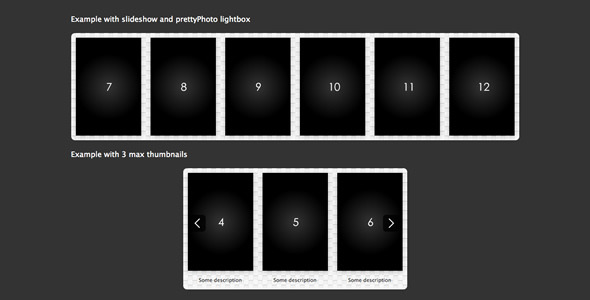
- Fully Responsive and Adaptive: In a world where mobile traffic dominates, this plugin doesn’t compromise. The responsive design ensures the slider scales fluidly with the container width. More impressively, the thumbnail navigation grid is dynamic—the number of thumbnails displayed adjusts automatically as you resize the browser window, ensuring the UI remains clean on tablets, desktops, and smartphones.
- CSS3 Transitions: Instead of relying on slow, choppy JavaScript animations, the plugin harnesses the power of CSS3 transitions. This results in buttery-smooth fade and slide effects that are hardware-accelerated in modern browsers. This leads to better performance and lower CPU usage.
- Chainability and Plugin Compatibility: Built with standard jQuery principles, this slider respects the concept of chaining. It works flawlessly alongside other plugins (such as lightboxes or lazy loaders) without triggering ‘jQuery is not defined’ errors or breaking the script timeline. This makes debugging and maintenance significantly easier.
- Optional Navigation Arrows: You have complete control over the user interface. While the core slider includes thumbnail navigation, you can enable or disable the previous and next arrows depending on the desired aesthetic and user flow.
- Modernizr Browser Detection: The plugin includes built-in compatibility checks via Modernizr. This allows it to gracefully degrade for older browsers that do not support CSS3, ensuring that the content remains visible and functional even if the animation falls back to standard jQuery effects.
Who Is This For? Use Cases
This plugin is not a one-size-fits-all solution but rather a precision tool for specific scenarios. It is incredibly versatile, fitting into both beginner and advanced workflows.
Freelance Designers and Agency Developers
If you build client websites, you need assets that are reliable and easy to customize. The jQuery Nivo Slider Plugin is perfect for creating hero sections for corporate sites. Because it is chainable, you can easily integrate it into complex JavaScript bundles without worrying about scope creep. The hover-to-pause feature is also a massive plus for client presentations, as it allows stakeholders to scrutinize an image without the slide changing mid-review.
Digital Portfolio Owners and Creative Professionals
Photographers, graphic designers, and illustrators live and die by their visual presentation. This slider allows you to showcase high-resolution images in a clean, uncluttered format. The automatic adjustment of thumbnails ensures that even if you upload 20 images, the bottom navigation bar doesn’t become overwhelming on a mobile device. The CSS3 transitions provide a professional, minimalistic feel that complements the aesthetics of a creative portfolio, rather than detracting from it with flashy, dated effects.
E-commerce Product Showcases
While not specifically an e-commerce plugin, it serves as an excellent addition to a Shopify or WooCommerce site via custom code. You can use it to highlight key product angles or promotional banners. The optional arrow controls allow for quick navigation, directly aiding the ‘browse and buy’ behavior. The pause-on-hover feature is particularly useful for products with specific details or custom texts overlaid on the image, making sure potential buyers can read the key selling points.
News Portals and Magazine Blogs
For content-heavy sites, the top slider is prime real estate. This plugin provides a dynamic way to feature top stories with images. The lightweight nature of the code ensures that it doesn’t slow down your page load time—a critical ranking factor for Google. The auto-delay feature keeps the page looking alive even if the user isn’t interacting, which is ideal for retaining attention on high-traffic landing pages.
Technical Details & Compatibility
To ensure a smooth implementation, it is essential to understand the technical framework of this plugin. While the marketplace listing indicates a last update in July 2013 (specifically improving IE10 compatibility), the structural integrity of the code remains sound.
The plugin is built on jQuery (http://jquery.com) and relies heavily on the animate.css library for transitions and prettyPhoto support for lightbox integration. This means it inherits the broad browser support of these foundational libraries. It is compatible with all major browsers, including Chrome, Firefox, Safari, Opera, and Internet Explorer (with specific fixes applied for IE10). The inclusion of Modernizr ensures that the plugin checks for specific HTML5 and CSS3 features, providing fallbacks for legacy environments.
Regarding installation, it is not a WordPress-specific plugin, but rather a standalone jQuery script. This means it can be injected into any HTML template, WordPress theme (via the header or footer), or CMS. The code structure is clean and well-commented, making it relatively straightforward for developers to customize the transition speed, easing effects, and navigation parameters. It is also important to note that because it operates as a chainable plugin, it requires a standard jQuery library loaded prior to initialization.
Pros and Cons
Evaluating the strengths and weaknesses provides a realistic view of what the plugin offers versus its potential limitations.
Pros
- Lightweight and Fast: Unlike multi-purpose mega sliders that include dozens of unused features, this plugin is specifically focused on the core ‘Nivo’ style. This results in faster load times and better PageSpeed scores.
- True Responsiveness: The adaptive thumbnail behavior is a clever touch that many premium sliders lack. It shows a deep understanding of responsive design principles.
- Smooth Visuals: The use of CSS3 transitions guarantees 60fps animations, providing a premium feel that JavaScript-based sliders often struggle to achieve.
- Robust Integration: The chainability and compatibility with Modernizr make it a developer-safe choice that won’t break existing site functionality.
- User-Friendly Interaction: The hover pause is a simple yet effective UX feature that improves the usability of the slider significantly.
Cons
- Outdated Core Code: The last update was in 2013. While the code still works, it lacks the modern CSS Grid and flexbox techniques that newer sliders utilize. Developers may need to tweak the CSS to perfectly match modern design frameworks like Tailwind or Bootstrap 5.
- Minimal Feature Set: If you need video backgrounds, parallax effects, or carousel modes, this is not the right tool. It is strictly an image slideshow and does not offer those advanced modules.
- Reliance on External Scripts: The dependency on animate.css and Modernizr means you need to ensure those libraries are present in your environment, which could potentially conflict with other versions of those libraries already in use on your site.
- Average Aesthetic Options: While the transitions are smooth, the default styling is quite basic. Heavy customization of the thumbnail borders and backgrounds is likely required to match a modern, sleek site design.
Frequently Asked Questions
Is this jQuery Nivo Slider Plugin compatible with modern WordPress Themes like those on ThemeForest?
Yes, it is compatible. Since it is a jQuery plugin, it operates independently of the WordPress core. You can enqueue it into your theme’s “ or footer using the standard `wp_enqueue_script` function. However, because the plugin relies on `animate.css`, you should check for conflicts with your theme’s built-in animation libraries. If your theme already uses a different animation library, you may need to dequeue the plugin’s version and use the theme’s standard CSS3 classes to ensure smooth interaction. It naturally works with themes built by authors who respect standard jQuery practices and do not use aggressive Noconflict modes.
Does the slider support swipe gestures on touch devices?
While the plugin boasts strong responsive design, the original feature set does not explicitly list “swipe” or “touch-drag” support like some modern sliders. The core functionality relies on mouse clicks for arrows and thumbnail clicks. On mobile devices, users can tap the arrows or thumbnails directly. However, modern browsers often translate slight horizontal touch swipes into native browser navigation (back/forward) unless prevented. For a native swipe experience, you might need to add a small custom script using touch events (touchstart/touchmove) to trigger the next or previous slide functions, or simply rely on the thumbnail taps which are thumb-friendly.
Is this plugin SEO-friendly and does it defer loading of images?
The plugin structure is generally clean for SEO because it renders standard `` tags inside the `
Final Verdict
Despite its age, the jQuery Nivo Slider Plugin remains a reliable workhorse for developers who need a clean, responsive slider without the complexity of modern drag-and-drop builders. It is the kind of plugin that “just works,” which is a rare commodity in the ecosystem of constantly evolving JavaScript frameworks. While it lacks the fancy parallax effects and video backgrounds of newer tools, its core strengths—speed, adaptive UI, and seamless integration—make it an excellent choice for specific use cases like minimalist portfolios, corporate headers, and content-heavy blogs. It is a testament to the solidity of the original theme that even though the last update occurred years ago, it still functions with modern browser architecture. You are not just buying code; you are buying stability and a simplified user experience.
If you are a developer looking for a straightforward solution that prioritizes performance over gimmicks, or a site owner who needs a trustworthy banner to display crisp work without slowing down your page, this is the tool for you. While you may need to spend a little time refreshing the CSS to match the latest design standards, the foundation is solid and dependable. The hover-pause feature alone justifies the download for presentations and portfolio reviews, ensuring your audience can always read your content at their own pace. In a sea of bloatware, this plugin is a lean, effective alternative. Buy with confidence, spend the extra time on your high-quality images, and let the slider elevate your content without getting in the way.