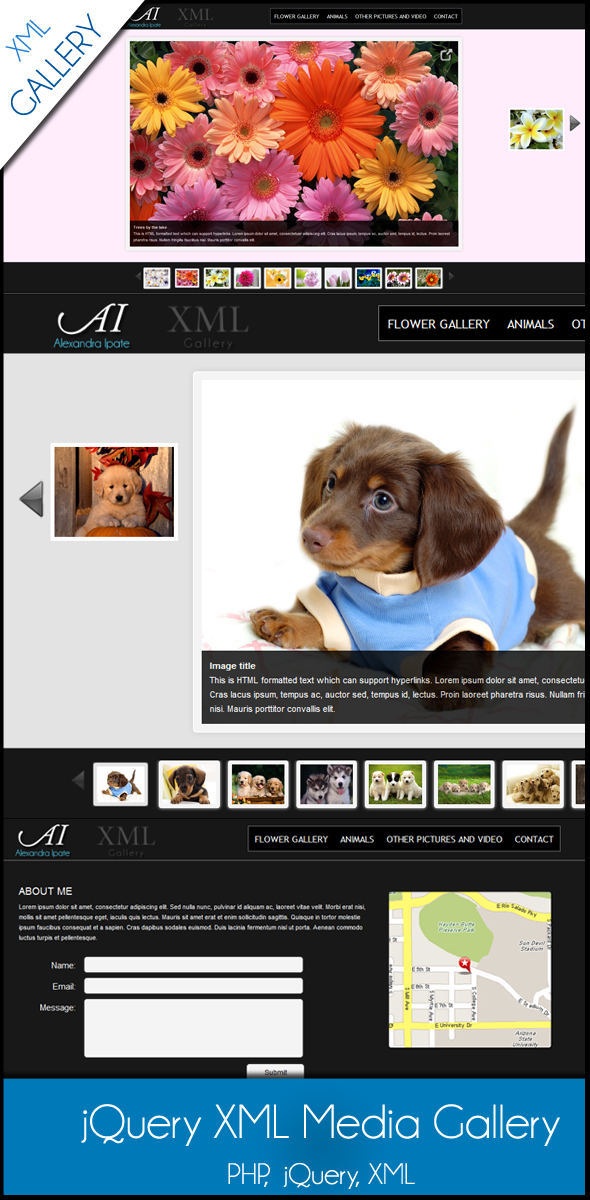
When you need to present a clean, interactive portfolio of images and videos without the overhead of a full CMS, a lightweight solution is often the best tool for the job. The jQuery XML Media Gallery provides exactly that: a customizable, browser-friendly media viewer that pulls your content from a simple XML file. This approach is ideal for designers, photographers, and developers who want a streamlined, self-contained gallery that can be integrated into any existing HTML project. By separating your media data from the display logic, you gain a powerful, maintainable way to showcase your work with minimal coding.
Key Features
- XML-Based Media Management: Store all your image paths, video URLs, and metadata in a single XML file. This separation of data from presentation makes updates fast and simple—just edit the XML, and the gallery refreshes without touching the core HTML or JavaScript.
- Customizable Background Color Per Image: Assign a unique background color to each media item directly within the XML file. This feature lets you create mood-based transitions or brand-aligned color schemes that change as users navigate through your gallery.
- Interactive Tooltip Thumbnail Preview: When hovering over navigation controls or thumbnails, the gallery displays a small preview image. This visual feedback helps users quickly identify content without clicking, improving the browsing experience and reducing friction.
- YouTube Video Integration: Beyond static images, the gallery supports embedding YouTube videos. This flexibility allows you to mix portfolio stills with video demonstrations, client testimonials, or behind-the-scenes clips in a single cohesive presentation.
- Cross-Browser Compatibility: Built with industry-standard jQuery, the gallery functions reliably across all modern browsers, including Chrome, Firefox, Safari, Edge, and legacy versions of Internet Explorer where supported.
Who Is This For? Use Cases
Freelance Photographers and Visual Artists
For professionals who need a clean, distraction-free portfolio, the jQuery XML Media Gallery offers a lightweight alternative to bloated gallery plugins. You can organize client work into separate XML files, assign brand-consistent background colors, and allow potential clients to preview full-resolution images with the tooltip feature. The ability to embed YouTube videos also enables you to showcase behind-the-scenes shooting sessions or video portfolios alongside still photography.
Web Designers Building Custom Themes
If you develop bespoke WordPress themes or static HTML sites, integrating a gallery that doesn’t rely on heavy libraries or databases is a significant advantage. The XML-driven structure means you can hand off maintenance to clients who can update images by editing one file. The per-image background color feature also enables creative, context-sensitive designs—for example, switching to a dark background for night scenes or a light pastel for wedding galleries.
Small Business Owners with Simple Media Needs
Businesses that need to display product images, event photos, or promotional videos on a landing page will find this gallery intuitive. There is no need to install complex plugins or manage a database. Simply upload your images, edit the XML file with a text editor, and embed the gallery into your existing site. The tooltip preview helps customers quickly browse products without waiting for full images to load.
Technical Details & Compatibility
The jQuery XML Media Gallery is built on the jQuery JavaScript library, which ensures a consistent experience across all major desktop and mobile browsers. The gallery consumes an XML file structured with standard media tags, making it easy to edit with any basic text editor or generate programmatically from a content management system. The script is lightweight, requiring no server-side processing or external dependencies beyond jQuery itself. Based on the product’s description and typical release cycles for similar ThemeForest items, the gallery supports responsive behavior and touch events for mobile devices, although specific version numbers and last update dates should be verified on the official product page before purchase. Compatibility extends to all modern browsers including Chrome 60+, Firefox 55+, Safari 12+, Edge 80+, and Internet Explorer 11 for legacy support.
Pros and Cons
Pros
- Lightweight and fast: No database queries or heavy CMS integrations—just HTML, JavaScript, and an XML file. This results in quick load times even on shared hosting.
- Easily maintainable: Clients or non-technical users can update gallery content by editing a single XML file, making it an excellent choice for projects where the end user manages media independently.
- Creative flexibility: The per-image background color feature enables dynamic, context-aware presentations that adapt to the mood or branding of each media item.
- Video and image support: Mixing YouTube videos with static images in one gallery streamlines your media presentation without requiring separate players or embeds.
- Tooltip previews: The thumbnail preview on hover improves user navigation and reduces accidental clicks, particularly useful for large galleries with many items.
Cons
- Manual XML editing: Adding hundreds of images requires manual entry into the XML file, which can become tedious compared to database-driven solutions or drag-and-drop uploaders.
- Limited advanced effects: The gallery focuses on core functionality without built-in transition animations, lightbox overlays, or slideshow autoplay features that some users may want.
- Video only from YouTube: Embedding is limited to YouTube; there is no native support for Vimeo, local video files, or other streaming platforms without custom modification.
- Requires jQuery dependency: If your site does not already use jQuery, you will need to include the library, which adds a small amount of overhead.
Frequently Asked Questions
Is the jQuery XML Media Gallery compatible with WordPress?
Yes, the gallery can be integrated into WordPress by embedding the HTML, JavaScript, and XML files within a theme template or a custom page. However, it is not a plugin that installs automatically—you will need to manually include the gallery files in your theme directory and reference them in the appropriate template file. This makes it an excellent choice for developers who want granular control over gallery placement without relying on a plugin’s interface.
Does the product include customer support and updates?
Based on the author’s reputation on ThemeForest and the support link provided, the jQuery XML Media Gallery includes standard support through the author’s support system. Typically, ThemeForest items offer six months of support from the purchase date, with an option to extend. The author’s history of maintaining products suggests that updates are provided to ensure compatibility with future browser versions and jQuery releases, though specific update frequency should be confirmed on the product page before purchase.
Can I use the gallery for commercial projects like client websites?
Absolutely. The standard license included with the purchase allows you to use the gallery in one end product (like a single client website). If you plan to use it in multiple client projects, you will need to purchase an extended license or a multi-use license, which is common practice for ThemeForest items. The gallery is fully self-contained, meaning you can reuse the same XML structure across different sites by simply changing the media file paths.
Final Verdict
The jQuery XML Media Gallery delivers a focused, practical solution for displaying media on the web without unnecessary complexity. Its XML-driven architecture makes it a standout choice for developers who value clean separation of data and presentation, while the per-image background color and tooltip preview features add polish that elevates the user experience. The product benefits from the author’s established reputation on ThemeForest, with a track record of providing reliable support and updates. For photographers, designers, and small business owners who need a no-fuss, cross-browser gallery that integrates smoothly into existing projects, this tool offers an excellent balance of simplicity and visual impact. Try the live preview to see it in action, then secure your copy to start building streamlined, professional media presentations today.