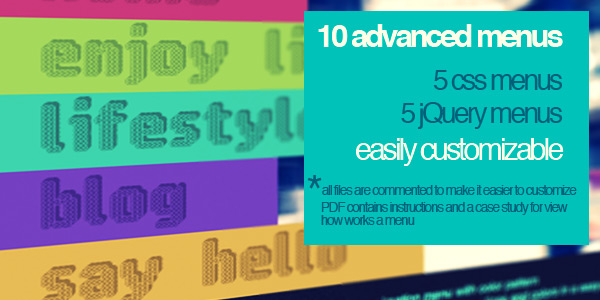
The **Super Menu Pack** is a curated collection of ten distinct navigation menus designed to provide a rapid, inspirational starting point for web projects. Created in 2010, this pack includes five menus built entirely with pure CSS and five enhanced by the jQuery framework. These menus are not simply functional components; they are design artifacts intended to elevate visual hierarchy and user interaction. For developers and designers seeking to inject a unique aesthetic into headers and primary navigation, this pack offers a diverse range of styles—from sleek minimalism to complex, animated dropdowns. This product stands as a snapshot of creative front-end problem-solving from an era when jQuery was a dominant force for dynamic effects. While the technical landscape has evolved, the underlying creative spark and structured code remain valuable assets for rapid prototyping, educational exploration, or adding a vintage, hand-crafted feel to specific projects. The collection serves as both a practical toolkit and a source of inspiration, allowing professionals to adapt and reimagine classic navigation patterns.
Key Features
- Diverse Menu Styles: The pack contains ten distinct menus, split evenly between 5 pure CSS implementations and 5 jQuery-driven solutions. This variety ensures options for projects ranging from static, lightweight sites to those requiring sophisticated, interactive navigation.
- Immediate Visual Inspiration: Each menu is designed to be a unique visual starting point. The collection is intentionally varied in appearance, covering different color schemes, layout shapes (horizontal, vertical, dropdown), and tactile effects, helping users break out of design ruts.
- Complete Source Files Included: Users receive all core project files: HTML for structure, CSS for styling, JavaScript (jQuery) for interactivity, image assets for icons and backgrounds, and Cufon font files with usage rights. This is a fully self-contained package.
- Heavily Commented & Documented Code: Every CSS and JavaScript file is thoroughly commented. This makes customization straightforward, even for those new to these techniques. The code is written to be read and understood, not just executed.
- Easy Customization via CSS: All visual aspects—colors, fonts, spacing, borders, and hover effects—can be easily modified directly within the CSS files. The clear structure allows developers to tailor each menu to their specific brand guidelines.
Who Is This For? Use Cases
The Aspiring Front-End Developer
For individuals learning HTML, CSS, and the fundamentals of jQuery, this pack is a fantastic educational resource. The heavily commented code acts as a live tutorial, demonstrating how common navigation patterns are constructed. By dissecting the 5 pure CSS menus, a learner can grasp advanced selectors, pseudo-classes, and transitions. The 5 jQuery menus provide a practical introduction to DOM manipulation, event handling, and animation effects. This is far more engaging than reading abstract documentation.
The Freelance Designer Seeking Quick Prototypes
Time is often the most scarce resource for a freelancer. When a client needs a mock-up that goes beyond a boring default navigation bar, the **Super Menu Pack** provides a library of ready-to-implement concepts. A designer can quickly drop in a menu, adjust its colors to match a brand kit, and present a polished, interactive prototype in minutes. This accelerates the feedback loop and demonstrates a higher level of craft to the client.
The Hobbyist with a Retro or Thematic Project
There is a growing appreciation for the aesthetic of early 2010s web design. The use of Cufon fonts, subtle jQuery animations, and specific visual textures gives these menus a distinct character that is hard to replicate with modern “flat” frameworks. For a personal blog, a site for a classic film club, or a retro-themed game project, these menus offer an authentic, nostalgic feel that modern tools cannot easily duplicate.
The Educator Teaching Web Design History
The pack serves as a time capsule in code. An instructor can use these menus to illustrate the evolution of front-end development. The pure CSS menus demonstrate what was possible with standard CSS2.1 and early CSS3, while the jQuery menus show the pre-VanillaJS era of plugin-based interactivity. It is a concrete, hands-on way to teach the context and evolution of web technologies.
Technical Details & Compatibility
This product was created in 2010 and is no longer actively supported by the author. It relies on older web technologies that may require specific considerations in a modern development environment. The jQuery menus specifically require the inclusion of the jQuery library (version 1.x or newer). The Cufon font replacement system is a legacy technology that has been largely superseded by @font-face and web fonts. For modern browsers, you may need to replace Cufon with a standard web font solution. The pure CSS menus are more robust and will function in most modern browsers with minimal adjustments, though certain CSS3 features like gradients and animations may have vendor prefixes that need updating. The package is platform-agnostic as it consists of standard HTML, CSS, and JavaScript files. It integrates with any CMS (WordPress, Joomla, Drupal) or custom back-end system on a code level. However, it is not distributed as a plugin or module for any specific platform. This item is sold as-is, without future updates, bug fixes, or support. Its value lies in its creative inspiration and educational clarity.
Pros and Cons
Pros
- Excellent for Creative Inspiration: The primary value is sparking design ideas very quickly.
- Educational Code: Heavily commented files are a great resource for learning older techniques.
- Diverse Aesthetic Range: Ten unique styles cover many visual bases.
- Complete Package: All necessary assets (HTML, CSS, JS, images, fonts) are included.
- Low Cost Entry Point: A very affordable way to obtain a variety of navigation concepts.
Cons
- Legacy Technology: Relies on Cufon fonts and jQuery, which are outdated. Modern alternatives (web fonts, vanilla JS) are preferred.
- No Active Support or Updates: The author explicitly states the item is no longer supported. Do not expect bug fixes or compatibility patches.
- Not Responsive by Default: Menus were designed for fixed-width desktop layouts. Significant work is needed to make them mobile-friendly.
- Not a Drag-and-Drop Solution: Requires manual code editing to customize. Not for users who cannot write or modify HTML/CSS/JS.
- Potential Security & Compatibility Issues: Using legacy jQuery versions can introduce vulnerabilities, and Cufon may have issues with modern browser security restrictions.
Frequently Asked Questions
Is the Super Menu Pack compatible with modern WordPress themes?
It is not a plugin, so it cannot be installed directly. However, a developer can extract the HTML, CSS, and JavaScript from the pack and manually integrate a menu into a WordPress theme’s header.php file. This requires a solid understanding of WordPress theme development. The pure CSS menus are easier to adapt than the jQuery ones. Expect to rewrite the jQuery code for modern WordPress standards (using enqueued scripts and avoiding global namespace pollution).
Does this item include support or future updates?
No. The product description explicitly states that the item is no longer supported and was created in 2010. There are no updates planned. The author has provided it as a historical, inspirational, and educational resource. Any customization or troubleshooting is the sole responsibility of the user. This is a “final sale” item in terms of support.
Can these menus be used for commercial projects?
Yes, the standard ThemeForest license for CodeCanyon items allows for use in commercial projects that you sell or build for a client. The Cufon fonts included have usage rights that typically allow for embedding on websites. However, you should always double-check the specific license file included in the download. The main risk is not the license but the technical viability of using such legacy code in a modern, production-grade commercial site.
Final Verdict
The **Super Menu Pack** is a niche product that delivers precisely what it promises: a collection of ten creative menu ideas, well-documented and ready to be explored. Its greatest strength is not its immediate production readiness, but its role as a catalyst for imagination and a learning tool. With over a decade since its creation, its technical components are outdated, yet its conceptual value remains. For the developer who enjoys deconstructing and modernizing code, this pack offers a rich playground. The author, Van, created these with care and a designer’s eye, and that creative intent still shines through. While you may not deploy these menus as-is on a cutting-edge site, the patterns, transitions, and layout ideas can easily be translated into modern CSS Grid, Flexbox, and vanilla JavaScript. The sale count and long-standing presence on the marketplace serve as social proof that many have found value in this pack. If you are a designer looking for a spark, a student wanting to learn, or a developer who appreciates the artistry of old-school web design, this is a worthwhile acquisition. Click the download button and unlock a decade of navigational creativity to fuel your next project. Transform your headers and breathe life into your site’s navigation with a touch of classic, well-crafted code.