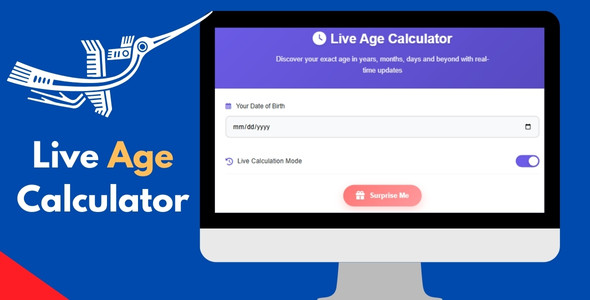
The Live Age Calculator html5 script is a small front-end tool that computes a person’s age from a birth date and displays it live, ticking upward in years, months, days, hours, minutes and seconds without a page reload. It adds birthday celebration effects such as balloons and confetti when the relevant date arrives, and it is aimed at site owners, freelancers and agencies who want a lightweight, embeddable age counter on a personal site, profile page or simple web app. It is a single-purpose script rather than a full plugin or platform, and the vendor sells it on ThemeForest for $7.
What the Live Age Calculator actually does
At its core the script takes a supplied date of birth and runs a continuous calculation against the current time, then renders the result as a live counter. The interesting part is the granularity: rather than showing a static “32 years old” figure, it breaks the elapsed time into years, months, days, hours, minutes and seconds and updates each unit as it changes. That makes the display feel dynamic in a way a plain date-difference function does not, and it is the feature most buyers will be paying for.
Several capabilities follow from that design:
- Second-level ticking without a refresh. The counter advances on its own, so a visitor can watch the seconds roll over. This is what separates a “live age ticker” from a conventional age calculator that only recalculates when a form is submitted.
- Birthday celebration effects. Balloons and confetti are triggered around the birthday itself, turning the widget into a small celebratory moment rather than a dry readout. The vendor lists these as the headline visual feature but does not document how the trigger window is configured.
- No database dependency. Everything runs client-side, so there is nothing to install on the server beyond the files themselves. That keeps hosting requirements minimal and makes the script portable between environments.
- Embedding in HTML or PHP pages. The vendor states it can be dropped into any HTML or PHP site, which covers static pages, hand-built sites and most templated CMS output.
- Responsive layout. The display is described as mobile-friendly, which matters because a multi-unit counter (years through seconds) is exactly the kind of element that breaks awkwardly on narrow screens if it is not designed for it.
- Editable source. The code is presented as clean and customisable, so colours, labels and layout can be adjusted rather than locked behind an admin panel.
One point worth stating plainly: the vendor does not publish a feature list beyond the above, and there is no mention of a settings UI, shortcode, WordPress plugin wrapper or multi-person support. Buyers should treat this as a self-contained script to be integrated by someone comfortable editing HTML, CSS and JavaScript.
Where a real-time age counter fits, and where it does not
The most natural fit is a personal, portfolio or “about me” page where the owner wants a distinctive detail. A live age readout is a novelty, but it is a memorable one, and it gives a profile page something a static biography cannot. The same logic applies to birthday or anniversary landing pages, where the confetti and balloon effects do real work: they create a moment of celebration that a plain greeting does not.
Health, fitness and lifestyle sites are a second credible use. Age-tracking tools, milestone pages and “days alive” style counters all benefit from a display that updates continuously, and the absence of a database means such a page stays cheap to host and simple to maintain. Educational contexts are another reasonable fit — a live counter is a tangible way to demonstrate how date arithmetic and timers behave in a browser, and the readable source code makes it a workable teaching example.
Where the product is the wrong choice is equally clear. Anyone expecting a WordPress plugin with an admin screen, shortcode generator and per-user birth dates stored in the database will be disappointed: this is a front-end script, and wiring it into a CMS, a membership site or a user profile system is integration work the buyer performs. The same applies to projects that need a functional age calculator with a date-picker form and a calculated result on demand — that is a different tool. And a site with a strict, corporate design language may find the confetti and balloon effects at odds with its tone; the celebration layer is the point of the product, so stripping it out removes much of what distinguishes it.
Strengths and limitations
Strengths
- Genuinely live output — the counter updates every second without reloading, which is the core differentiator against static age displays.
- Very low integration cost: no database, no server-side dependencies, and the vendor states compatibility with all major browsers.
- Multi-unit breakdown (years, months, days, hours, minutes, seconds) gives a richer readout than a single-number age.
- Birthday effects add personality that a plain counter cannot match, and they suit celebratory pages well.
- Readable, customisable code means a developer can restyle it to match an existing design system.
- At $7 the price is low enough that the purchase decision is close to trivial for a single project.
Limitations
- No documented configuration interface. Colours, birth date and effect behaviour appear to be set by editing files, which rules out non-technical users.
- The vendor does not state how the birthday effect trigger window works — whether it fires on the day only, for a range of days, or on a manual flag — so that behaviour has to be verified after purchase.
- No database or user system means no native support for multiple people, member profiles or stored birth dates; each instance is effectively hard-coded.
- There is no WordPress plugin, shortcode or block, so CMS integration is manual.
- No published sales history or rating is available on the listing, so there is no independent signal of real-world use to weigh against the vendor’s description.
- Accessibility and localisation are not addressed in the listing; a seconds-ticking display can be distracting for some users and needs care with reduced-motion preferences.
How it compares with the wider category
The alternatives to a live age ticker fall into three broad groups. The first is a general-purpose countdown or timer script, which handles date-based counting but is usually built for events rather than ages and rarely breaks time into years, months and days. The second is an age calculator widget — typically a form where a visitor enters a birth date and receives a result — which is more functional for arbitrary users but lacks the always-on, ticking presentation that makes this product distinctive. The third is a page-builder or CMS add-on, which offers convenience and an admin interface but ties the feature to a specific platform.
Against those, the Live Age Calculator html5 script competes on presentation and simplicity rather than breadth. It does one thing — display a live age with celebratory effects — and does it without server requirements. A buyer who needs a general countdown, a multi-user calculator or a no-code CMS widget will find better-fitting options elsewhere; a buyer who wants a single, attractive, self-contained live age display will find this cheaper and lighter than assembling the equivalent from a general-purpose library.
Frequently Asked Questions
Does the Live Age Calculator need a database or PHP backend?
No. The vendor states the script requires no database and runs as a front-end tool, so it works on static hosting as well as PHP environments. The age calculation happens in the browser, which keeps server requirements minimal. The trade-off is that birth dates are set in the code rather than stored and managed through an admin interface.
Can the birthday confetti and balloon effects be turned off?
Most likely yes, since the code is described as clean and customisable, but the vendor does not document a toggle. The effects are the product’s main visual selling point, so anyone planning to disable them should question whether the script is the right purchase. Confirm the behaviour with the vendor before buying.
Will it work on a WordPress site?
It can, but not as a plugin. The vendor describes embedding in any HTML or PHP site, so on WordPress the script would be added through a custom HTML block, a template file or a child theme. There is no shortcode, block or settings screen, so a developer or someone comfortable with theme files is needed.
How accurate is the live age in years, months, days, hours, minutes and seconds?
Accuracy depends on the calculation logic and the visitor’s device clock, since the script runs client-side. Calendar months vary in length, so month-level figures are an approximation by nature. The vendor does not publish the underlying method, so exact behaviour at boundaries such as leap days should be tested after purchase.
Verdict
The Live Age Calculator html5 script is worth buying for developers and site owners who want a distinctive, always-ticking age display with birthday effects on a personal, portfolio or celebratory page, and who are comfortable editing HTML and JavaScript to set it up. It is also a sensible low-cost choice for educational demos and simple lifestyle pages where a database-backed solution would be overkill. It is not the right purchase for anyone needing a no-code WordPress plugin, multi-user birth date storage, or a form-based calculator that returns an age on demand. At $7 the risk is small, but the real cost is integration time, and that should be weighed honestly against the simplicity of the feature itself.