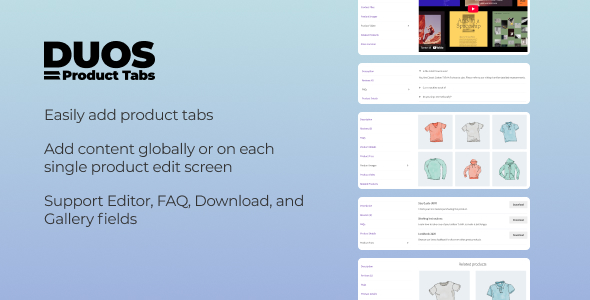
Duos Product Tabs for WooCommerce Ecommerce is a plugin that adds custom tabs to WooCommerce product pages, letting a store owner place FAQs, downloadable files, image galleries, video embeds, Google Maps and related-product grids alongside the standard description and review tabs. It is aimed at store owners, freelancers and agencies who want more control over product-page content without editing theme templates or writing code. At $18 it is a low-cost add-on rather than a full page-builder, and it is best understood as a focused tool for organising product information into tabbed sections.
What Duos Product Tabs for WooCommerce Ecommerce Actually Lets a Store Do
The plugin’s core idea is that a tab is a container whose content type is chosen from a fixed list. Each type behaves differently, and that distinction matters more than the feature list suggests.
- Rich text tabs use the standard WordPress editor, so long-form copy, headings and inline links are all available. This is the general-purpose option for sizing guides, care instructions or brand stories.
- FAQ tabs render questions as a toggle or accordion rather than an open block of text, which keeps a long list of questions from dominating the page.
- Download tabs present files such as PDFs, ZIPs and documents as a list. For stores selling equipment, software or anything with manuals, this replaces the common workaround of dumping links into the description field.
- Gallery tabs hold additional imagery — extra product shots, certificates, scanned manuals — separate from the main WooCommerce gallery.
- Video tabs embed YouTube or Vimeo content, useful for assembly demonstrations or demonstrations of a product in use.
- Google Maps tabs embed a map iframe, which suits showrooms, pickup points or service areas.
- Related products tabs place a product grid inside a tab, giving cross-sells a dedicated space instead of relying on the theme’s default placement.
Content can be defined globally and then overridden per product through metaboxes, and tabs can be assigned to specific categories or individual products. That two-tier model is the most practically important capability here: a store with two hundred products can create one FAQ tab at the global level, then replace it on the handful of products where a different answer set applies. The vendor also includes a “Before Tab Content” editor for placing static or dynamic content ahead of the main tab field, which is a niche but sensible escape hatch for layouts that do not fit the standard pattern.
Separately, the plugin exposes a visibility control under WooCommerce → Settings → Products → Product Tabs Visibility, where the default Description, Reviews and Additional Information tabs can be switched off. Hiding the Reviews tab on a store that has not yet collected reviews is a small thing, but it is the kind of detail that separates a considered add-on from a bare feature dump. Tab ordering is handled by drag-and-drop using a priority weight, and reusable tab templates are available for content that repeats across a catalogue.
Housekeeping is covered by an export/import function that writes the tab configuration to a JSON file, plus an option to delete all plugin data on uninstall. Both are the sort of thing agencies expect when handing a site to a client, and their presence is a reasonable signal about how the plugin was built.
Where This Fits, and Where It Does Not
The clearest fit is a store whose product pages are information-heavy but whose theme offers only the three WooCommerce defaults. Consider a retailer of industrial parts: each product needs a specification table, a downloadable datasheet, a compatibility FAQ and a video of the item in operation. Without a tabs plugin, that content either crowds the description or gets scattered across custom fields the theme does not render. Duos Product Tabs for WooCommerce Ecommerce gives each block a home and keeps the page scannable.
A second fit is the agency building repeatable product-page layouts across several client sites. Global tabs plus per-product overrides plus JSON export means a base configuration can be built once, exported and imported elsewhere, then adjusted per catalogue. The category-level assignment is useful for stores organised by product family, where every item in a range shares the same care instructions.
A third fit is any store using tabs for trust signals — certificates in a gallery tab, a showroom map, a documents library — where the content is static and does not need a page builder.
The wrong choice is a store that needs conditional or dynamic tab content driven by product data: for example, a tab that pulls a live specification table from custom fields, or one that changes its contents based on the selected variation. The plugin’s content types are fixed and editor-driven, and the vendor does not describe any templating or shortcode-level logic for building tabs from arbitrary data. A store with that requirement is better served by a more developer-oriented tab solution or by custom theme work. Similarly, a store whose product pages are already built with a page builder that manages its own tab modules may find this plugin redundant.
Strengths and Limitations
Strengths
- The content-type approach is genuinely practical. Separating a download list from a gallery from an accordion FAQ produces better pages than one generic rich-text tab repeated everywhere.
- Global tabs with per-product and per-category overrides solve the real maintenance problem: content that is mostly shared but occasionally different.
- Default tab visibility is controllable from a single settings screen, so the standard Description and Reviews tabs can be removed without touching theme files.
- JSON export and import make the configuration portable, which matters for agencies and for staging-to-live migrations.
- Drag-and-drop ordering with priority weights is a low-friction way to arrange tabs without code.
- The price is low relative to the amount of page-level control it adds.
Limitations
- The plugin is young. The changelog shows an initial release in May 2025 and a single compatibility update in July 2025 for WooCommerce 10.0.2. There is no long track record of updates against future WooCommerce releases, and no disclosed sales figures to indicate how widely it has been deployed.
- Tab content is editor-driven. There is no described mechanism for generating tab content dynamically from custom fields, variation data or external APIs, which caps how far the plugin scales for data-heavy catalogues.
- Google Maps support is an iframe embed, not an API integration. That is fine for a static location but offers no interactive features such as directions or multiple pins.
- The “Before Tab Content” editor exists to work around the limitations of certain tab types. Its presence is honest, but it also signals that some layouts will need manual adjustment rather than fitting the default model.
- Because tabs are configured globally and overridden individually, a very large catalogue with many one-off tab sets could become its own management overhead — the opposite of the time saving the plugin promises.
How Duos Product Tabs for WooCommerce Ecommerce Compares With the Wider Category
Product-tab plugins generally fall into three groups. The first is the lightweight tab manager: it adds tabs, controls ordering and visibility, and stops there. The second is the content-rich tab builder, which adds specific content types such as FAQs, downloads and media. The third is the developer tool, which exposes hooks, templating and dynamic data binding for tabs generated from product fields.
Duos sits firmly in the second group, with some of the housekeeping features — export/import, uninstall cleanup, default-tab visibility — that are usually found in the first. Against lightweight tab managers, it offers more content types and therefore more reasons to use tabs at all. Against developer-oriented tools, it trades flexibility for a no-code admin interface: a store owner can configure everything from the dashboard, but cannot build a tab whose contents are computed at runtime. Against page-builder tab modules, it is narrower but lighter, and it keeps tab content inside WooCommerce’s own product editing screen rather than in a separate builder layout.
The practical question is not which category is best but which matches the content. If the tabs hold hand-written material — FAQs, manuals, maps, videos — the content-type approach is a good fit and the plugin’s price makes it an easy experiment. If the tabs need to reflect live product data, the category’s developer tools are the better comparison, and this plugin will feel constrained.
Frequently Asked Questions
Does Duos Product Tabs work with the default WooCommerce tabs?
Yes. The plugin leaves WooCommerce’s Description, Reviews and Additional Information tabs in place by default and adds controls to hide any of them from a single settings screen under WooCommerce → Settings → Products → Product Tabs Visibility. Custom tabs sit alongside the defaults, and ordering across both is managed through drag-and-drop priority weights.
Can different products have different tabs?
Yes. Tabs can be created globally and then overridden at the product level using metaboxes, and they can be assigned to specific categories or individual products. This means a shared FAQ tab can apply across a catalogue while a handful of products carry their own replacement content, without duplicating the setup everywhere.
Can the tabs be moved to another site?
Yes. The settings page includes a JSON export of the tabs and plugin configuration, and a matching import for restoring or migrating a setup. That makes it possible to build a tab structure on a staging site and reproduce it on a live store, or to reuse a configuration across client sites.
Does it support video and Google Maps inside tabs?
Yes. Video tabs embed YouTube or Vimeo content, and a Google Maps tab embeds a map iframe, which is suitable for showrooms, pickup locations or service areas. The map is a static iframe rather than an API integration, so it does not provide interactive features such as multiple pins or turn-by-turn directions.
Verdict: Who Should Buy Duos Product Tabs for WooCommerce Ecommerce
This plugin suits store owners and agencies who need to move FAQs, downloads, galleries, video and maps out of the product description and into clearly labelled tabs, and who want to manage that content from the WordPress dashboard without code. The global-plus-override model and the JSON export make it particularly sensible for agencies maintaining several catalogues. It is not the right purchase for stores that need tabs generated dynamically from custom fields or variation data, nor for those already using a page builder with its own tab modules. Given the May 2025 release date and the absence of disclosed sales, buyers should treat it as an early-stage product and check that the current version is confirmed compatible with their WooCommerce installation before relying on it for a client build.