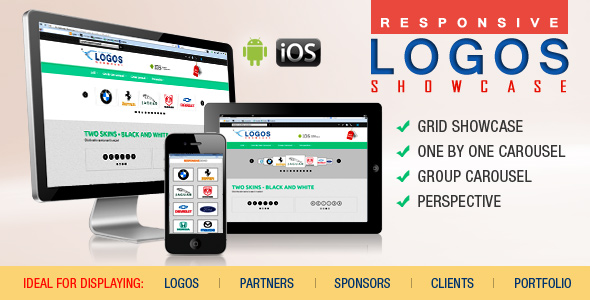
Logos Showcase Pro is a JavaScript-based display script sold on ThemeForest that renders client, partner, sponsor and brand logos as a grid, a carousel or a perspective-style slider. The Logos Showcase Pro images-and-media package ships four layout variants — Grid, Carousel One-by-One, Carousel Group and Perspective — with black and white skins for the three carousel-family layouts, and it is aimed at freelancers and small agencies who need a reusable logo wall without paying for a full WordPress plugin subscription.
The product is a standalone front-end script rather than a plugin, which matters more than the price tag suggests. A separate WordPress plugin built on the same layouts is sold on CodeCanyon, so buyers should confirm which artefact they actually need before purchasing. At $9, the script sits at the impulse-buy end of the marketplace, and the vendor (Lambert Group) does not disclose a sales count, so there is no purchase history to lean on as reassurance.
What the Logos Showcase Pro images-and-media script actually does
The core proposition is narrow and clearly defined: take a set of images and present them as a logo strip or logo wall. Four rendering modes cover most of the conventional arrangements. Grid lays logos out in a static matrix. Carousel One-by-One advances a single logo at a time. Carousel Group moves several logos per step, which suits longer client lists where a one-at-a-time rotation would take too long to cycle. Perspective adds a tilted, depth-styled presentation that reads as more decorative than the other three.
The three carousel-family variants each ship with two skins, black and white, so the surrounding chrome can be matched to a light or dark page without editing CSS by hand. The Grid variant does not carry the skin option.
Shared behaviour across all four layouts
Every variant inherits the same baseline feature set, which is the practical reason the package holds together as one purchase rather than four unrelated scripts:
- Responsive output with an opt-out. Layouts adapt to viewport width by default, but a parameter allows responsive behaviour to be switched off when a fixed-width design is required — useful inside legacy templates or email-adjacent builds where fluid grids cause more problems than they solve.
- Touch navigation. Mobile and tablet users can swipe through carousel items rather than relying on arrow controls, which is the minimum expected of any slider in this price bracket.
- Grayscale treatment. Logos can be desaturated by default and colourised on interaction, a common technique for keeping a client wall visually quiet. The vendor states plainly that grayscale fails on IE10 and IE11 because of a browser restriction, though it works on IE9 — an unusual and honest caveat rather than a hidden defect.
- Per-image borders. Border width and colour can be set separately for active and inactive states, which gives a visible hover or focus cue without writing custom CSS.
- Tooltips. A tooltip can be toggled on or off, typically used to surface a client name or short caption on hover.
- Per-image links. Each logo accepts its own external URL, with a target of _blank or _self, so a logo wall can double as a partner directory linking out to client sites.
- Autoplay with a timing parameter. Carousel variants accept a delay in seconds; setting it to zero disables autoplay entirely, which is the correct way to handle the accessibility objection to motion.
- Multiple instances per page. Several showcases can coexist on one page, either sharing a skin or using different ones — relevant for an agency site with a client section and a separate technology-partner section.
The download also includes the JavaScript options exposed for further customisation, the full set of examples shown in the preview, and written help documentation. That last point is worth taking literally: the examples are not just a demo, they are the working source files, which shortens the gap between seeing a layout and reproducing it.
Where this fits, and where it does not
The strongest fit is a marketing site that needs a credible-looking client or partner strip without a page builder. A freelancer building a static HTML or hand-coded PHP site can drop the script in, point it at a folder of logo files, and be finished in an afternoon. Agencies maintaining several small client sites benefit from the same reusable component across projects, particularly because the per-image link and target parameters turn a decorative element into something functional.
Portfolio use is explicitly supported by the vendor’s own framing — the same grid and carousel logic works for project thumbnails as for logos — so a photographer or design studio wanting a lightweight project carousel is a reasonable second audience.
It is the wrong choice in at least two situations. The first is any project where the client expects to manage logos through the WordPress dashboard. This is a script, not a plugin; adding or removing a logo means editing markup or a data source, not clicking an admin screen. The vendor points to a separate CodeCanyon plugin for that workflow, and buyers who skip that distinction will end up owning the wrong product. The second is a site that needs advanced motion, layered parallax, video slides or complex easing. The Perspective layout is a styling treatment, not an animation engine, and the feature list here is deliberately conservative.
Strengths and limitations
Strengths
- Four distinct layouts and two skins in a single $9 purchase, which is cheaper than most single-purpose slider scripts.
- Consistent parameter set across variants, so learning one layout effectively teaches the other three.
- Genuinely useful per-image options — external URL, link target, individual tooltip and border states — rather than cosmetic toggles only.
- Autoplay can be set to zero, and responsive behaviour can be disabled, giving real control over edge cases.
- Working example files ship with the download, and the vendor documents the IE10/IE11 grayscale failure instead of hiding it.
Limitations
- No disclosed sales figure on the listing, so there is no user base to gauge reliability or long-term support against.
- Grayscale is broken on IE10 and IE11 by browser restriction. IE9 works, which is an odd support profile for a product sold today.
- Skin options are limited to black and white for the carousel variants; the Grid layout has no skin at all, so matching a strongly branded palette requires custom CSS.
- No admin interface, no CMS integration and no dynamic data source described in the listing — content is effectively hard-coded per instance.
- The listing does not state a JavaScript framework requirement, browser support beyond the IE grayscale note, or a changelog, so buyers cannot verify ongoing maintenance from the page alone.
- Documentation quality is asserted but not demonstrated; the listing gives no page count or format.
How it compares with the wider category
Logo showcase tools generally fall into three groups: WordPress plugins with admin screens, page-builder modules bundled inside larger theme packages, and standalone scripts like this one. The plugin route wins on client manageability and loses on portability — a plugin is tied to WordPress, and moving the same logo wall to a static site means starting over. Page-builder modules are convenient until the site migrates away from that builder, at which point the logo wall has to be rebuilt.
Standalone scripts occupy the opposite trade-off. They are framework-agnostic, drop into any HTML output, and cost less, but every content change is a code change. Within that group, this package competes on layout variety rather than depth: four modes and two skins is a broader spread than most single-layout scripts, but it does not attempt the animation richness or the CMS connectivity that higher-priced slider libraries offer. Buyers weighing alternatives should decide first whether the logo list will change often. If it will, the plugin route is the better fit regardless of price. If it will not, a script of this kind is the leaner answer.
Frequently Asked Questions
Is Logos Showcase Pro a WordPress plugin?
No. It is a standalone JavaScript script sold on ThemeForest, with no WordPress admin integration. The vendor separately links to a WordPress plugin on CodeCanyon that implements the same grid and carousel layouts. Anyone who needs to manage logos from the WordPress dashboard should buy the plugin instead, since the script requires editing markup directly.
Can the logo carousel be stopped from auto-scrolling?
Yes. The carousel variants accept an autoplay parameter measured in seconds, and setting that value to zero disables automatic scrolling entirely. This is useful for accessibility, since motion that cannot be paused is a common complaint against slider components, and it also suits sites where a static first impression is preferred.
Does the grayscale effect work in all browsers?
No. The vendor states that grayscale does not function in Internet Explorer 10 or 11 because of a browser restriction, although it does work in IE9. Modern browsers are not flagged as problematic. Sites that still serve IE10 or IE11 visitors should either accept colour logos in those browsers or avoid relying on grayscale as a design device.
Can several logo showcases appear on the same page?
Yes. Multiple instances can be placed on one page, and the carousel variants can either share a skin or use different ones. This allows a page to carry, for example, a black-skinned client grid alongside a white-skinned partner carousel without the two components visually conflicting. The Grid variant has no skin option.
Verdict
This is a sensible purchase for a developer or freelancer who needs a lightweight, framework-agnostic logo wall for a hand-coded site and is comfortable editing markup when the client list changes. The Logos Showcase Pro images-and-media package delivers four layouts, two skins and a consistent parameter set for $9, and the per-image link, tooltip and border controls make it more functional than a purely decorative strip. It is not the right buy for anyone who needs dashboard-managed content, since that is a different product entirely, nor for projects demanding advanced animation or long-term vendor transparency. The absence of a disclosed sales count and the outdated IE grayscale caveat are reasons to test it against a real logo set before committing it to a client build.