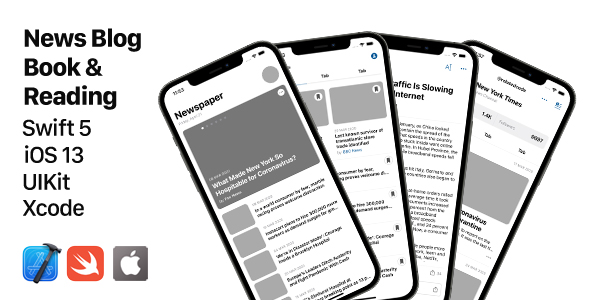
The News, Blog, Book & Reading UIKit Template provides iOS developers with a ready-made solution for creating content-rich applications. Built entirely with Swift and UIKit, this template offers a comprehensive starting point for news aggregators, blogging platforms, digital magazines, or ebook reader apps.
Comprehensive Feature Set for Content Apps
This UIKit template delivers everything developers need to kickstart their content-focused iOS applications:
- Modern UI Components: Professionally designed interfaces following Apple’s Human Interface Guidelines
- Flexible Architecture: Well-organized codebase with clear separation of concerns for easy customization
- Theme System: Complete light/dark mode support with customizable color schemes
- Device Compatibility: Responsive layouts that work across all iPhone models from 6S to the latest Pro Max
- Performance Optimized: Leverages native iOS technologies like Auto Layout and SF Symbols
Technical Specifications
The template is built with modern iOS development best practices:
- Language: 100% Swift implementation (no Objective-C legacy code)
- Interface Builder: Uses XIB files for flexible view management
- Minimum iOS Version: Supports iOS 13 and later
- Dependencies: Zero third-party libraries – pure UIKit implementation
- Data Handling: Includes sample data structures that can be replaced with real API calls
Complete Screen Inventory
The template includes an extensive collection of pre-built screens covering all essential flows for content applications:
User Authentication
- Multi-step login process with email/phone verification
- Secure code entry screens
- Location permission flows
- Notification opt-in screens
Content Browsing
- Multiple home screen variations
- Category browsing with different layout options
- Featured content carousels
- Comprehensive search functionality
Reading Experience
- Article viewing with multiple display modes
- Text customization options (font size, theme)
- Commenting system with threaded replies
- Bookmark management
Book-Specific Features
- Digital book reader interface
- Library management screens
- Author profiles and biographies
- Genre-based browsing
Customization Opportunities
Developers can easily adapt this template for specific needs:
- Branding: Modify colors, fonts, and icons to match corporate identity
- Content Structure: Rearrange or combine screens to create unique flows
- Data Integration: Connect to existing CMS or backend systems
- Feature Expansion: Add premium content gates or subscription flows
Implementation Considerations
When using this template, developers should:
- Review all screen transitions to ensure they match the intended user journey
- Replace placeholder images with actual content assets
- Implement proper error handling when connecting to live APIs
- Consider adding analytics to track user engagement
- Test thoroughly across different device sizes and iOS versions
The template’s clean architecture and comprehensive documentation make these customizations straightforward, allowing teams to focus on creating unique value rather than rebuilding common UI components.