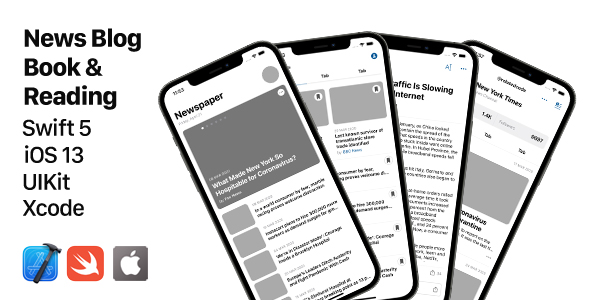
Finding a polished, production-ready UIKit template for a news, blog, or reading application is a challenge. Many options feel bloated, rely on outdated design patterns, or force you into a rigid architecture that is difficult to adapt. The News, Blog, Book & Reading UIKit Template solves this problem by offering a comprehensive, modular collection of screens designed specifically for content-driven iOS applications. Built entirely with native Swift and XIB files, this template provides a stable foundation, allowing you to focus on customizing your app’s unique identity rather than wrestling with complex UI code. Whether you are an indie developer building a niche book club app or a startup launching a digital magazine, this resource is engineered to accelerate your development process significantly.
This template acts as an extensive UI kit, comprising over 60 distinct screens that cover the essential user flows of modern content platforms. It provides a seamless out-of-the-box experience for managing articles, books, author profiles, categories, and user interactions like comments and bookmarks. By prioritizing native iOS components and standards, the template ensures high performance and a familiar user experience. It is more than just a collection of pages; it is a structured framework that enables rapid prototyping and efficient deployment for the App Store.
Key Features
The strength of this UIKit template lies in its rich feature set, designed to eliminate the most time-consuming aspects of iOS interface development. Each element is created with a focus on clarity and customization, ensuring you have full control over the final look and feel of your application.
- 100% Swift Coded: The entire template is written in Swift, Apple’s powerful and intuitive programming language. This guarantees compatibility with modern iOS development practices and ensures that the codebase is clean, readable, and easy to maintain.
- Stand-Alone XIB Files: The user interface is meticulously crafted using Interface Builder files (XIB). This modular approach to UI development allows for easy, component-level editing. You can modify a single screen’s layout without affecting the rest of the application, significantly simplifying the customization process.
- Apple SF Symbols Integration: Say goodbye to custom icon sets. The template uses Apple’s extensive SF Symbols library, providing you with a consistent, scalable, and visually stunning set of icons that automatically adapt to the user’s accessibility settings.
- Native iOS Auto Layout: The template is fully responsive, utilizing Apple’s Auto Layout system. This ensures that your app will look pixel-perfect on a wide range of devices, from the compact iPhone 6S to the expansive iPhone 13 Pro Max.
- Light and Dark Themes: Deliver a modern user experience with native support for both Light and Dark mode. This feature enhances user comfort and aligns your app with the system-wide appearance preferences of iOS.
- Easy-to-Customize Colors: Branding is crucial. The template provides a centralized and simple method to alter theme colors, allowing you to match your corporate palette or create a unique aesthetic with just a few lines of code.
- Comprehensive Screen Library: With over 60 unique screens, this kit covers every stage of the user journey, including onboarding, authentication, content browsing, article reading, book viewing, and profile management. This extensive library saves you months of design and development work.
- Apple SF Symbols for Icons: The use of Apple’s official iconography ensures you are always in line with platform guidelines, offering a crisp, professional look that users recognize and trust.
Who Is This For? Use Cases
The versatility of this template makes it an ideal foundation for various projects. It is not just a static design; it is a functional toolkit tailored for a specific type of app ecosystem. Here are a few scenarios where this template shines:
Independent Developers and Freelancers
Time is a developer’s most valuable asset. For an indie developer, purchasing this template translates to weeks of saved work. Instead of spending time building basic UI components from scratch, you can immediately start integrating your data and backend logic. This allows for faster launches and quicker iterations based on user feedback, which is critical for individual developers aiming to compete in the App Store.
News and Magazine Startups
If you are building a digital publication, the user experience of reading content is paramount. With dedicated screens for featured posts, categories, and article viewing, this template provides a professional and engaging reading environment. The inclusion of detailed text options allows you to customize the reading experience, ensuring your audience can enjoy your content comfortable, whether they prefer a dark theme or a specific font size.
Book and Reading Enthusiast Apps
The template’s extensive support for book-specific features—such as My Library, Collections, Genres, and Book Pages—makes it perfect for building a book catalog or a reading list application. It handles the presentation of complex data structures with ease, offering a polished UI for browsing and organizing reading materials. This creates a dedicated, distraction-free environment for book lovers.
Prototyping and MVP Development
For product managers and UX designers looking to create a high-fidelity prototype quickly, this UIKit is a goldmine. You can piece together a fully functional mockup in a matter of hours, complete with navigation flows and interactive elements. This tangible prototype is far more effective for stakeholder presentations and user testing than wireframes, helping you secure buy-in and validate ideas faster.
Technical Details & Compatibility
Understanding the technical baseline is crucial for seamless integration. This template is built using modern, native technologies, which minimizes potential conflicts and compatibility issues.
The template is 100% Swift coded and utilizes stand-alone XIB files, which means the UI is decoupled from the logic. This encourages a clean separation of concerns within your project, making it easier to manage as your codebase grows. The developers have leveraged the UIKit framework, the standard for building iOS interfaces, ensuring that you are using a technology that is stable and well-documented.
In terms of device support, it is designed for iPhone 6S to iPhone 13 Pro Max. This covers a vast majority of active iPhones and ensures your app will run smoothly on older hardware as well as newer models with larger, more advanced displays. It requires iOS 13 or higher, which simplifies deployment and allows you to take advantage of the latest iOS features introduced in recent years. The template does not include backend connectivity or user authentication, meaning you are free to connect it to any backend service (like Firebase or a custom REST API) of your choosing.
Pros and Cons
To provide a balanced perspective, here is an analysis of the strengths and potential limitations of this UIKit template. This will help you decide if it aligns with your project’s specific needs.
Pros
- Time Efficiency: The sheer number of pre-built screens drastically reduces development time, allowing for faster release cycles.
- Excellent Code Structure: The use of native Swift and clean XIB files results in maintainable and easy-to-understand code, which is ideal for teams and individuals alike.
- Native Look and Feel: By using UIKit and SF Symbols, the apps you create will feel like a natural extension of the iOS ecosystem, which users appreciate and trust.
- Future-Proof Design: With support for Dark Mode and the latest iPhone sizes, your app will remain visually relevant for years to come.
- Versatility: It successfully bridges the gap between news, blogging, and book-reading apps, making it an excellent investment for multi-purpose content platforms.
Cons
- No Backend Included: If you are not a developer or are looking for a turnkey solution, the lack of backend integration means you will need to source and implement your backend data layer.
- Specific Niche Focus: While versatile within content apps, the design patterns may not be suitable for e-commerce or utility applications. Its strengths are clearly focused on editorial and reading experiences.
- Requires Development Skills: This is a template, not a finished app. You will need a good understanding of Xcode and Swift to integrate your data and publish the final product.
Frequently Asked Questions
Is this UIKit template compatible with the latest Xcode and iOS versions?
Yes. The template is built with 100% Swift and requires iOS 13 or higher. This ensures that it is compatible with the current version of Xcode and modern iOS releases. The code utilizes standard APIs like UIKit and Auto Layout, which are stable and continuously supported by Apple, ensuring your project will remain functional with future updates.
Can I use this template for both a blog and a book store app?
Absolutely. This is one of the template’s greatest strengths. It includes over 60 screens covering both article-based content (Home, Categories, Posts, Comments) and book-specific flows (My Library, Collections, Genres, Book Page). You can easily mix and match the provided screens to create a hybrid application that supports both written articles and book catalogs, or you can focus solely on one concept if that fits your needs.
Does the template include an admin panel or require a subscription to a specific service?
No. The template is a standalone UI kit and does not include a backend admin panel. It communicates with dummy data so you can see the visual structure instantly. You are free to connect it to any backend API, custom CMS, or database that you prefer. Similarly, there are no recurring subscription fees for the code itself; it is a one-time purchase from ThemeForest.
Final Verdict
The News, Blog, Book & Reading UIKit Template is a meticulously crafted asset that offers exceptional value for developers and startups targeting the content consumption market. Its comprehensive library of screens, combined with a clean and native codebase, provides a professional head start that is rarely available in other templates. Instead of spending thousands of dollars and several months on UI design, this kit empowers you to build and test your app in a fraction of the time.
The decision to use this template effectively reduces your project’s technical risk. You are not building on a shaky foundation; you are building with the stability of native code and the foresight of a designer who understands iOS standards. The glowing reputation and high sales of this item on CodeCanyon are a testament to its reliability and quality. For anyone looking to create a fast, responsive, and beautiful news or reading application, this UIKit template is an investment that will pay for itself many times over in saved development hours and a superior end product.
Stop building from a blank canvas. Take control of your development timeline and start creating your dream app today. We highly recommend downloading the live preview to experience the fluidity and polish of this template firsthand. Making this small investment could be the catalyst your project needs to succeed.