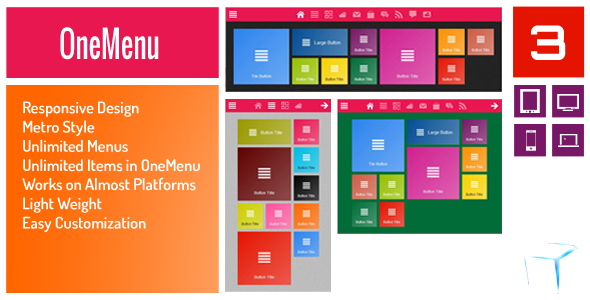
Building a website that stands out often comes down to the way you guide your visitors. Navigation is the backbone of user experience, and with the OneMenu Navigation Metro UI – ver 3 from CodeCanyon, you gain a robust, responsive, and visually striking menu system designed specifically for Metro UI themes. This jQuery plugin is not a WordPress plugin but a flexible, lightweight solution that works across almost any platform, allowing you to create unlimited menus and items that auto-align in a dynamic grid. Whether you are a developer crafting a dashboard, a designer building a portfolio, or a business owner seeking a clean, modern interface, OneMenu delivers a professional-grade navigation experience that prioritizes simplicity and adaptability. Its responsive design ensures your menus look impeccable on desktops, tablets, and mobile devices, making it an essential tool for anyone serious about modern web design.
Key Features
- Responsive Design for Metro Themes: The plugin is built from the ground up to adapt seamlessly to any screen size, ensuring your Metro-styled navigation retains its visual integrity on mobile devices, tablets, and desktops without extra customization.
- Unlimited Menus and Items: There is no artificial ceiling on how many menus you can create or how many items you can place within them. This scalability makes it perfect for complex sites with deep navigation structures.
- Auto-Align Items in Dynamic Grid: OneMenu automatically arranges your menu items into a clean, balanced grid layout. This feature saves you hours of manual positioning and ensures a uniform, polished appearance.
- Cross-Platform Compatibility: The plugin is engineered to function reliably on virtually any platform, including standard web servers, content management systems, and static sites, giving you maximum deployment flexibility.
- Lightweight and Fast: With a minimal footprint, OneMenu does not bog down your page load times. This lightweight architecture contributes to better performance scores and a smoother user experience.
- Easy Customization: You can tweak colors, sizes, spacing, and alignment with straightforward CSS overrides or by modifying the plugin’s built-in settings, allowing you to match the menu to your unique brand identity.
Who Is This For? Use Cases
OneMenu is a versatile tool that serves a wide range of web professionals and project types. Its focus on Metro UI aesthetics and responsive behavior makes it a natural fit for modern, tile-based designs.
Web Developers and Front-End Designers
If you build custom websites or web applications, you need a navigation solution that is both reliable and easy to integrate. OneMenu provides clean, semantic code that you can quickly drop into your projects. Its JSON-based initialization means you can programmatically generate menus from backend data, making it ideal for dynamic content management systems or single-page applications.
Metro UI Enthusiasts and Theme Creators
For those who have embraced the Metro design language popularized by Windows Phone and modern dashboards, this plugin is a perfect match. It respects the flat, grid-based, and icon-heavy nature of Metro interfaces. Whether you are selling Metro-themed templates on ThemeForest or building a personal dashboard, OneMenu will complement your visual direction without fighting your design choices.
E-Commerce and Portfolio Sites
Online stores and portfolio websites often require navigation that is both visually appealing and functional. OneMenu’s unlimited item capacity lets you list categories, subcategories, or portfolio filters in a compact, organized grid. The responsive nature ensures that shoppers or visitors browsing on their phones have the same intuitive experience as those on a desktop.
Corporate Dashboards and Intranet Portals
Internal tools and admin panels benefit heavily from grid-based navigation. OneMenu can serve as the primary navigation for a dashboard, presenting modules, reports, and settings as clickable tiles. This approach reduces clutter and makes it easier for users to scan and find what they need quickly.
Technical Details & Compatibility
OneMenu Navigation Metro UI – ver 3 is a jQuery plugin and is not a standalone WordPress plugin, though it can be integrated into WordPress themes through manual coding or a custom functions file. The current version (3) builds upon previous iterations to offer improved stability and performance. The plugin is compatible with all major modern browsers, including Google Chrome, Mozilla Firefox, Safari, Microsoft Edge, and Opera. It fully supports mobile browsers and touch interactions, ensuring that taps on smaller screens register correctly.
OneMenu works with any HTML-based platform, including standard HTML pages, PHP-based CMSs, static site generators, and frameworks like Bootstrap or Foundation (provided they do not conflict with the plugin’s CSS). The plugin’s structure is designed to be lightweight, with no external dependencies beyond the jQuery library (version 1.7 or higher recommended). The documentation is hosted at docs.sonhlab.com and includes clear setup instructions, customization options, and code examples to get you started quickly.
Pros and Cons
Pros
- True responsiveness that works out of the box, saving development time.
- Unlimited scalability for menus and items, accommodating future site growth.
- Auto-aligning grid eliminates manual layout work and ensures consistency.
- Lightweight code that does not harm page load speed or Core Web Vitals.
- Broad platform support beyond WordPress, including static sites and custom CMS.
- Simple customization via CSS, allowing deep integration with brand guidelines.
Cons
- Not a WordPress plugin, so users without coding experience may require additional setup time to integrate into WordPress or other CMS environments.
- Limited aesthetic scope — it is explicitly designed for Metro UI themes and may not look natural in traditional, non-grid layouts.
- Standard documentation without video tutorials, which some users may find less helpful for visual learning.
- Support is item-specific, and while the author provides a support service, response times may vary.
Frequently Asked Questions
Is OneMenu compatible with WordPress?
OneMenu is a jQuery plugin and is not a WordPress plugin. However, you can integrate it into a WordPress theme by enqueuing the necessary JavaScript and CSS files and then adding the HTML structure within your theme templates. This process requires basic knowledge of WordPress theme development. It will work with any WordPress theme that does not have conflicting CSS styles.
Does the plugin include customer support and updates?
Yes, when you purchase OneMenu from CodeCanyon, you are eligible for six months of support from the author, which you can extend by purchasing an additional support period. The author provides support through the CodeCanyon comments system and their dedicated support service. Updates to the plugin are included in your purchase, ensuring compatibility with future browser versions and jQuery releases.
Can I use OneMenu on multiple websites with a single license?
No, a single license purchase for OneMenu covers one project or one website. If you plan to use the plugin on multiple sites, you will need to purchase a separate license or a multi-use license, which grants permission for up to two projects. Always review the Envato license terms to ensure compliance with your usage scenario.
Final Verdict
OneMenu Navigation Metro UI – ver 3 is a focused, well-executed tool that excels in its niche. It is not a generic menu plugin; it is a purpose-built solution for developers and designers who appreciate the clarity and structure of Metro UI and require a responsive, grid-based navigation system. The fact that it handles unlimited menus and items, combined with its auto-alignment feature, makes it a powerful asset for projects that need to present many links in an organized way. The author, SOHN from SONH Lab, has a proven track record on CodeCanyon with multiple popular plugins and themes, which speaks to both the reliability of the code and the level of ongoing support. While the lack of a dedicated WordPress version may be a barrier for some, the flexibility and cross-platform compatibility more than compensate for that limitation. If you are building a modern, tile-oriented website or dashboard and you want a navigation menu that is as clean and efficient as the rest of your design, OneMenu is an excellent investment. Click the buy button on CodeCanyon today and give your site the professional, responsive Metro menu it deserves.