WordPress site owners and developers are constantly seeking ways to display their content in a more dynamic, engaging, and visually compelling manner. Static grids and simple lists often fail to capture user attention, leading to higher bounce rates and lower session durations. This is where **Post Layout: Carousel + Slider for Visual Composer** steps in as a formidable solution. As a premium WordPress plugin available on CodeCanyon, it empowers you to transform your standard blog posts, portfolio items, and custom post types into stunning, interactive carousels and sliders directly within the WPBakery Page Builder (formerly Visual Composer) interface. Whether you are showcasing a portfolio, a client testimonial feed, or a series of news articles, this plugin provides the granular control needed to align every visual aspect with your brand’s identity, without touching a single line of code.
Key Features
This plugin is engineered not just for aesthetic appeal but also for functional depth, offering a suite of features that cater to both casual users and advanced designers. Below is a breakdown of the most potent capabilities that set this product apart in the crowded market of WordPress content layout tools.
- Four Distinct Hover Effects: Elevate user interaction with four meticulously crafted hover animations. These effects add a layer of polish to your content, making it feel modern and responsive to user actions. You can switch between these effects in real-time to find the perfect match for your site’s tone.
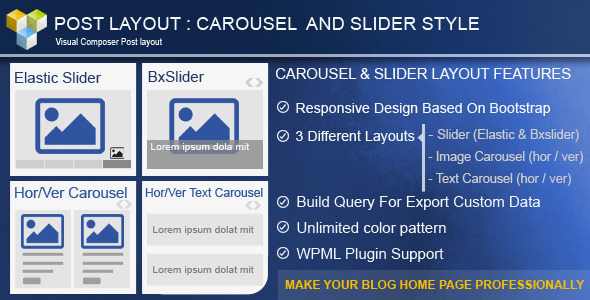
- Robust Query Building Engine: This is arguably the most powerful feature for content-heavy sites. The plugin allows you to build complex queries to pull in exactly the content you want. You can filter by Post Type, Category, Tags, Custom Taxonomies, and even Individual Authors, giving you absolute control over your data feed.
- Three Unique Layouts: Versatility is key. The plugin offers a Horizontal/Vertical Carousel, a Text Carousel, and a Slider module featuring both BXSlider and Elastic Slider types, ensuring you have the right tool for any content presentation challenge.
- Granular Control Over Carousel Behavior: You are not locked into default settings. Adjust the Items Per View, set the Animation Speed, and toggle the Infinite Loop mode to create the exact browsing experience you envision for your visitors.
- Complete Typography Customization: With access to 500+ Google Fonts, you can match the typography of your titles, excerpts, and meta sections perfectly with your global site styles. Layering on font size controls for each element ensures that hierarchy and readability are always optimized.
- Advanced Meta & Skin Options: Choose between two distinct skins for the carousel and select specific Meta Colors to ensure your post information integrates seamlessly with your color scheme.
- Tailored Read More Options: Control user journeys with flexible CTA settings. You can choose to display a traditional Read More Link or a more prominent Read More Button, allowing you to drive clicks effectively.
- WPML Compatibility: In an increasingly global digital landscape, the plugin’s full support for the WPML plugin ensures that your multilingual sites will function flawlessly, making it a safe option for international businesses.
Who Is This For? Use Cases
The flexibility of this plugin makes it a universal tool for anyone utilizing the WPBakery Page Builder. However, it shines brightest for specific user groups who can leverage its features to solve unique design problems.
Portfolio Creatives and Freelancers
For photographers, graphic designers, and web developers, showcasing work in a static grid can feel flat. Using the Carousel layout, professionals can display their portfolio items in a horizontal scrolling format that feels premium and interactive. The Elastic Slider is particularly effective for creating a bold, first-fold portfolio impression, allowing viewers to focus on one large, beautiful image at a time before navigating to the next project.
News Publishers and Magazine Editors
Content-heavy sites often struggle with clutter. Editors can use the plugin’s advanced query builder to automatically pull the latest articles into a compact, navigable slider. This is perfect for “Trending Now” sections or “Editor’s Picks” modules on a homepage. The ability to filter by category or tag allows editors to curate specific feeds—for example, a slider dedicated solely to “World News” or “Tech Reviews”—without creating duplicate content pages.
E-commerce Brand Managers (WooCommerce Users)
While the plugin is not solely for WooCommerce, it integrates beautifully with custom post types. E-commerce site managers can create elegant carousels to display “Featured Products” or “Customer Favorites” on the shop landing page. By utilizing the Build Query feature to sort by specific product categories, you can upsell and cross-sell effectively, all while maintaining a clean, conversion-focused layout that keeps the shopping experience frictionless.
Web Design Agencies
Agencies managing multiple client sites require tools that are both powerful and easy to deploy. This plugin offers that efficiency. The drag-and-drop functionality within WPBakery means that creating a custom slider for a real estate client or a carousel for a restaurant’s menu is a matter of minutes, not hours. The Responsive Layout ensures that all these dynamic elements render perfectly across mobile devices, tablets, and desktops, preserving the client’s brand integrity on every screen size.
Technical Details & Compatibility
Before integrating any new software, it is crucial to understand its technical footprint and requirements. This plugin is built specifically as an extension for the WPBakery Page Builder (Visual Composer), meaning that this add-on is a mandatory prerequisite for its functionality. The plugin is not a standalone page builder itself; it enriches the existing WPBakery ecosystem with specialized post-layout widgets.
Regarding performance and stability, the development team has consistently maintained the plugin through several iteration cycles. Since its earlier versions, the team has diligently released updates to ensure compatibility with the latest versions of the parent plugin, including recent patches to address compatibility with the New Visual Composer interface and to fix minor backend issues. Notable updates have introduced support for Visual Composer 5.2x and fixed conflicts with various themes, ensuring that the plugin remains a stable addition to your development arsenal. The script is primarily CSS and jQuery-based, which allows for smooth client-side rendering without heavy server-side processing, ensuring that your page load times remain optimized for both user experience and SEO scores. It is also fully compatible with the WPML plugin, ensuring translation workflows are not hindered.
Pros and Cons
To provide a transparent and balanced view of this product, it is essential to evaluate its strengths and potential limitations objectively. This empirical breakdown will help you determine if it aligns with your specific project needs.
Pros
- Exceptional Design Flexibility: The sheer number of layout variations—carousel, slider, grid—combined with hover effects and font choices grants an unsurpassed level of creative freedom without needing custom CSS.
- Streamlined Workflow: Integrating directly with WPBakery’s drag-and-drop builder accelerates the site-building process, making it incredibly efficient for rapid development.
- Lightweight & Fast: Despite its feature-rich nature, the plugin is coded to be efficient, ensuring it does not bloat your site’s database or significantly impact speed.
- Strong Query Filtering: The deep integration with WordPress’s query system allows for advanced content curation, which is a lifesaver for sites managing large volumes of posts.
- Localization Ready: With WPML support, your global audience can enjoy the same dynamic layouts in their native language, removing a major barrier to international scaling.
Cons
- Dependency on WPBakery: This plugin is useless without the WPBakery Page Builder. This makes it a niche tool specifically for the WPBakery community, not for users of Gutenberg or other page builders like Elementor.
- Steep Learning Curve for Query Builder: While extremely powerful, the extensive query options (Taxonomies, Custom Post Types, etc.) might seem intimidating to WordPress beginners who are accustomed to simpler “latest posts” blocks.
- Visual Effects Over Content Priority: Some of the heavier hover effects and slider animations, while beautiful, may detract from text-heavy content if not configured with moderation and clarity in mind.
Frequently Asked Questions
When considering a premium plugin, potential buyers frequently have specific inquiries regarding setup, support, and limitations. Here are answers to some of the most common questions regarding this product.
Is Post Layout: Carousel + Slider for Visual Composer compatible with the latest version of WPBakery?
Yes. The developers have maintained a consistent update schedule to ensure compatibility with the latest iterations of the parent Visual Composer plugin. The changelog specifically highlights patches for version 5.2x and fixes for the “New Visual Composer” interface, reflecting their commitment to ensuring that the plugin operates smoothly on modern WordPress installs.
Can I use this plugin to display WooCommerce products in a carousel?
Absolutely. While it is not a WooCommerce-specific extension, the plugin works by utilizing the standard WordPress query system. Since WooCommerce products are registered as a custom post type called “product”, you can easily select this as your data source within the Build Query section. You can then filter by product categories and tags to create a fully functional, visually appealing shop carousel.
Does the plugin slow down my website because of the animations?
No, the plugin is designed with performance in mind. The animations and slider effects are efficiently coded using CSS3 and jQuery, which rely on the user’s browser processing power rather than overloading your server. Additionally, the plugin does not execute excessive AJAX calls or database queries when displaying the carousel, ensuring that you can maintain high PageSpeed scores if you host your media files intelligently.
Final Verdict
In the competitive landscape of WordPress add-ons, Post Layout: Carousel + Slider for Visual Composer distinguishes itself as a professional-grade tool that prioritizes depth and control. It bridges the gap between basic post display and custom-coded sliders, offering a middle ground that is both code-free and highly flexible. The plugin’s long-standing presence on CodeCanyon, evidenced by a detailed changelog dating back to 2014, stands as a testament to its reliability and the developer’s dedication to long-term maintenance—a critical factor for anyone afraid of plugin abandonment.
If you are heavily invested in the WPBakery ecosystem and have been searching for a reliable way to make your content pop, waiting is only costing you site engagement. This plugin offers the granular control over typography, hover effects, and query building that professional projects demand. Stop settling for default grid layouts that blend into the background. Elevate your portfolio, streamline your news display, and captivate your audience with interactive storytelling. Click the button below to purchase your license now and start transforming your visual content strategy today.