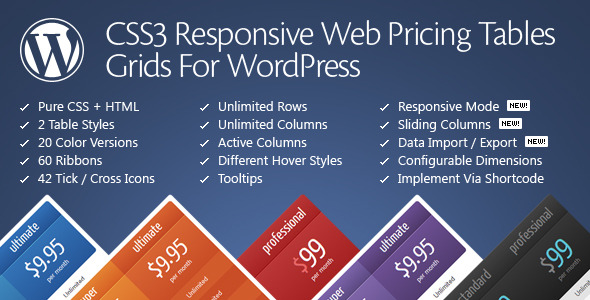
Choosing the right pricing table plugin for your WordPress site can be the difference between a visitor bouncing and a visitor converting. A clunky, unresponsive table can undermine your professionalism, while a sleek, feature-rich comparison tool can guide customers seamlessly to the perfect plan. Pricing Tables for WordPress by QuanticaLabs is a dedicated solution designed to solve this exact problem, offering a blend of aesthetic flexibility and powerful administrative controls that puts the power of professional-grade pricing displays directly into your hands.
Key Features
- Intuitive Admin Panel with Live Configuration: The plugin boasts a backend interface where changes are previewed in real-time. QuanticaLabs claims you can have a fully functional table ready in 2-5 minutes, dramatically reducing setup time.
- Dual Table Styles with 20 Predefined Colors: You are not locked into a single look. The pack includes two distinct CSS3 table styles and twenty color variations, allowing you to match your brand or experiment with different aesthetics without touching a line of code.
- Advanced Responsive Mode Configurator: Unlike plugins that simply scale down, this tool lets you define your own responsive breakpoints. You can set specific column widths and font sizes for each responsive step, ensuring your tables look intentional on every device.
- Sliding Columns & Expandable Rows: Enhance user interaction with sliding column effects and expandable rows. This allows you to present a clean, compact table while providing the option to reveal additional details on demand.
- Active (Popped-Up) Columns & Ribbons: Draw attention to your recommended or best-value plan. You can set any column to be “active” and pop out by default, and adorn it with one of 60 available ribbons to create a clear visual hierarchy.
- Dedicated Elementor & WPBakery Widgets: For users of these popular page builders, dedicated components are included. This means you can insert and customize your pricing tables directly within your page builder interface, streamlining your workflow.
- Comprehensive Icon & Tooltip System: Communicate plan features clearly. The plugin includes 42 tick and cross icons to denote included or excluded features, plus CSS3 tooltips for adding explanatory hints without cluttering the table layout.
- Import/Export Functionality: Manage multiple sites or back up your configurations. The ability to import and export settings and table data is a significant time-saver for developers managing several client projects.
Who Is This For? Use Cases
This plugin is built for any WordPress site owner, freelancer, or agency that needs to present pricing, packages, or subscription options in a clear and persuasive manner.
Freelancers and Small Business Owners
If you offer tiered services—such as a basic, standard, and premium package for web design, consulting, or marketing—this tool allows you to create a professional comparison table without hiring a developer. The live admin panel and pre-built color schemes mean you can produce a polished result in minutes, directly from your WordPress dashboard.
Software as a Service (SaaS) and Membership Sites
For sites selling monthly subscriptions or software plans, the ability to highlight an “active” or recommended column is crucial. You can use the popped-up column feature to visually push your best-value plan, while the expandable rows can list advanced features without overwhelming the initial view. The dedicated Elementor and WPBakery widgets make integration into complex landing pages seamless.
E-commerce Stores with Tiered Shipping or Memberships
While not a direct replacement for a WooCommerce table, this plugin is excellent for presenting non-cart pricing structures, such as membership club levels, tiered shipping options, or donation amounts. The clear comparison grid and hover states help users quickly digest differences between options.
Web Design Agencies and Developers
For professionals building sites for clients, the import/export feature is a standout. You can create a master set of configurations and deploy them across multiple client sites. The extensive admin panel options, including column sorting and cell-level configuration, provide the granular control needed to match complex client requirements.
Technical Details & Compatibility
Pricing Tables for WordPress is a pure CSS3 and HTML solution, ensuring fast load times and minimal server-side overhead. It is compatible with WordPress Multi-Site (MU) and implements a shortcode [css3_grid] for easy placement. The plugin loads its files only when the shortcode is used, which helps maintain site performance. Browser support is robust, with full support for Firefox 3.5+, Opera 11+, Safari 5+, Chrome, and IE9+. Note that IE6-8 lack support for rounded corners and shadows, which is a standard limitation for older browsers. The current version is v11.8, updated as of August 2025, indicating active maintenance and support from QuanticaLabs.
Pros and Cons
Pros
- Exceptional Ease of Use: The live configuration panel is a major time-saver. User testimonials consistently mention how quickly they were able to set up and publish tables.
- High Level of Customization: From responsive breakpoints to column widths in pixels or percentages, the control is deep. The 20 color versions and 60 ribbons offer significant visual variety out of the box.
- Strong Page Builder Integration: Dedicated widgets for Elementor and WPBakery make it a natural fit for those who build sites with these tools.
- Proven Track Record: With over 11,224 sales and a developer reputation built over 9+ years on Envato, the plugin has a large user base and a history of reliability.
- Responsive and Helpful Support: QuanticaLabs runs a dedicated support forum and aims for 24-hour response times on weekdays. Multiple user reviews specifically praise the support team’s speed and effectiveness.
- Value for Money: At $27.00, the plugin offers a comprehensive feature set that would cost significantly more if custom-developed or purchased from a premium SaaS provider.
Cons
- Limited to Two Base Styles: While the 20 color versions provide variety, the structural design is limited to two core table styles. Users wanting a radically different layout may find the options restrictive.
- No Native WooCommerce Integration: The plugin is designed for informational pricing tables. It does not connect directly to WooCommerce for adding items to a cart or processing payments. It is a display tool, not a checkout tool.
- Legacy Browser Limitations: While modern browsers are fully supported, the lack of support for rounded corners and shadows in IE6-8 may be a concern for organizations that must support very old enterprise environments.
Frequently Asked Questions
Is Pricing Tables for WordPress compatible with the latest version of WordPress?
Yes. The plugin was updated to version 11.8 in August 2025, which demonstrates active development and compatibility with current WordPress core updates. The developer, QuanticaLabs, has a long history on Envato and is committed to maintaining compatibility.
Can I use this plugin with the Elementor or WPBakery page builder?
Absolutely. The plugin includes a dedicated Elementor widget and a WPBakery Page Builder component. This allows you to insert and customize your pricing tables directly within your page builder interface, making it a seamless fit for sites built with these tools.
Does this plugin include support and documentation?
Yes. The purchase includes full documentation and access to QuanticaLabs’ support forum. Support is conducted in GMT+1, with a target of 24-hour responses on weekdays. Weekend and holiday requests are handled on the next business day. User reviews consistently highlight the quality and responsiveness of the support team.
Final Verdict
Pricing Tables for WordPress by QuanticaLabs delivers on its core promise: making it fast and easy to create beautiful, responsive pricing tables. The live admin panel is a genuine productivity boost, and the depth of customization—from responsive breakpoints to column ribbons—is impressive for a plugin at this price point. With over 11,000 sales and a consistently positive user reputation, it is a well-vetted tool that has proven its value for freelancers, agencies, and site owners alike. If you are looking for a reliable, feature-rich pricing table solution that integrates smoothly with Elementor and WPBakery, and you value a developer with a strong support track record, this is a smart investment. Give your pricing pages the professional edge they deserve and try Pricing Tables for WordPress today.