Sharp Gallery is a jQuery-based image gallery script sold on ThemeForest for $7, built around a grid of oversized thumbnails where the full-size image opens inside the grid itself rather than in a separate lightbox overlay. It is aimed at developers and designers who want a lightweight, hand-configurable gallery they can drop into a static site or custom build, and who are comfortable editing JavaScript settings rather than clicking through a WordPress admin panel. Anyone expecting a point-and-click plugin should look at the separate WordPress edition instead.
What Sharp Gallery images-and-media actually does well
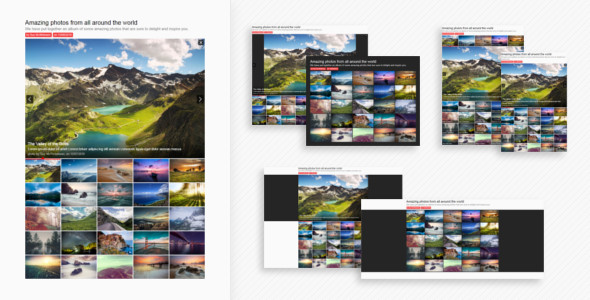
The defining design decision is that the expanded image appears in place, anchored to the thumbnail that triggered it, with the rest of the grid rearranging around it. That is a meaningfully different interaction model from the standard modal lightbox, and it is the reason to consider this script over the dozens of generic gallery libraries available for free. The grid stays visible and interactive while an image is open, which suits editorial layouts and portfolio pages where the surrounding thumbnails are part of the composition rather than a navigation afterthought.
Configuration through JavaScript settings
The script exposes more than forty settings, all set in the build code. They cover thumbnail width, stage position, animation behaviour, keyboard navigation, borders, spacing, label styling, text colour and font handling. Because these are JavaScript options rather than CSS overrides, a developer can define several distinct gallery configurations in one project without duplicating stylesheets. The 2.0 release moved a large batch of former CSS settings into the JS layer and kept backward compatibility for the old names, which suggests the author is thinking about upgrades rather than shipping and abandoning.
Templates as starting points
Twelve templates ship with the package, each demonstrating a different configuration of the same engine. They are viewable on the vendor’s preview page before purchase, which is the right way to evaluate whether the available permutations cover a given design brief. In practice the templates function as documentation by example: a developer can take the closest match and adjust settings from there rather than building a configuration from an empty file.
Weight and animation performance
The minified plugin file is under 16KB, and animations run through Velocity rather than jQuery’s own animation queue. For a gallery that has to coexist with analytics, fonts, tracking scripts and a CMS front end, that footprint is genuinely small, and Velocity is a sensible choice for transform-heavy motion on mobile hardware. The vendor states the gallery is responsive and cross-browser tested, including older browsers, though no specific browser versions or devices are listed.
Installation and documentation
Setup consists of copying the HTML markup and an assets folder into the project. There is no build step, no package manager dependency and no server-side component, which makes it viable for hand-coded sites, landing pages and environments where adding a dependency is impractical. A written guide covers installation, customisation and support contact details, and the vendor makes it available for preview before purchase — a reasonable transparency signal.
Where Sharp Gallery fits, and where it does not
The strongest fit is a custom-built or static website where the developer controls the markup: a photographer’s portfolio, an architecture or design studio showcase, a restaurant or hotel site with a curated image set, or a campaign landing page that needs a distinctive grid interaction. It also suits agencies maintaining a house boilerplate who want one small, predictable gallery dependency across client projects.
It is the wrong choice for a WordPress site owner who wants to add a gallery through the dashboard — a separate WordPress plugin version exists for exactly that reason, and buying the jQuery edition by mistake would be an avoidable frustration. It is also a poor fit for anyone who needs the gallery to be populated dynamically from a CMS API, a database or a user upload system without writing that integration themselves; the script is a front-end renderer, and the vendor does not describe any data-fetching layer. Projects requiring built-in e-commerce, watermarking, download protection or client proofing galleries should look at dedicated photography platforms instead.
Strengths and limitations of Sharp Gallery images-and-media
Strengths
- The in-grid expansion interaction is distinctive and keeps surrounding thumbnails visible and usable, unlike a modal lightbox.
- Under 16KB minified keeps the performance cost low relative to feature count.
- Over forty JS settings allow multiple configurations in one project without CSS duplication.
- Velocity-driven animation is a better choice than jQuery’s default animation for smooth mobile motion.
- Twelve previewable templates and a previewable guide reduce the risk of buying blind.
- No build tooling or server dependency; copy the files and go.
- Free updates and direct author support are included in the one-time $7 price.
Limitations
- Configuration lives in JavaScript, so changing the gallery requires code edits and redeployment rather than a settings screen — unsuitable for non-technical site owners.
- No sales figures are disclosed on the listing, so there is no public track record to weigh.
- The most recent update listed is version 2.1 from March 2018, which raises legitimate questions about ongoing maintenance and compatibility with current browser behaviour.
- No named browser versions, device matrix or performance benchmarks are published, so cross-browser claims cannot be independently verified from the listing.
- Several settings use coarse two-value choices (small or big, square or round, gradient or plain) rather than free numeric or colour input, which limits fine-grained design control.
- There is no described mechanism for dynamic image sources, lazy loading or responsive image srcsets — image delivery optimisation is left to the implementer.
- Because the gallery is a front-end script, accessibility behaviour such as focus management and screen-reader labelling is not documented and would need to be audited on implementation.
How it compares with the broader gallery script category
The gallery market splits roughly into three groups: free open-source libraries, heavyweight commercial gallery suites, and small paid scripts like this one. Free libraries such as lightbox and grid plugins usually win on community size and update frequency, but they rarely offer the specific in-grid expansion behaviour, and customising them to match a design often costs more developer time than the $7 purchase price. Heavyweight commercial suites bundle sliders, video, albums, social feeds and admin interfaces, and price accordingly; they suit projects that need many media types in one system.
Sharp Gallery sits deliberately in the narrow middle: one interaction pattern, executed with a large number of styling options, at a trivial cost. The trade-off is scope. A buyer gets a focused, small, well-parameterised grid gallery and nothing else — no video support, no album hierarchy, no admin UI, no dynamic data layer. For a developer whose brief matches the interaction, that focus is an advantage. For anyone whose brief is still shifting, a broader suite or a free library with an active maintainer is the safer commitment.
Frequently Asked Questions
Is Sharp Gallery a WordPress plugin?
No, this listing is the jQuery plugin edition, not a WordPress plugin. A separate WordPress version is sold under the name Sharp Gallery for WordPress. The jQuery edition requires copying HTML markup and an assets folder into a hand-coded or custom-built site, and configuration happens in JavaScript rather than through the WordPress dashboard.
Does Sharp Gallery work on mobile phones?
Yes, the vendor states the gallery is fully responsive and resizes content to fit available space. Animation runs through Velocity, which is generally efficient on mobile hardware, and the minified file is under 16KB. However, no specific device list or mobile test results are published, so verification on target devices is advisable before launch.
How much does Sharp Gallery cost and are updates included?
It costs $7 as a one-time purchase on ThemeForest, and the vendor states all future updates are free to existing buyers. Update history is documented on the listing, with the most recent entry being version 2.1 from March 2018. Prospective buyers should weigh that update date when assessing long-term maintenance expectations.
Can Sharp Gallery pull images from a CMS or database?
Not out of the box. The script renders a gallery from HTML markup and JavaScript settings, and the vendor does not describe any data-fetching, API or CMS integration layer. Populating it from a database, headless CMS or user uploads would require custom development to generate the required markup before the script initialises.
Verdict on Sharp Gallery images-and-media
Buy Sharp Gallery if the in-grid expansion interaction matches a design brief, the project is hand-coded or static, and a developer is available to edit JavaScript settings and manage image delivery manually. At $7 with free updates and direct author support, the risk is low for that specific use case. Do not buy it if the site runs on WordPress and needs dashboard management, if images must come from a CMS or database without custom work, or if a documented recent maintenance record is a procurement requirement. The script is a focused, well-parameterised tool rather than a general media platform, and it rewards buyers whose requirements are already settled.