A pricing table is often the final checkpoint before a visitor commits to a purchase or subscribes to a service. If it looks messy, feels cluttered, or lacks visual hierarchy, potential customers will hesitate. For designers, developers, and freelancers who need a no-fuss solution that still packs a visual punch, the Simple, Clean and Bold Three Color Pricing Table HTML & CSS delivers exactly what the name promises: clarity, impact, and rapid implementation. This lightweight component strips away unnecessary complexity, giving you a ready-to-use, three-tier pricing layout that works out of the box, helping you convert visitors into buyers without the usual design headaches.
Key Features
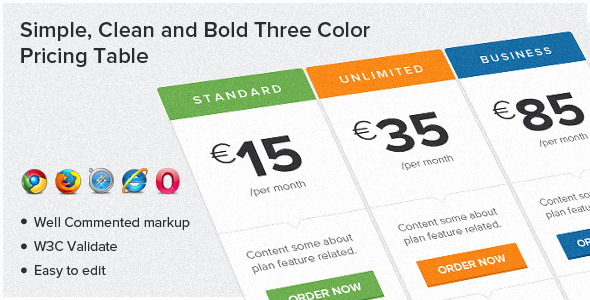
- Clean and Bold Three-Color Scheme: Each pricing column features a distinct, vibrant color. This visual differentiation helps users instantly grasp the differences between plans (e.g., Basic, Professional, Enterprise) without reading every line. The bold colors create a strong focal point that guides the eye toward the most important option.
- Simple Feature Section: The table includes a dedicated area for listing plan highlights. The layout is clean, using minimal styling to ensure the features are scannable. You can easily edit the text to include your unique selling points, from storage limits to support hours.
- Prominent “Order Now” Button: Each plan includes a clear call-to-action button. This button is styled to stand out from the feature list, reducing friction for users ready to click. The design encourages conversions by making the next step obvious and clickable.
- Well-Commented Markup: The HTML and CSS are thoroughly commented. This is invaluable for developers who need to customize the table. You can quickly locate the pricing values, color variables, or button text without hunting through uncommented code. It respects your time.
- W3C Validated Markup: The code has been validated against W3C standards. This ensures compatibility across modern browsers and reduces the risk of rendering errors. A valid foundation also contributes to better SEO performance and site health.
- Responsive & Browser Supported: The table is designed to work on all major modern browsers including Chrome, Firefox, Safari, and Opera. The responsive layout ensures the pricing columns stack neatly on mobile devices, maintaining readability and clickability on smaller screens.
- Google Fonts Integration (Lato): The table uses the popular Lato font from Google Fonts. Lato is known for its excellent readability and modern, approachable aesthetic. This gives your pricing section a professional, contemporary look without additional design work. A direct link to the font resource is provided in the documentation.
Who Is This For? Use Cases
Freelance Web Designers and Developers
If you build websites for clients, time is money. You need components that are reliable, look professional, and can be customized quickly. This pricing table is perfect for client projects where you need a clean, bold, and functional pricing section without building one from scratch. You can drop it into a WordPress site, a static HTML page, or a landing page platform. The well-commented code makes it easy to adjust colors, features, and buttons to match your client’s branding. It saves you hours of CSS debugging and gives your client a polished result.
SaaS Startups and Digital Product Owners
A clear pricing page is critical for any software-as-a-service or digital product. This three-color table is ideal for presenting your subscription tiers. The visual hierarchy helps customers quickly understand the value progression—for example, a “Starter” plan in blue, a “Growth” plan in green, and a “Premium” plan in a bold accent color. The simple feature list and clear “Order Now” button are designed to reduce hesitation and drive sign-ups. It works exceptionally well for tools, membership sites, and online courses.
Marketing Teams Creating Landing Pages
When running a campaign or promotion, you need a high-converting landing page quickly. This pricing table can be integrated into a landing page to clearly show your offers. The simplicity of the design means it won’t distract from your core message. You can use it for one-time purchase products, service packages, or tiered subscription plans. Its lightweight nature ensures fast loading times, which is crucial for maintaining conversion rates and ad quality scores.
Non-Techies Using Page Builders with Custom HTML
Even if you’re not a coder, many page builders (like Elementor, Divi, or Gutenberg) allow you to insert custom HTML and CSS blocks. This simple table is a great candidate for such use. You can copy the code, paste it into a custom HTML widget, and adjust the text and colors directly. It bypasses the often-clunky pricing modules found in some page builders and gives you a cleaner, more controlled result.
Technical Details & Compatibility
This pricing table is built with clean, semantic HTML5 and styled with CSS3. It does not rely on any JavaScript or jQuery for its core functionality, making it extremely lightweight and fast to render. The layout uses a simple flexbox model or a straightforward grid approach to align the three columns side-by-side on desktop and stack them vertically on mobile devices.
The stylesheet includes media queries to handle responsiveness, ensuring the table looks good on screens ranging from 320px wide phones to 1920px wide desktops. While the product is tested and confirmed to work on major modern browsers (Chrome, Firefox, Safari, Opera, Edge Chromium), the documentation explicitly notes that Internet Explorer (IE) does not support some CSS3 attributes, such as rounded corners, gradients, or transitions used for hover effects. For 2024 and beyond, this is rarely a practical limitation, but it is an honest transparency note from the developer.
The font used is Lato, a widely respected Google web font known for its warmth and readability. The developer provides a direct link to Google Fonts, ensuring the font is loaded correctly in your project. The markup is W3C validated, which means it follows official web standards, reducing the risk of unexpected rendering issues. You do not need to worry about conflicting CSS frameworks; the code is self-contained and applies only to the pricing table structure.
Pros and Cons
Pros
- Extremely easy to implement. The code is ready to go. Copy, paste, and adjust your text. No complex setup or build tools required.
- Lightweight and fast. No bloat. No unnecessary scripts. This keeps your page load speed high, which is a major Google ranking factor and conversion element.
- Clean, professional design. The bold colors and simple layout are modern and trust-building. It doesn’t look like a cheap, outdated template.
- Well-documented code. The comments in the CSS and HTML make customization straightforward, even for intermediate developers.
- Versatile use cases. Works for services, products, subscriptions, and memberships. The three-column layout is the standard for pricing comparison.
- Responsive by default. Ensures a good mobile experience, which is non-negotiable for modern web traffic.
Cons
- Not compatible with Internet Explorer. While this is increasingly irrelevant, legacy corporate environments still using IE11 may encounter styling issues.
- Limited to three columns. If you need four or more pricing tiers, this specific set isn’t the right fit. You would need to modify the structure significantly.
- No built-in JavaScript features. There is no toggle for monthly vs. yearly pricing, no tooltips, and no dynamic calculation. It is a static presentation. This is also a pro for simplicity, but a con for advanced needs.
- Basic feature icons. The current structure uses simple text or symbols for features. If you need intricate SVG icons or custom graphics, you will need to edit the HTML yourself.
Frequently Asked Questions
Is this pricing table compatible with WordPress?
Yes, it is compatible with WordPress. You can add it to any page or post by using a “Custom HTML” block (in Gutenberg) or by using a plugin like Advanced Custom Fields or a page builder that supports raw code. You simply paste the HTML and CSS. Just ensure your theme’s CSS doesn’t have conflicting high-specificity styles for lists or buttons; quick adjustments in the custom CSS area of the theme can resolve this. It works great on static sites, landing pages, and WordPress.
Does this product include support or updates?
As a standard HTML/CSS file download from ThemeForest or CodeCanyon, the pricing table itself is a static product. Support from the author typically covers assistance with using the code as described, fixing bugs related to the original code, or clarifying the documentation. It does not include ongoing updates in the same way a theme or plugin might. However, because it is pure HTML and CSS, it is future-proof; it will continue to work as long as modern browsers support CSS3. You get a lifetime license to use the file you download.
Can I easily change the colors of the three tables?
Absolutely. Because the code is well-commented, you can find the section for each pricing column’s color variables or class names (e.g., .pricing-col-blue, .pricing-col-green, .pricing-col-orange). You can change the background-color, border-color, and button-color properties directly in the CSS. If you want to use a completely different palette, you just update these few lines of CSS. It’s designed to be customized.
Final Verdict
The Simple, Clean and Bold Three Color Pricing Table HTML & CSS is a reliable, professional-grade component that solves a very specific problem: presenting three pricing tiers in a visually compelling and trustworthy way. It doesn’t try to be a Swiss Army knife of pricing widgets; instead, it masters the standard three-column layout with excellent design taste and clean code. This honest approach makes it a valuable asset for anyone who needs to move fast and look good.
Social proof isn’t explicitly listed in the description, but the author’s presence on ThemeForest/CodeCanyon typically implies a track record of delivering functional, well-reviewed code. The product’s strength lies in its simplicity and the developer’s respect for standards (W3C validation, commented code). You are not paying for a flimsy template; you are paying for a solid, time-saving block that reduces your development overhead.
If you are tired of wrestling with complicated CSS frameworks or over-engineered pricing solutions, this is the remedy. It is the digital equivalent of a well-tailored suit: simple, sharp, and effective. Stop wasting hours tinkering with margins and flexbox properties. Get this table, drop your content in, and start closing more sales. Click the download button on ThemeForest or CodeCanyon now and add a professional, high-converting pricing section to your project in minutes. It’s a small investment for a tool that pays for itself with the first customer who clicks “Order Now.”