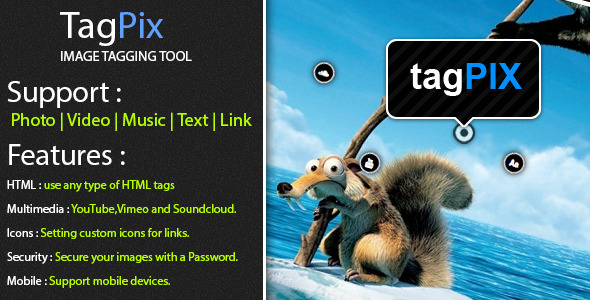
Creating interactive, shoppable, or informative image content doesn’t need to require a complex database or a slow, bloated plugin. If you have spent hours searching for a lightweight solution to add clickable hotspots and tooltips to your images, you have found the perfect tool. tagPix is a pure HTML/CSS/JS solution that allows you to tag images with multimedia content and generate clean, copy-paste-ready code. It is designed for creators who value performance, simplicity, and direct control over their output. Whether you are a developer embedding product shots or a blogger annotating infographics, tagPix eliminates the overhead of database calls and server-side processing, delivering a snappy, mobile-friendly experience out of the box.
Key Features
- Zero Database Dependency: Unlike many image mapping tools, tagPix operates entirely on the client-side. You tag your image, copy the output code, and paste it anywhere. No SQL queries, no PHP backend, and no performance hit.
- Five Versatile Tag Types: Add value to your visuals by attaching Photos (image URLs), Videos (YouTube/Vimeo), Music (SoundCloud), Text (with full HTML support), or Links (with custom icons and descriptions).
- HTML Freedom in Text & Links: You are not limited to plain text. Use any HTML tags—including bold, italic, images, or even nested elements—inside your tooltips to create rich, engaging content.
- Custom Link Icons: Enhance user experience by assigning unique, custom icons to your link tags. This visual differentiation helps users immediately identify action-oriented tags vs. informational ones.
- Password Security: Protect sensitive images and their annotations with a built-in password feature. This is ideal for private client galleries or restricted content.
- Full Responsiveness & Mobile Support: Every tagged image scales perfectly across devices. Whether viewed on a 27-inch monitor or a 5-inch phone screen, the tooltips and tags remain accessible and functional.
- Seamless Copy/Paste Workflow: Once your tagging is complete, the tool generates a standalone code block. Simply copy and paste it into any HTML page—no additional scripts or style imports required.
Who Is This For? Use Cases
tagPix is built for anyone who needs to communicate information visually without the friction of complex software. It is a developer’s secret weapon and a designer’s best friend for creating interactive mockups.
Web Developers & Freelancers
If you build custom websites for clients, you know the value of a lightweight solution. Instead of integrating a heavy WordPress plugin that slows down the admin panel, you can use tagPix to quickly annotate product features, map out office layouts, or create interactive portfolios. The fact that it is database-free means you can embed the output into static sites, AMP pages, or even email templates without compatibility issues.
E-commerce Store Owners & Marketers
Transform your product images into interactive shopping experiences. Tag a dress with a YouTube runway video, a pair of shoes with a SoundCloud playlist, and a handbag with a direct link to the checkout page. With tagPix, you can turn a simple product photo into a multimedia showcase that increases user engagement and dwell time—two key metrics for conversion.
Bloggers & Content Creators
Infographics, tutorials, and travel guides become far more engaging when readers can click on specific areas to learn more. Tag the Eiffel Tower in a travel photo with a Vimeo documentary link, or annotate a cooking infographic with text recipes. The HTML support inside text tags allows you to format recipes, include bullet points, or even embed secondary images directly inside the tooltip.
Educators & Trainers
Create visual learning aids for students without needing a dedicated Learning Management System (LMS). Tag diagrams with video lectures, label parts of a historical map with text descriptions, or build interactive anatomy charts. The password feature is especially useful for distributing private study materials to specific classes.
Technical Details & Compatibility
Understanding the technical footprint of a tool is crucial for project planning. tagPix is built entirely with HTML5, CSS3, and vanilla JavaScript. This means it does not rely on jQuery or any external libraries, keeping the file size minimal and the loading speed maximum. The current version, Version 1.0, represents the initial stable release with all core features active.
Compatibility is a strong selling point. The tool supports legacy browsers including Internet Explorer 7 through 10, as well as modern browsers like Firefox, Chrome, Opera, and Safari. This extended legacy support is rare among modern tools and ensures that your content reaches users on older corporate machines or enterprise environments. Furthermore, mobile and tablet devices are fully supported, with touch interactions replacing hover states where necessary.
Since the product is database-free, it integrates seamlessly with any CMS or framework that accepts raw HTML. It works with WordPress via the Custom HTML block, with static site generators like Jekyll or Hugo, and with any basic web server. There are no server requirements beyond the ability to serve static files.
Pros and Cons
Pros
- Incredibly lightweight: Vanilla JS means no bloat. Your pages stay fast.
- No server setup: Ideal for static sites and simple hosting environments.
- Multimedia versatility: Supports YouTube, Vimeo, and SoundCloud natively without extra plugins.
- Legacy browser support: Works back to IE7, protecting your investment in enterprise or government projects.
- Copy-paste ease: The output is self-contained. You do not need to manage separate CSS or JS files.
- HTML freedom: Advanced users can inject custom styling or complex layouts into text tags.
- Free updates and support: Continuous improvement and direct customer assistance are included.
Cons
- No visual editor for final output: You must re-tag the image and re-copy the code if you need to make changes to the HTML tag scripts themselves.
- Manual embed required: There is no WordPress plugin or CMS widget; you paste raw HTML into your page editor.
- Limited to static tags: The tagging positions are fixed coordinates; there is no dynamic repositioning based on aspect ratio.
- Single image workflow: You tag one image at a time; there is no bulk processing or gallery mode.
Frequently Asked Questions
Does tagPix work with WordPress?
Yes, tagPix works perfectly with WordPress, but not through a dedicated plugin interface. You will need to use the WordPress Classic Editor or the Custom HTML block in the Block Editor (Gutenberg). Simply generate your tag code using the tagPix tool, copy it, and paste it into the HTML block on your desired page or post. Because the code is self-contained and database-free, it will render immediately without conflicts.
Can I use tagPix for commercial projects?
Absolutely. When you purchase tagPix from CodeCanyon, you are buying a regular license which allows you to use it in one end product for yourself or for a single client. You can freely tag images on commercial websites, e-commerce stores, or client portfolios. The HTML output you generate belongs to you and can be distributed as part of your project without additional fees.
Does tagPix include automatic updates or support?
Yes. The product listing explicitly states that free updates are provided all the time, covering any bug fixes, security patches, or new feature releases for Version 1.x. Additionally, free customer support is included. If you encounter a specific issue with an older browser or have a question about formatting, you can contact the author directly through the CodeCanyon support system for assistance.
Final Verdict
tagPix fills a specific and valuable niche in the web development toolkit. It is not a comprehensive image editor, nor is it a complex e-commerce plugin. Instead, it is a laser-focused tool that solves the problem of adding rich, multimedia annotations to images with zero server overhead. For developers, this means a clean, fast implementation. For content creators, it means the ability to tell a story through visuals without wrestling with code. For business owners, it means higher engagement and a more professional presentation.
With support for five distinct tag types, legacy browser compatibility, and a password security feature, it offers remarkable flexibility for its size. The honest trade-off is the manual workflow—you must paste the code manually—but this also gives you complete control over where and how the tags appear. The author’s commitment to free updates and customer support provides peace of mind that the tool will evolve with the web.
If you have been looking for a straightforward, database-free solution to add meaningful interaction to your images, tagPix is exactly what you need. Stop relying on heavy plugins or complex JavaScript frameworks. Purchase tagPix today and start creating interactive, multimedia-rich images that captivate your audience and keep them coming back for more.