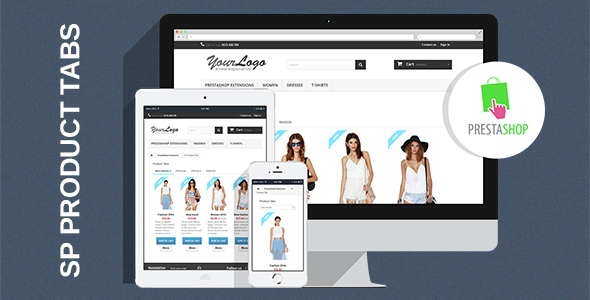
E-commerce store owners using PrestaShop 1.6.x often face a critical challenge: how to display a large catalog of products without overwhelming the shopper. The solution lies in organizing merchandise into digestible, clickable segments that drive engagement. SP Product Tabs – Responsive Prestashop Module addresses this exact need by transforming static product listings into dynamic, tabbed interfaces. This module allows you to automatically sort and display products by key commercial criteria—such as New Products, Best Sellers, Random, and Specials—all within a single, clean interface. For merchants looking to increase session duration and simplify navigation, this tool offers a powerful way to present inventory strategically.
Key Features
Understanding the backend capabilities of SP Product Tabs is essential to maximizing its potential. This module is engineered for granular control, allowing you to customize nearly every visual and functional aspect without touching a line of code. Below are the standout functionalities that make this module a practical asset for your store.
- Comprehensive Product Sorting: Automatically organize products into tabs for New Products, Best Sellers, Random Items, and Special Offers. This removes the manual work of curating collections and ensures your tabs are always up-to-date.
- Full Layout Control: Manage the display status of crucial elements directly from the admin panel. Toggle the visibility of prices, “Add to Cart” buttons, wishlist links, and compare options to streamline the buying process and reduce clutter.
- Responsive & Cross-Browser Support: The layout is built to be fluid, ensuring the product tabs render beautifully on mobile phones, tablets, and desktops. It is fully compatible with modern browsers including Chrome, Firefox, Safari, Opera, and IE9+, guaranteeing a consistent experience for all visitors.
- Multi-Module Integration: You are not limited to a single placement. Use multiple instances of the module on one page—for example, one for “Featured” products and another for “On Sale” items—allowing for flexible page architecture.
- Limitless Display Customization: Adjust the maximum length of product titles and descriptions to maintain layout balance. You can also specify exact image width and height, ensuring your visuals are crisp and uniform across all tabs.
- Admin Content Injection: Easily insert custom HTML or promotional banners at the top or bottom of the module. This is ideal for seasonal campaigns or highlighting specific categories.
- Advanced Link Handling: Choose how product links open—whether in the Same Window, a New Window, or a Popup Window—to control the user’s navigation flow precisely.
Who Is This For? Use Cases
SP Product Tabs is not a one-size-fits-all solution; it is a versatile tool that adapts to different business models. Whether you run a small boutique or a large-scale electronics retailer, the module’s sorting and display logic can be tailored to your specific operational needs. Below are a few scenarios where this module proves invaluable.
High-Inventory Retailers
If you manage a store with hundreds or thousands of SKUs, keeping the homepage fresh is a logistical nightmare. This module solves that by creating a random product tab. This feature automatically rotates inventory, giving older or less-visited products a chance to shine. It prevents your storefront from going stale and encourages repeat visitors to explore new items without manual intervention.
Marketing Campaign Managers
For those running flash sales or seasonal promotions, the Special Product tab is a game-changer. Instead of building a dedicated landing page, you can highlight discounted items directly on your main product listing pages. By utilizing the “open in new window” feature, you can keep the main tab active while shoppers view the special offers, reducing the friction of navigating back and forth.
User Experience Designers
Reducing cognitive load is key to conversions. By separating products into distinct tabs, you help users self-segment. A customer looking for popular items clicks “Best Sellers,” while a bargain hunter clicks “Specials.” This reduces bounce rates and increases the time spent on the page. The ability to hide unnecessary buttons (like “Compare” on mobile) helps streamline the interface for different device types.
Technical Details & Compatibility
When integrating a new module, technical requirements are the first barrier to success. SP Product Tabs – Responsive Prestashop Module is specifically engineered for PrestaShop 1.6.1.x. It is imperative to verify your installation version before purchase to ensure a seamless fit. The module’s codebase is optimized for performance, ensuring that multi-module setups do not significantly impact page load times.
Regarding browser support, the module adheres to modern web standards. It is fully operational across all major platforms, including the latest versions of Chrome, Firefox, Safari, Opera, and legacy support for Internet Explorer 9 and above. The responsive layout is CSS-based, ensuring that images and text scale proportionally on any screen size. The module was released in January 2016, and while it is a mature product, it remains a stable and reliable choice for merchants still operating on the 1.6 branch of PrestaShop.
Pros and Cons
No software solution is perfect, and a balanced assessment helps set accurate expectations. Here is an honest breakdown of the strengths and limitations of SP Product Tabs.
Pros
- Intuitive Back-Office Interface: The configuration panel is straightforward, making it accessible even for users who are not technically inclined.
- Time-Saving Automation: Automated sorting based on product status reduces the need for manual curation, freeing up time for other business tasks.
- High Flexibility: The ability to enable/disable features and adjust image dimensions provides a high level of control over the final appearance.
- Lightweight Code: The module is built to run efficiently, minimizing server load even when multiple instances are active on a single page.
Cons
- Specific Version Requirement: This module is not compatible with PrestaShop 1.7 or the older 1.5 versions. It is strictly tailored for the 1.6.1.x branch.
- Lack of Ajax-Based Tab Loading: Depending on your server speed, switching tabs may require a slight delay as the page re-renders the product data, unless you have caching enabled.
- Design Limitations: While the layout is responsive, you may need custom CSS if your theme has very specific color schemes or spacing rules that differ from the module’s default styling.
Frequently Asked Questions
To assist in your decision-making process, here are answers to the most common queries regarding this module.
Is SP Product Tabs compatible with PrestaShop 1.7?
No. This module is specifically coded for the PrestaShop 1.6.1.x architecture. It relies on hooks and template overrides specific to that version and is not compatible with the newer 1.7 framework. If you are using 1.7, you will need to look for a native 1.7 module or a newer version of this product if the author has released an update.
Can I place this module on multiple pages of my store?
Yes, absolutely. The module supports multi-module usage. You can register it on different hooks (e.g., homepage, category pages, or footer) and configure each instance independently. This allows you to create different tabs for different contexts—for instance, showing “Best Sellers” on the homepage and “New Arrivals” on a specific manufacturer page.
Does this module affect website loading speed?
The module is built with optimized, lightweight code that minimizes the impact on page load times. However, performance ultimately depends on your server environment and the total number of products. To ensure best results, we recommend enabling PrestaShop’s built-in caching and ensuring your server meets the minimum performance requirements for PHP execution.
Final Verdict
In the crowded marketplace of PrestaShop add-ons, SP Product Tabs – Responsive Prestashop Module stands out as a robust, focused utility. It takes the guesswork out of product placement by leveraging automated sorting criteria, which is a significant time-saver for busy store admins. The granular control over display options—such as toggling the cart button or adjusting image sizes—gives you the power to create a customized shopping experience that aligns with your branding.
The module’s popularity, evidenced by its presence on the MagenTech profile, indicates a track record of reliability and user satisfaction. While its scope is limited to PrestaShop 1.6.1.x, for users on that platform, it is a seamless fit that delivers exactly what it promises: a responsive, organized, and conversion-focused way to display your catalog.
If you are looking to reduce clutter, highlight specific inventory segments, and provide a more interactive browsing experience, this module is a worthwhile investment. Upgrade your store’s navigation today and give your customers a faster, cleaner way to discover the products they want. Click the download button and transform your product listings into high-performing sales tools.