Introducing SPlayer 2.5 – The Ultimate HTML5 Music Player
Step into the future of web audio with SPlayer 2.5, the most advanced JavaScript player for building rich music web apps. In this flagship release we’ve added three powerful Music API services—last.fm, iTunes, and Deezer—and fixed the infamous “white star” image issue on last.fm, ensuring artists always display their authentic portraits.
Why SPlayer?
Modern browsers now support full HTML5 audio, yet most libraries still only play or pause tracks. SPlayer goes far beyond, delivering:
- Gapless playback for a flawless listening experience
- Dual audio engines (MP3, OGG, AAC, M4A, MP4) without any Flash or PHP
- Smart metadata parsing—combining embedded tags with online data from last.fm, iTunes, and Deezer
- Algorithm‑driven search and recommendation (the kind that even powers Spotify and iTunes)
- Social sharing, history, queue, and offline support baked in
Key Features
- Pure vanilla JavaScript, ES6‑ready, and built with Rollup.js for lightweight loads
- Built‑in database capable of 10,000+ tracks, structured in tracks, albums, artists, genres, playlists, collections, and more
- Event‑driven architecture and async worker threads for fast metadata handling
- jQuery‑like API for quick integration and manipulation
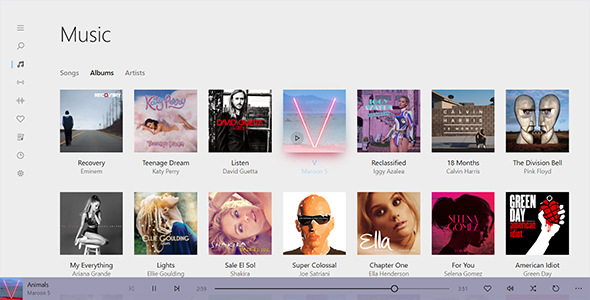
- Fully configurable UI with a free, colorful Groove‑styled plugin, plus a WordPress‑style Control Panel that requires zero coding
- Cross‑browser compatibility checks and graceful degradation on unsupported devices
- Extensible plug‑in system – add your own features with ease
Architecture Highlights
- HTML5 Desktop App Ready – integrate with Electron or NW.js for native‑style experiences
- Modular, split‑modules design so you can cherry‑pick the features you need
- Multi‑threading via Web Workers to keep UI responsive during heavy metadata parsing
- Feature‑detection tests to provide fallback options on legacy browsers
Database & Data Management
SPlayer’s client‑side object‑oriented database lets you:
- Import massive libraries with a single upload, auto‑generating artists, albums, and genres
- Manage tracks, streams, and radio stations with custom metadata plugins
- Create playlists, collections, and sophisticated queues
- Leverage powerful selector API to retrieve and manipulate data objects by ID, name, source, or custom properties
Getting Started – One Click to Play
Upload your music folder to any web host, launch the SPlayer Control Panel, and you’re ready to launch a polished, feature‑packed player on your site instantly. No backend required and no coding skills needed.
Learn More & Download
Explore detailed documentation, sample projects, and source code at splayer.org. Make your music web experience super‑charged with SPlayer 2.5 today!