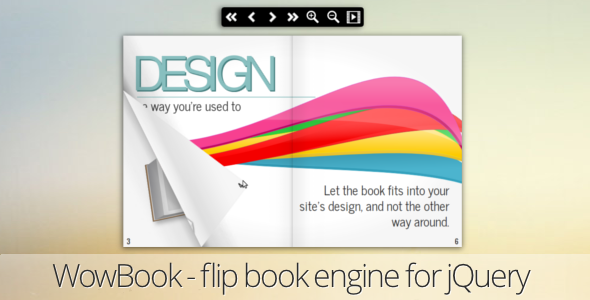
Digital publications have moved far beyond static PDFs and clunky document viewers. Whether you are a designer showcasing a portfolio, a marketer distributing a product catalog, or a developer building an immersive e-commerce experience, the way content is presented directly impacts engagement. WowBook, a flipbook jQuery plugin, offers a polished, realistic solution for turning flat documents into interactive, page-flipping publications that feel like a physical book. Developed by the reputable author maguiar01, this plugin has been purchased over 6,520 times, signaling a proven track record for quality and reliability. This article breaks down everything you need to know about this popular CodeCanyon asset, from its core features to its practical applications, helping you decide if it is the right fit for your next project.
Key Features
WowBook is not just a simple page flipper; it is a comprehensive toolkit designed to handle complex publishing needs. The plugin leverages HTML5, CSS3, and JavaScript to create a seamless experience without requiring Adobe Flash. Here are the standout features that make it a versatile choice for developers:
- PDF Rendering via PDF.js: The plugin integrates the PDF.js library to render PDF files directly within the flipbook. This includes support for internal links, external HTML links, an index, and selectable text. You can also extract a table of contents automatically from the PDF structure.
- Fully Responsive Design: Built-in features resize the book to fit different screen dimensions. It includes a responsive toolbar and a dedicated responsive single-page mode optimized for mobile devices, ensuring your content looks great on any viewport.
- Realistic Page Flipping Effects: Choose between two distinct animation styles: one that mimics the rigid structure of a hardcover book and another that simulates the flexible curl of regular paper. The curl page corner on hover adds a tactile, interactive feel.
- Touch & Gesture Support: On tablets and smartphones, users can drag page borders, swipe to change pages, and use pinch-to-zoom or double-tap to zoom into content. The book remains draggable in zoom mode for detailed inspection.
- Comprehensive Navigation Tools: The plugin can automatically generate a toolbar with font icons, a table of contents, thumbnails, and automatic page numbering. Additional controls include a home button and a display showing the current page versus total pages.
- Advanced Viewing Modes: Enjoy a fullscreen mode, a lightbox for presenting the book as a modal popup, and a slideshow feature with an optional loop. The “unclosable book” option allows for a continuous scroll without covers.
- Accessibility & Usability: Support for right-to-left (RTL) languages is included, making it suitable for Arabic or Hebrew publications. Keyboard navigation and mouse wheel scrolling are configurable, and the plugin supports the browser’s back button via deeplinking.
- Performance Optimization: Lazy loading ensures pages are only rendered when needed, improving initial load times. A tool is also included to help generate image sprites for thumbnails, reducing server requests.
- Developer-Friendly API: A robust API allows for deep customization. You can trigger page turns, listen to events like onLoadPDF, and customize text strings in the toolbar to match your localization needs.
Who Is This For? Use Cases
The versatility of WowBook, a flipbook jQuery plugin makes it applicable across various industries and project types. Its ability to handle both image-based and PDF content opens up a wide range of possibilities.
Digital Marketers & E-commerce Managers
Replace static product PDFs with interactive catalogs and brochures. Instead of a simple download link, you can embed a flipbook directly on your product page. This increases time-on-page and provides a richer browsing experience. The ability to link specific pages to your online store means you can turn a lookbook into a direct sales tool. The responsive and touch features ensure that customers browsing on their phones have the same high-quality experience as those on desktop.
Publishers & Content Creators
For magazine publishers, e-book authors, and newsletter creators, presentation is key. This plugin allows you to publish issues directly on your website with a premium feel. The PDF search (beta) feature and selectable text are critical for readers who want to find information quickly. The realistic page-flip effect, complete with a turning page sound in supported browsers, creates an engaging reading experience that honors the print tradition while embracing digital convenience.
Web Developers & Agencies
If you build websites for clients, this plugin is a valuable addition to your toolkit. Its clean API and extensive documentation make it easy to integrate into custom themes. You can use it to create impressive portfolio presentations for photographers and designers, or to build interactive annual reports for corporate clients. The automatic table of contents and thumbnail generation save development time, allowing you to deliver a sophisticated feature without building it from scratch.
Educators & Trainers
Transform training manuals, course materials, and academic papers into engaging digital resources. The ability to add internal links means you can create non-linear navigation, guiding students to specific chapters or related resources. The “book without cover” mode is useful for continuous reading materials, while the lightbox feature is perfect for presenting case studies or visual aids directly within a lesson page.
Technical Details & Compatibility
Understanding the technical requirements is crucial before implementation. WowBook, a flipbook jQuery plugin is built on a modern web stack, ensuring compatibility with contemporary browsers.
- Core Technology: Requires jQuery and utilizes HTML5, CSS3, and JavaScript. The PDF rendering is powered by the PDF.js library.
- Browser Support: Supports all major modern browsers, including Chrome, Firefox, Safari, and Edge. It is important to note that support for IE7 and IE8 was dropped in an update from October 2015. Furthermore, due to limitations in the PDF.js library, PDF rendering does not work on IE9.
- Responsive & Mobile: Fully responsive design with touch support (swipe, drag, pinch-to-zoom) for iOS and Android devices.
- Ongoing Maintenance: The developer, maguiar01, has a strong history of updates. The changelog shows consistent improvements, bug fixes, and feature additions. The most recent update was on 13/10/2020, which introduced new options like thumbnailNumber and fixed a Chrome-specific thumbnail alignment issue.
- Customization Options: A wide array of configuration options allows you to control everything from maximum width and height (maxWidth, maxHeight) to navigation behavior (swipeDuration) and toolbar text (strings).
Pros and Cons
To provide a balanced view, let’s examine the strengths and potential drawbacks of this plugin based on the information provided.
Pros
- Extensive Feature Set: From PDF support to RTL and lightbox, it covers almost every feature you would expect from a premium flipbook plugin.
- No Flash Required: Built entirely with modern web standards, ensuring compatibility with current web practices and mobile devices.
- Strong Social Proof: With over 6,520 sales, the plugin has a large user base, indicating stability and satisfaction.
- Active Development: The long list of updates from 2012 to 2020 demonstrates a commitment to fixing bugs and adding new features.
- Excellent Value: Priced at $25, it offers a cost-effective alternative to subscription-based services or the time-consuming process of building a custom solution.
- Performance Features: Lazy loading and sprite generation tools show a focus on website performance, which is critical for SEO and user experience.
Cons
- Legacy Browser Limitations: The lack of support for IE9 and older versions might be a dealbreaker for organizations that still rely on outdated enterprise browsers.
- PDF Search is Beta: While a valuable feature, the PDF search functionality is marked as “BETA,” suggesting it may not be as polished or reliable as the core flipbook features.
- jQuery Dependency: As a jQuery plugin, it requires the jQuery library to be present on your page, which may not be ideal for modern projects that have moved away from jQuery.
- Learning Curve: While “easy to use” with ready-made examples, the sheer number of configuration options and the API can be overwhelming for complete beginners without JavaScript experience.
Frequently Asked Questions
Is WowBook compatible with WordPress and WooCommerce?
Yes, since it is a jQuery plugin, it can be integrated into any WordPress theme or WooCommerce site that allows custom JavaScript. You would typically enqueue the plugin’s scripts and styles and then initialize it on a specific div. For WooCommerce, you could use it to display product manuals or interactive catalogs, but it does not come with a dedicated WordPress plugin wrapper, so some custom coding is required.
Does WowBook work on mobile devices like iPads and iPhones?
Absolutely. The plugin is designed to be fully responsive and includes dedicated touch support. Users can swipe to turn pages, drag page corners, and use pinch-to-zoom or double-tap to zoom in on content. There is also a specific “responsive single page mode” for mobile devices to ensure readability on smaller screens.
Can I create a flipbook from a PDF file with selectable text?
Yes, one of the standout features is its PDF rendering capability. By using the PDF.js library, it can render PDF files and supports selectable text. This means users can highlight, copy, and search for text within the PDF. Additionally, it can extract the table of contents automatically, making navigation much easier for longer documents.
Final Verdict
WowBook, a flipbook jQuery plugin stands out as a mature, feature-rich solution in the CodeCanyon marketplace. Its longevity, backed by over 6,520 sales and a decade of updates from developer maguiar01, demonstrates a reliable and continuously improving product. The combination of realistic page-flip effects, robust PDF support, and comprehensive mobile touch gestures makes it a powerful tool for anyone looking to elevate their digital content presentation.
While the beta status of PDF search and the lack of support for very old browsers are minor considerations, the overall package offers exceptional value. At just $25, it saves you countless hours of development time and provides a professional result that can enhance user engagement on your site. Whether you are a developer seeking a reliable plugin for client projects or a business owner wanting to showcase your catalog in style, WowBook delivers a premium experience that is hard to match at this price point. With its extensive documentation and ready-to-use examples, you can have a stunning flipbook live on your site in a matter of minutes. It is a smart investment for those who understand the power of interactive content, and it is ready to be put to work on your next project.