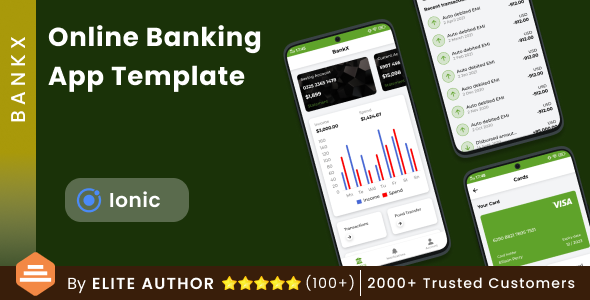
The Online Banking Android App + Online Banking iOS App Template| Bank App| BankX is a front-end mobile application template built with Ionic and Capacitor, sold on ThemeForest for $34. It supplies a complete set of pre-designed banking screens — login, OTP verification, home dashboard, money transfer, beneficiaries, cards, loans, statements and settings — as editable source code that compiles to both Android and iOS. It suits developers, freelancers and small agencies who need a credible banking interface to build on, rather than a finished, backend-connected banking product.
What the Online Banking Android App + Online Banking iOS App Template actually contains
The purchase delivers three things: the Ionic source code, documentation, and free access to future version upgrades. That last point matters more than it first appears, because the vendor has committed to adding features over time rather than shipping a static package. The changelog shows an initial release in June 2023 and a maintenance update in July 2024, so the codebase has at least been revisited after launch.
The screen inventory is the core of the offer. Every page is delivered as a separate file, which is a practical decision rather than a marketing one: a developer can open the transfer flow without scrolling through an unrelated dashboard component, and swapping a screen out does not risk breaking the rest of the app. The pages cover the full arc of a retail banking session:
- Onboarding and access — splash screen, login, registration and an OTP verification screen, which together establish the security-first pattern most banking apps follow.
- Account overview — a home screen that acts as the dashboard hub, plus an account settings page for profile and preference management.
- Payments — a money transfer screen, a beneficiary-based transfer screen, and a form for adding a new beneficiary, covering both first-time and repeat payee flows.
- Cards and credit — a manage card screen and a dedicated loan screen with its own loan statement view.
- Records — a bank account statement screen and a loan statement screen, kept separate because the two typically carry different data structures.
- Supporting pages — notifications, settings, a support screen, and the privacy policy and terms of use pages that app stores expect an app of this type to include.
What this amounts to in practice is a UI layer with navigation already wired up. The template gives a team a realistic banking interface to demo to a client, to use as the visual foundation of a white-label product, or to hand to a backend developer as the agreed contract for what the API needs to return. It does not include a server, a database, an authentication service or any live banking integration — the vendor listing makes no such claim, and buyers should assume every number and balance shown is placeholder content.
Where BankX fits, and where it does not
The strongest fit is a development team that already has a backend and needs the mobile shell in front of it. Ionic’s web-technology foundation means a developer comfortable with Angular-style component structures can move quickly, and the Capacitor layer handles the native packaging for both platforms from a single codebase. A fintech startup building an MVP, an agency pitching a banking client with a working prototype, or a studio producing a white-label app for a credit union or microfinance institution would all find the screen coverage proportionate to the price.
It is also a reasonable choice for a learning or portfolio project. Someone studying mobile finance interfaces gets a full, coherent screen set rather than isolated dribbble-style mockups, and the clean-code claim is at least plausible given the per-page file organisation.
The wrong choice is any project that needs a functioning banking product out of the box. There is no backend, no payment rail, no KYC flow, no real OTP delivery and no regulatory compliance layer. A buyer expecting to connect a bank account and move money will be disappointed. Similarly, a team with no Ionic or JavaScript experience should not treat this as a no-code tool — it is source code that requires a developer to compile, configure and extend. The vendor also states plainly that refunds are not offered once the item is downloaded, so the decision needs to be made before purchase, not after.
Strengths and limitations of the Online Banking Android App + Online Banking iOS App Template
Strengths
- Genuine cross-platform output from one Ionic/Capacitor codebase, so the same work serves Android and iOS users.
- Broad screen coverage for a banking context — transfers, beneficiaries, cards, loans and statements are all present, not just a login and a dashboard.
- Separate files per page and component make the code easier to navigate and to modify selectively.
- Includes the compliance-adjacent pages (privacy policy, terms of use, support) that app store review commonly asks for.
- Free future updates are included with the licence, and the changelog shows the vendor has shipped at least one maintenance release.
- At $34, the cost is low relative to the hours saved on interface construction alone.
Limitations
- No backend, API layer or data persistence is included. Every screen is a front end awaiting real data, and the integration work is entirely the buyer’s responsibility.
- The vendor does not state which Ionic version the template targets beyond the generic “Ionic 5” tag in the listing, and does not publish a compatibility matrix — worth confirming before purchase if the project is pinned to a specific framework version.
- No refunds once downloaded, which shifts all evaluation risk onto the buyer.
- Sales figures are not disclosed, so there is no public signal of adoption or of how many real-world deployments the template has survived.
- The feature set is retail-banking generic; there is nothing specific to business banking, multi-currency, or regulated regional requirements such as UPI-specific flows beyond the tag list.
- Documentation is referenced but its depth is not described, so buyers should not assume it covers backend integration guidance.
How it compares with the wider banking app template category
Banking app templates on marketplaces generally fall into two groups: UI kits that ship design files or static screens, and full source templates like this one that ship compilable code. The Online Banking Android App + Online Banking iOS App Template sits firmly in the second group, which gives it an advantage over pure UI kits — a developer receives something that runs on a device, not a set of images to rebuild.
Against native-template alternatives built separately in Kotlin and Swift, the trade-off is familiarity versus performance ceiling. A single Ionic codebase is cheaper to maintain and faster to staff, but a team that needs the tightest possible native feel or heavy device-level integration may prefer two native codebases. Against no-code app builders, this template offers far more control and no subscription, but demands actual development skill.
Where it competes least well is against templates that bundle a mock backend or a Firebase starter. Buyers who want to see data flowing between screens on day one will find this package thinner. Where it competes best is on breadth of screens for the money — a full retail banking journey for the price of a few hours of a designer’s time.
Frequently Asked Questions
Does the BankX banking app template include a backend or database?
No. The package contains only the Ionic front-end source code, documentation and update access. There is no server, database, authentication service or payment integration included, and the vendor does not claim otherwise. All balances and transaction data shown in the screens are placeholders that a development team must replace with live API calls.
Can the Online Banking iOS App Template really build for both Android and iOS?
Yes. The template is built on Ionic with Capacitor, which packages a single codebase into native Android and iOS builds. That means one project serves both platforms, though the buyer still needs the appropriate build tooling — Android Studio and Xcode — and the relevant developer accounts to publish to each store.
Is this online banking app template suitable for a real bank launch?
Not on its own. It provides the interface layer only, so a real launch requires a secure backend, regulatory compliance, KYC and anti-fraud measures, and security auditing — none of which are included. It is best treated as a starting point or prototype that a qualified team extends into a production system.
What Ionic version does the BankX template use, and will it work with the latest release?
The vendor does not state a precise version beyond an “Ionic 5” tag in the listing. Because the framework has moved on considerably since that release line, buyers should confirm current compatibility with the developer before purchasing. The documentation and the vendor’s support channel are the places to raise that question.
Verdict on the Online Banking Android App + Online Banking iOS App Template
This template is worth buying for developers, freelancers and small agencies who need a broad, well-organised retail banking interface in Ionic and are equipped to connect it to their own backend. The screen coverage is generous for $34, the per-page file structure is sensible, and free updates add some long-term value. It is not suitable for anyone wanting a working banking product, a no-code solution, or a template with a bundled backend — and the no-refund policy means that distinction should be settled before checkout. RenderCodeTechnology has shipped a competent starting point rather than a finished system, and it should be judged on those terms.