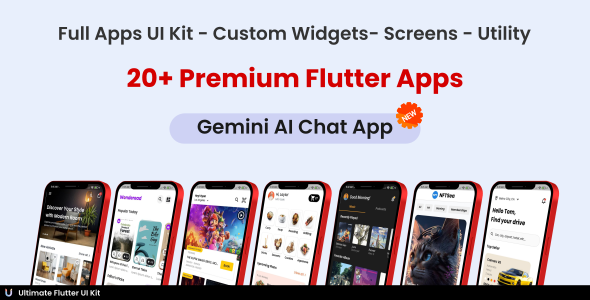
Ultimate Flutter UI Kit is a commercial component library for Flutter that bundles 24 complete app interface templates, a large set of reusable custom widgets, a collection of standalone screens and several working utility apps into a single $29 download on ThemeForest. It is aimed at Flutter developers and agencies who want a finished visual starting point for a mobile project rather than building every screen from scratch. The package ships as source code with documentation and a video tutorial, and a demo build is published on the Play Store.
What the Ultimate Flutter UI Kit actually contains
The listing is organised into four distinct layers, and understanding the difference between them matters more than the headline screen count, because each layer serves a different job.
Full app templates. Twenty-four named app interfaces are included, each presented as a complete application rather than a loose set of screens. The range covers room finding (Haven, 17+ screens), ecommerce (Trendise, 13+), on-demand home services (Huma, 24+), video streaming (VideoFlix, 12+), job search (JobScout, 13+), ride hailing (Taxy, 21+), video conferencing (Comu, 18+), mail (Zmail, 9+), messaging (ChatApp, 14+), social media (Instago, 19+), NFT marketplace (NFTSea, 10+), travel, eLearning, freelancer marketplace, car rental, e-book reading, food delivery, movie ticket booking, recipe planning, news, music and podcasts, a second podcast app, furniture retail and a second recipe app. The vendor states that each can be lifted out and used directly as a project kick-starter, which is the practical value here: a developer gets a navigable, styled app shell with realistic screen flows instead of a blank main.dart.
Custom widgets. The reusable widget library spans app bars, grids, sliders, progress and navigation bars, lists, cards, bottom navigation, buttons, social sign-in buttons, forms, titles, text styles, tabs, chips, tables, drawers and dialogs. In practice this is the layer most buyers will use daily, because it lets a team assemble new screens from pre-styled parts that already match the kit’s visual language, keeping a project consistent without rewriting the same card or form field repeatedly.
Standalone screens. Fifteen-plus individual screens cover the flows almost every app needs: splash, onboarding, preferences, sign up, sign in, password recovery, search, profile, notifications, chat, verification, settings, payment, success, review and membership. These are useful for projects that are not based on any of the 24 templates but still need authentication and account screens that look finished.
Utility and functional apps. This is the most technically interesting section and the one the vendor tags with AI and chatbot keywords. It includes a Gemini AI chatbot, OCR, NFC reading, an image picker, a video player, an image editor, a barcode scanner, a QR code generator and local authentication. These are working utilities rather than static mockups, which means they demonstrate integration with device hardware and third-party services — the part of Flutter development that tends to consume the most debugging time.
Delivery and maintenance. Buyers receive the source in a flutter_ultimate_ui_kit_master folder, a documentation file and a video tutorial. The version history shows six point releases since launch, adding a furniture shop app, a recipe app, the utility section, a Room Finder app and an upgrade to Flutter 3.22, plus a bug-fix release. That cadence suggests the author is actively extending the package rather than shipping once and leaving it.
Where the Ultimate Flutter UI Kit fits, and where it does not
The strongest fit is a freelancer or small studio that has been contracted to build a consumer mobile app in a well-known vertical — food delivery, ride hailing, ecommerce, streaming, social — and needs to compress the design and scaffolding phase. Starting from a 20-screen template with consistent typography, spacing and component styling can remove days of layout work, and the client sees a clickable prototype far sooner.
It also suits teams building an MVP or internal proof of concept where visual polish matters but pixel-level originality does not. The utility section extends that to hardware-dependent features: a developer who needs to demonstrate NFC, barcode scanning or on-device authentication can read a working implementation instead of assembling one from scattered documentation.
Developers learning Flutter benefit too. Reading a complete, structured multi-screen app is a different exercise from following tutorials, and the vendor explicitly markets the code structure as easy to follow.
The kit is the wrong purchase in several common situations. A team with an established design system and brand guidelines will find most of the visual work already done and will spend its time stripping out the kit’s styling rather than gaining from it. A project with unusual or highly custom interaction patterns — a drawing tool, a complex data visualisation dashboard, a game — is not represented in the template list, and the widget library is oriented toward conventional app layouts. And anyone expecting a backend will be disappointed: this is a UI kit, so authentication, payments and data persistence are presented as interface flows, not as wired-up server infrastructure. The vendor does not state which state-management approach the templates use, which is a detail worth confirming before purchase if a team has strong architectural preferences.
Strengths and limitations of the Ultimate Flutter UI Kit
Strengths
- Breadth for the price. At $29, 24 complete app templates plus a widget library and utility apps is an unusually large amount of starting material; comparable single-template purchases often cost a similar amount on their own.
- Four usable layers. Because templates, widgets, screens and utilities are separated, the kit serves both greenfield projects and existing codebases that only need components.
- Real device integrations. NFC, OCR, barcode scanning, local auth and a Gemini chatbot are working implementations, not placeholder screens.
- Recent Flutter baseline. The changelog records an upgrade to Flutter 3.22, which is a meaningful signal that the code is not stranded on an old SDK.
- Multiple learning formats. Documentation, a video tutorial and a Play Store demo let a buyer evaluate the look and feel before committing.
Limitations
- No disclosed sales or rating history. The listing shows no sales figures or reviews, so there is no independent buyer feedback to weigh against the vendor’s own description.
- UI-only scope. There is no backend, no API layer and no stated state-management pattern; every template needs to be connected to real data by the buyer.
- Visual sameness across templates. Twenty-four apps built by one team tend to share spacing, type scales and component styling, so shipping a template close to as-is risks a generic look that other buyers may also be using.
- Vertical concentration. The catalogue leans heavily on consumer marketplaces and media apps; B2B, productivity, finance and dashboard-style interfaces are largely absent.
- Documentation depth is unverified. The listing names a documentation file and video tutorial but gives no indication of their length, coverage or whether they explain customisation rather than just installation.
How the Ultimate Flutter UI Kit compares with other Flutter template options
The Flutter template market splits into three rough categories, and this product sits deliberately across all of them.
The first category is the single-purpose app template: one vertical, deeply built, often with a backend or Firebase integration and a premium price. Those are better when a buyer needs one specific app taken close to production. Ultimate Flutter UI Kit trades that depth for range — no single template here is likely to be as complete as a dedicated premium template for the same vertical, but the buyer gets 23 others alongside it.
The second category is the pure widget or component library, typically free and open source, offering Material-adjacent components without full screens. Those are lighter and more composable but leave all screen assembly to the developer. This kit’s widget layer overlaps with them while adding finished screens and flows on top.
The third category is the mega-bundle UI kit, which is what this is. The differentiators within that category are the currency of the Flutter version, whether the bundled apps are genuinely complete, and whether the extras — here, the utility apps and the Gemini chatbot — are real code or marketing labels. On the first and third points the changelog and the utility list are reassuring; on the second, the Play Store demo is the honest way to judge before buying.
Relative to free alternatives, the case rests on time saved rather than capability unlocked. Relative to a single premium template, it rests on optionality. Neither argument is decisive for every project.
Frequently Asked Questions
What is included in the Ultimate Flutter UI Kit?
Buyers receive Flutter source code containing 24 full app templates, a library of reusable custom widgets, a set of standalone screens such as sign-in and onboarding, and nine utility apps including a Gemini chatbot, OCR, NFC and a barcode scanner. Documentation, a video tutorial and access to a Play Store demo are also included.
Does the Ultimate Flutter UI Kit include a backend or database?
No. The package is a user interface kit only, so authentication, payments, chat and content screens are presented as interface flows rather than connected services. Developers must wire every template to their own API, database or backend-as-a-service. The vendor does not specify a state-management pattern, so that architecture decision remains with the buyer.
Which Flutter version does the Ultimate Flutter UI Kit require?
The most recent changelog entry records an upgrade to Flutter 3.22, so the codebase targets a relatively current SDK. Earlier releases moved from Flutter 3.16, showing the author has kept pace with framework updates. The listing does not state a minimum Dart SDK version, so confirming compatibility with a specific project setup before purchase is sensible.
Can the Ultimate Flutter UI Kit templates be used in a client project?
Yes, the templates are intended as project starters that can be extracted and used directly. Licensing terms are governed by the ThemeForest regular and extended licence, so a freelancer building a single client app typically needs the standard licence, while a product resold to multiple end users generally requires the extended licence. Checking the licence terms before purchase is advisable.
Verdict on the Ultimate Flutter UI Kit
This is a sensible purchase for freelancers, small studios and solo developers who need a polished Flutter starting point in a mainstream consumer vertical and want widgets, screens and working device integrations in one package at a low price. The utility apps and the Flutter 3.22 baseline give it more substance than a folder of mockups. It is a poor fit for teams with an existing design system, for projects needing backend logic, or for anyone building outside the consumer marketplace and media categories the templates cover. The absence of any sales or rating history means buyers are relying on the Play Store demo and the changelog as their evidence, which is reasonable but worth doing carefully. Treat it as a time-saving scaffold, not a finished product, and the value proposition holds.