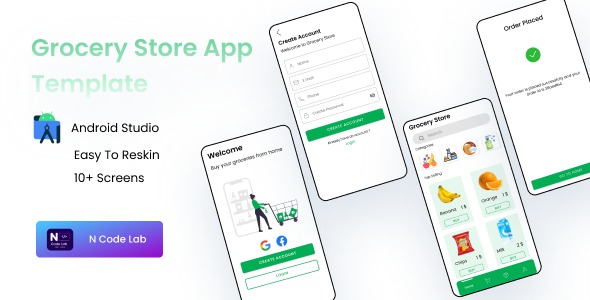
Grocery Store App || Grocery App Template Android is a $10 source-code template sold on ThemeForest that provides a pre-built Android front end for an online grocery business, written in Java and delivered as an Android Studio project. It bundles nine ready-made screens — splash, intro, sign-up, login, home, cart, orders, account and checkout — plus documentation and free updates. It suits developers and freelancers who want a head start on the interface layer of a grocery ordering app, not a complete, backend-connected store.
What the template actually gives a developer
The listing is refreshingly modest about scope, and that honesty is worth taking at face value. The deliverable is a UI shell: a set of screens that model the standard shopping flow of a grocery app, from first launch through to order placement. What follows is what each part of that shell lets a buyer do once it is imported into Android Studio.
A complete browsing-to-checkout screen flow
The nine screens map onto the journey a grocery customer actually takes. The splash and intro screens handle first-run presentation, sign-up and login establish an account, the home screen acts as the product-browsing surface, the cart collects selections, the orders screen lists past purchases, the account screen holds user details, and checkout closes the loop. Because every step is present, the template can be wired into a demo or prototype without designing a single new layout. That continuity is the main practical benefit — a developer inherits a coherent navigation structure rather than a handful of disconnected mockups.
Java source in an Android Studio project
The vendor tags name Java specifically, and the deliverable is an importable Android Studio project rather than a design file or a compiled APK. That matters for anyone who needs to modify behaviour, not just appearance: the code can be opened, inspected and extended. The listing describes the code as clean and well managed, which is a claim a buyer can only verify after purchase, but the format at least makes verification possible. Teams working in Kotlin should note the language mismatch up front.
A deliberately plain interface
The stated design goal is a simple, clean UI. For a grocery template that is a reasonable choice — product grids, prices and cart totals benefit from restraint — but it also means the visual layer offers little differentiation out of the box. Buyers expecting a polished, brand-ready aesthetic will likely restyle colours, typography and imagery themselves. The upside is that a plain layout is easier to adapt than an opinionated one.
Documentation and update entitlement
Documentation is included, and the vendor promises free updates. Neither is unusual for ThemeForest, but both reduce the friction of getting the project running for the first time. The listing does not state how detailed the documentation is or how frequently updates ship, so those remain open questions until the files are in hand.
Direct support channel
Support is handled by email at an address the vendor publishes in the listing. That is a lightweight arrangement typical of small template shops — there is no ticket portal or knowledge base described — so response times and depth of help are not guaranteed by anything in the product data.
Where this grocery app template fits, and where it does not
The clearest fit is a developer or small agency that has been asked to quote on a grocery ordering app and needs a credible, navigable front end quickly — for a client demo, a pitch, a proof of concept, or the starting skeleton of a real build. Students and junior Android developers learning how a multi-screen commerce flow is structured will also find it useful as reference material, since the whole journey is visible in one project at a low price. Freelancers who already have a backend and want to skip weeks of layout work are the third natural audience.
It is the wrong choice for anyone expecting a functioning store. There is no mention of a backend, database, payment gateway integration, admin panel, push notifications, product management or inventory logic in the listing, and a template at this price should not be assumed to include them. A business owner with no development resources who wants to sell groceries next month will be disappointed — this is a starting point for a build, not a finished product. Likewise, teams standardised on Kotlin or on a cross-platform stack such as Flutter or React Native will spend more time porting than building.
Strengths and limitations in plain terms
The case for and against the template is short enough to state directly.
Strengths
- Very low entry cost. At $10, the template costs less than an hour of most developers’ time, which makes experimentation cheap.
- End-to-end screen coverage. The full path from onboarding to checkout is present, so navigation and flow design are already solved.
- Editable source. An Android Studio project in Java can be opened, modified and extended rather than merely previewed.
- Clear scope. The listing does not overpromise; buyers can see exactly which screens exist before paying.
- Included documentation and updates. Both lower the cost of getting started and of fixing issues later.
Limitations
- No backend or commerce logic is described. Authentication, product data, cart persistence and order processing all appear to be UI only, meaning the substantial engineering work remains with the buyer.
- Java only. No Kotlin variant is offered, which is a real drawback for teams following current Android conventions.
- Nine screens is a thin feature set. There is no search, category filtering, wishlist, address book, order tracking or payment screen named in the listing — all common expectations in a grocery app.
- No stated proof of quality or adoption. The vendor does not disclose sales figures, and no rating is given, so there is no external signal of how the template performs in real projects.
- Support is a single email address. There is no described SLA, portal or community, and the documentation’s depth is unstated.
- Generic visual design. The simple UI will need restyling for almost any real brand.
How it compares with the wider template category
Android grocery templates on marketplaces generally fall into three tiers. At the entry tier sit UI-only shells like this one: a handful of screens, source code, minimal documentation, priced in single or low double digits. Mid-tier templates add a working backend — often Firebase — and include product management, authentication and order handling, typically costing several times more. Top-tier offerings are closer to white-label products, with admin dashboards, payment integration and ongoing support, priced accordingly.
Judged against its own tier, this template is competitive on price and on the completeness of its screen flow, but it is not distinctive on features; many entry-tier templates include comparable or larger screen counts. Against mid-tier options it loses decisively on functionality, because the buyer must build everything behind the interface. The honest comparison is one of effort: a cheaper UI shell means more development hours, while a pricier template with a backend trades money for time. Buyers should also weigh language and framework fit — a Java-only template is poor value for a Kotlin team regardless of price, and no help at all to someone building with a cross-platform toolchain. Compared with simply designing screens from scratch in a free tool, the template’s advantage is working, structured code rather than static mockups.
Frequently Asked Questions
Is this grocery app template a complete, working app?
No. The listing describes a set of nine UI screens delivered as an Android Studio project, with no backend, database, payment gateway or admin panel mentioned. It provides the interface and navigation for a grocery store app, but the buyer is responsible for connecting real product data, user accounts and order processing.
What programming language and tools does it use?
It is built in Java and delivered as an Android Studio project, according to the vendor’s tags and description. Buyers should have Android Studio installed and be comfortable working with Java source files. The listing does not mention a Kotlin version, so teams standardised on Kotlin would need to convert the code themselves.
Which screens are included in the download?
Nine screens are listed: splash, intro, sign-up, login, home, cart, orders, user account and checkout. Together they cover the standard path from first launch through account creation, product browsing, basket management and order placement. Features such as search, category filters, wishlists or payment screens are not named in the listing.
How much does it cost and what support is included?
It is priced at $10 on ThemeForest and includes documentation and free updates. Support is offered by email through an address published in the listing. The vendor does not state response times or the depth of the documentation, and no sales figures or ratings are disclosed, so there is no external quality signal to rely on.
Verdict: who should buy it and who should walk away
This Grocery Store App || Grocery App Template Android is worth buying for developers, freelancers and students who want a cheap, editable starting point for a grocery ordering interface and are prepared to build the backend and commerce logic themselves. At $10 the risk is negligible, and the complete screen flow saves real layout time. Buyers who need a launch-ready store, a Firebase or server-side implementation, Kotlin source, or a design that looks finished on day one should look at mid-tier templates or budget for custom development instead. The lack of disclosed sales, ratings or feature depth beyond nine screens means it should be treated as a utility purchase rather than a proven product — useful, inexpensive, and clearly a foundation rather than a solution.